CoreTechED

Loading

Learn C loops: for, while, do-while, nested loops, and control statements (break, continue, goto). Master iteration with examples and best practices.

Loops in C: for, while, do-while & Nested Loops

Loops in C: for, while, do-while, Nested & Control Statements

Loops are fundamental control flow structures in C that allow repeated execution of a block of code as long as a specified condition is satisfied. They eliminate code duplication, enable iteration over data structures, and form the backbone of many algorithms. Mastering loops is essential for writing efficient and concise programs.

This tutorial provides an in-depth exploration of loops in C: for, while, do-while, nested loops, infinite loops, and loop control statements (break, continue, goto). It covers syntax, practical examples, common pitfalls, and best practices.


Conceptual Introduction & Fundamentals

What are Loops?

A loop is a programming construct that repeatedly executes a block of statements until a termination condition is met. Each repetition is called an iteration.

Without loops (repetitive code):

c

printf("Hello\n"); printf("Hello\n"); printf("Hello\n");

With loops (concise):

c

for (int i = 0; i < 3; i++) { printf("Hello\n"); }

Why Use Loops?

  • Reduce code duplication: Write once, execute many times.
  • Handle variable repetition: The number of iterations can be determined at runtime.
  • Process data structures: Iterate over arrays, strings, linked lists, etc.
  • Implement algorithms: Searching, sorting, mathematical computations.
  • Maintainability: Changes to the loop body apply to all iterations.

Types of Loops in C

LoopTypeWhen to Use
forEntry-controlledWhen the number of iterations is known in advance
whileEntry-controlledWhen the number of iterations is unknown; condition checked before body
do-whileExit-controlledWhen the body must execute at least once

Loop Control Statements

StatementPurpose
breakTerminates the loop immediately
continueSkips the rest of the current iteration, jumps to next iteration
gotoTransfers control to a labeled statement (use sparingly)

Syntax & Core Mechanics

1. for Loop

The for loop is an entry-controlled loop with three components: initialization, condition, and update.

Syntax:

c

for (initialization; condition; update) { // Body of loop }

Components:

  • Initialization: Executes once before the loop starts.
  • Condition: Checked before each iteration; if false, loop exits.
  • Update: Executes after each iteration.

Example:

c

#include <stdio.h> int main(void) { // Print numbers 1 to 5 for (int i = 0; i < 5; i++) { printf("%d ", i + 1); } printf("\n"); return 0; }

Expected output:

text

1 2 3 4 5

Variations:

c

// Multiple variables for (int i = 0, j = 10; i < j; i++, j--) { printf("%d %d\n", i, j); } // Omitting components int i = 0; for (; i < 5; i++) { printf("%d ", i); } // Infinite for loop for (;;) { printf("Infinite\n"); break; // Prevent infinite }

2. while Loop

The while loop is an entry-controlled loop that repeats while the condition is true.

Syntax:

c

while (condition) { // Body of loop }

Initialization and update are done separately.

Example:

c

#include <stdio.h> int main(void) { int i = 0; // Initialization while (i < 5) { // Condition printf("%d ", i + 1); i++; // Update } printf("\n"); return 0; }

Expected output:

text

1 2 3 4 5

3. do-while Loop

The do-while loop is an exit-controlled loop that executes the body at least once before checking the condition.

Syntax:

c

do { // Body of loop } while (condition);

Example:

c

#include <stdio.h> int main(void) { int i = 0; do { printf("%d ", i); i++; } while (i < 5); printf("\n"); return 0; }

Expected output:

text

0 1 2 3 4

Key difference: The body executes at least once even if the condition is initially false.

c

int i = 10; do { printf("This prints once\n"); } while (i < 5); // Condition false, but body already executed

4. Nested Loops

A loop inside another loop. The inner loop runs completely for each iteration of the outer loop.

Example:

c

#include <stdio.h> int main(void) { // Outer loop runs 3 times for (int i = 0; i < 3; i++) { // Inner loop runs 2 times for each outer iteration for (int j = 0; j < 2; j++) { printf("i = %d, j = %d\n", i, j); } } return 0; }

Expected output:

text

i = 0, j = 0 i = 0, j = 1 i = 1, j = 0 i = 1, j = 1 i = 2, j = 0 i = 2, j = 1

Common use: Processing 2D arrays, generating patterns, matrix operations.

5. Infinite Loops

An infinite loop runs forever because its condition never becomes false.

Using for:

c

for (;;) { printf("This loop will run forever.\n"); // Must have a break condition to exit }

Using while:

c

while (1) { printf("This loop will run forever.\n"); }

Using do-while:

c

do { printf("This loop will run forever.\n"); } while (1);

Note: Infinite loops are useful for servers, event loops, and real-time systems but must have an exit mechanism (e.g., break on condition).

6. Loop Control Statements

break

Terminates the loop immediately and transfers control to the statement after the loop.

c

#include <stdio.h> int main(void) { for (int i = 0; i < 5; i++) { if (i == 3) { break; // Exit loop when i equals 3 } printf("%d ", i); } printf("\n"); return 0; }

Expected output:

text

0 1 2

continue

Skips the rest of the current iteration and jumps to the next iteration.

c

#include <stdio.h> int main(void) { for (int i = 0; i < 5; i++) { if (i == 3) { continue; // Skip when i equals 3 } printf("%d ", i); } printf("\n"); return 0; }

Expected output:

text

0 1 2 4

goto

Transfers control to a labeled statement. Use sparingly.

c

#include <stdio.h> int main(void) { for (int i = 0; i < 5; i++) { if (i == 3) { goto skip; // Jump to label } printf("%d ", i); } skip: printf("\nJumped to 'skip' label\n"); return 0; }

Expected output:

text

0 1 2 Jumped to 'skip' label

Full Practical Code Example with Explanation

This program demonstrates all loop types and control statements in a realistic scenario: a number analysis tool that reads numbers, calculates statistics, and searches for specific values.

Program: Number Analysis Tool

c

/** * number_analysis.c * Demonstrates for, while, do-while, nested loops, break, continue, and goto. * Analyzes a list of numbers: finds min, max, average, and searches for a value. */ #include <stdio.h> #include <stdlib.h> #include <string.h> #include <errno.h> #include <stdbool.h> #define MAX_NUMBERS 100 #define MAX_LINE_LEN 100 /* Function prototypes */ int readInteger(const char *prompt, int *outValue); void demonstrateForLoop(int numbers[], int count); void demonstrateWhileLoop(int numbers[], int count); void demonstrateDoWhileLoop(int numbers[], int count); void demonstrateNestedLoops(int numbers[], int count); void demonstrateBreakContinue(int numbers[], int count); int main(void) { int numbers[MAX_NUMBERS]; int count = 0; int choice; char buffer[MAX_LINE_LEN]; printf("=== Number Analysis Tool ===\n"); /* Read numbers using while loop */ printf("Enter numbers (enter -1 to stop):\n"); while (count < MAX_NUMBERS) { int value; if (readInteger("", &value) != 0) { fprintf(stderr, "Invalid input.\n"); continue; } if (value == -1) { break; // Exit loop when user enters -1 } numbers[count++] = value; } if (count == 0) { printf("No numbers entered.\n"); return EXIT_SUCCESS; } printf("You entered %d numbers.\n", count); /* Menu-driven demonstration */ while (1) { printf("\n--- Analysis Menu ---\n"); printf("1. Display numbers (for loop)\n"); printf("2. Calculate sum and average (while loop)\n"); printf("3. Find minimum (do-while loop)\n"); printf("4. Display multiplication table (nested loops)\n"); printf("5. Demonstrate break and continue\n"); printf("6. Exit\n"); printf("Enter choice: "); fflush(stdout); if (fgets(buffer, sizeof(buffer), stdin) == NULL) { fprintf(stderr, "Error reading choice.\n"); return EXIT_FAILURE; } choice = atoi(buffer); switch (choice) { case 1: demonstrateForLoop(numbers, count); break; case 2: demonstrateWhileLoop(numbers, count); break; case 3: demonstrateDoWhileLoop(numbers, count); break; case 4: demonstrateNestedLoops(numbers, count); break; case 5: demonstrateBreakContinue(numbers, count); break; case 6: printf("Exiting.\n"); return EXIT_SUCCESS; default: printf("Invalid choice. Please try again.\n"); break; } } return EXIT_SUCCESS; } /* Demonstrates for loop to display numbers */ void demonstrateForLoop(int numbers[], int count) { printf("\n=== Numbers (for loop) ===\n"); for (int i = 0; i < count; i++) { printf("%d ", numbers[i]); } printf("\n"); } /* Demonstrates while loop for sum and average */ void demonstrateWhileLoop(int numbers[], int count) { printf("\n=== Sum and Average (while loop) ===\n"); int sum = 0; int i = 0; while (i < count) { sum += numbers[i]; i++; } double average = (double)sum / count; printf("Sum: %d\n", sum); printf("Average: %.2f\n", average); } /* Demonstrates do-while loop to find minimum */ void demonstrateDoWhileLoop(int numbers[], int count) { printf("\n=== Minimum (do-while loop) ===\n"); int min = numbers[0]; int i = 1; do { if (numbers[i] < min) { min = numbers[i]; } i++; } while (i < count); printf("Minimum: %d\n", min); } /* Demonstrates nested loops for multiplication table */ void demonstrateNestedLoops(int numbers[], int count) { printf("\n=== Multiplication Table (nested loops) ===\n"); int firstNumber = numbers[0]; // Outer loop: rows (1 to firstNumber) for (int i = 1; i <= firstNumber; i++) { // Inner loop: columns (1 to 10) for (int j = 1; j <= 10; j++) { printf("%3d ", i * j); } printf("\n"); } } /* Demonstrates break and continue */ void demonstrateBreakContinue(int numbers[], int count) { printf("\n=== Break and Continue ===\n"); // Break: stop at first negative number printf("Break at first negative number:\n"); for (int i = 0; i < count; i++) { if (numbers[i] < 0) { break; } printf("%d ", numbers[i]); } printf("\n"); // Continue: skip negative numbers printf("Continue (skip negatives):\n"); for (int i = 0; i < count; i++) { if (numbers[i] < 0) { continue; } printf("%d ", numbers[i]); } printf("\n"); // Goto: jump to label printf("Goto demonstration:\n"); for (int i = 0; i < count; i++) { if (numbers[i] == 100) { goto found_hundred; } printf("%d ", numbers[i]); } printf("\n100 not found.\n"); return; found_hundred: printf("\nFound 100 in the list!\n"); } /* Reads an integer safely using fgets and strtol */ int readInteger(const char *prompt, int *outValue) { char buffer[MAX_LINE_LEN]; char *endPtr; long val; if (prompt[0] != '\0') { printf("%s", prompt); fflush(stdout); } if (fgets(buffer, sizeof(buffer), stdin) == NULL) { return -1; } errno = 0; val = strtol(buffer, &endPtr, 10); if (endPtr == buffer || (*endPtr != '\n' && *endPtr != '\0')) { return -1; } if (errno == ERANGE || val < -2147483647 - 1 || val > 2147483647) { return -1; } *outValue = (int)val; return 0; }

Explanation of Loop Usage

  1. while loop: Reads numbers until -1 is entered or MAX_NUMBERS is reached.
  2. for loop: Displays all numbers.
  3. while loop: Calculates sum and average.
  4. do-while loop: Finds minimum (ensures at least one iteration).
  5. Nested for loops: Displays multiplication table.
  6. break: Stops at first negative number.
  7. continue: Skips negative numbers.
  8. goto: Jumps to label when 100 is found.

Expected Output (sample run)

text

=== Number Analysis Tool === Enter numbers (enter -1 to stop): 5 10 15 -1 You entered 3 numbers. --- Analysis Menu --- 1. Display numbers (for loop) 2. Calculate sum and average (while loop) 3. Find minimum (do-while loop) 4. Display multiplication table (nested loops) 5. Demonstrate break and continue 6. Exit Enter choice: 1 === Numbers (for loop) === 5 10 15 Enter choice: 2 === Sum and Average (while loop) === Sum: 30 Average: 10.00 Enter choice: 3 === Minimum (do-while loop) === Minimum: 5 Enter choice: 4 === Multiplication Table (nested loops) === 1 2 3 4 5 6 7 8 9 10 2 4 6 8 10 12 14 16 18 20 3 6 9 12 15 18 21 24 27 30 4 8 12 16 20 24 28 32 36 40 5 10 15 20 25 30 35 40 45 50 Enter choice: 5 === Break and Continue === Break at first negative number: 5 10 15 Continue (skip negatives): 5 10 15 Goto demonstration: 5 10 15 100 not found. Enter choice: 6 Exiting.

Common Pitfalls, Edge Cases & Memory Considerations

1. Off-by-One Errors

Loop boundaries are often wrong by one iteration.

c

for (int i = 0; i <= 5; i++) { // Runs 6 times (0 to 5) } for (int i = 0; i < 5; i++) { // Runs 5 times (0 to 4) }

Solution: Carefully check loop conditions and test with small values.

2. Infinite Loops

Forgetting to update the loop variable or incorrect condition can cause infinite loops.

c

int i = 0; while (i < 5) { printf("%d ", i); // Missing i++ -> infinite loop }

Solution: Ensure the loop variable is updated and the condition will eventually become false.

3. Semicolon After Loop Condition

A semicolon immediately after the loop condition creates an empty loop body.

c

for (int i = 0; i < 5; i++); { // Empty loop body; block executes once printf("%d ", i); // i is out of scope or garbage }

Solution: Remove the semicolon or use it intentionally for empty loops.

4. Using = Instead of ==

Assignment in a loop condition can cause unexpected behavior.

c

while (x = 5) { // Always true; assigns 5 to x }

Solution: Use == for comparison. Enable compiler warnings.

5. Modifying Loop Variable Inside Body

Changing the loop variable inside the body can lead to unpredictable behavior.

c

for (int i = 0; i < 5; i++) { i += 2; // Skips iterations unexpectedly }

Solution: Avoid modifying the loop variable inside the body unless intentional.

6. Integer Overflow in Loop Counter

If the loop variable overflows, the loop may become infinite or terminate incorrectly.

c

for (int i = 0; i < INT_MAX; i++) { // i++ overflows at INT_MAX }

Solution: Use long long for very large counts, or check for overflow.

7. break and continue in Nested Loops

break and continue only affect the innermost loop. To break out of multiple nested loops, use goto or flags.

c

for (int i = 0; i < 5; i++) { for (int j = 0; j < 5; j++) { if (j == 3) { break; // Only breaks inner loop } } }

Solution: Use goto for breaking out of nested loops, or use a flag variable.

8. Off-by-One in Array Access

Looping beyond array bounds causes undefined behavior.

c

int arr[5]; for (int i = 0; i <= 5; i++) { // Accesses arr[5], out of bounds arr[i] = i; }

Solution: Always loop i < array_size.

9. Uninitialized Loop Variable

Using an uninitialized loop variable is undefined behavior.

c

int i; while (i < 5) { // i is garbage printf("%d ", i); i++; }

Solution: Initialize loop variables: int i = 0;.

10. Memory Considerations

  • Loops do not allocate memory inherently.
  • Large arrays declared inside loops are reallocated each iteration (stack overhead).
  • Use malloc for large dynamic allocations outside the loop, then reuse.

c

// Inefficient: allocates each iteration for (int i = 0; i < 1000; i++) { int temp[10000]; // Stack allocation each iteration } // Efficient: allocate once int temp[10000]; for (int i = 0; i < 1000; i++) { // use temp }

Summary & Best Practices

Loops are essential for repetitive tasks in C. Understanding the different loop types, their appropriate use cases, and control statements is crucial for writing efficient and correct code.

Key Takeaways

  • for loop: Use when the number of iterations is known.
  • while loop: Use when the condition must be checked before each iteration.
  • do-while loop: Use when the body must execute at least once.
  • Nested loops: One loop inside another; inner runs completely for each outer iteration.
  • break: Exits the loop immediately.
  • continue: Skips to the next iteration.
  • goto: Transfers control to a labeled statement (use sparingly).

Best Practices

  1. Use for loops when the number of iterations is known.
  2. Use while loops when the loop depends on a condition that may change.
  3. Use do-while when at least one execution is required.
  4. Always initialize loop variables before use.
  5. Keep loop bodies short and focused; extract complex logic into functions.
  6. Avoid side effects in loop conditions.
  7. Use braces {} consistently for loop bodies, even single statements.
  8. Limit nesting depth (3-4 levels max) for readability.
  9. Use break and continue sparingly; overuse can make code hard to follow.
  10. Test edge cases: zero iterations, one iteration, maximum iterations.

By mastering loops in C, you’ll write programs that efficiently handle repetition, process data structures, and implement complex algorithms with clarity.

Learn C decision making: if, if-else, nested if-else, if-else-if ladder, switch, and conditional operator. Master control flow with examples.

Decision Making in C: if, if-else, Nested, Ladder

Decision Making in C: if, if-else, Nested if, if-else-if

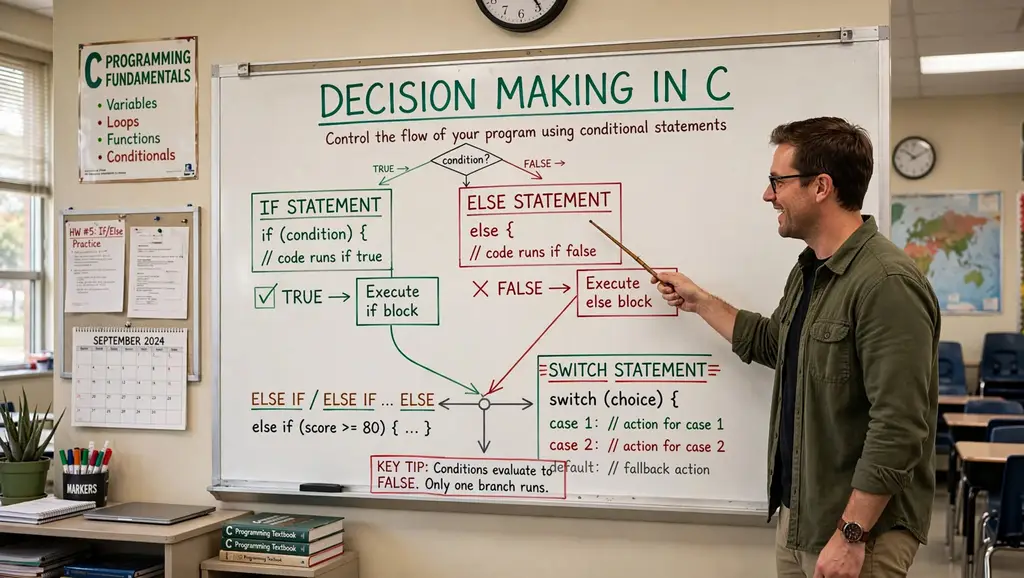
Conditional statements are fundamental control flow structures in C that allow programs to make decisions based on specific conditions. They enable the execution of different code blocks depending on whether a condition evaluates to true or false. Mastering decision-making constructs is essential for writing dynamic, responsive, and intelligent programs.

This tutorial provides an in-depth exploration of decision-making in C: if, if-else, nested if-else, if-else-if ladder, switch, and the conditional operator. It covers syntax, practical examples, common pitfalls, and best practices.


Conceptual Introduction & Fundamentals

What is Decision Making?

Decision making in programming refers to the ability of a program to choose between different execution paths based on conditions. In C, this is achieved through conditional statements that evaluate expressions and execute specific blocks of code accordingly.

Key concepts:

  • Condition: An expression that evaluates to true (non-zero) or false (zero).
  • Branching: Diverting program flow based on condition results.
  • Blocks: Groups of statements enclosed in { } that execute together.

Why Decision Making Matters

  • Program control: Directs execution flow based on user input, data values, or system state.
  • Flexibility: Programs can respond differently to different situations.
  • Error handling: Check for invalid conditions before proceeding.
  • Logic implementation: Implement complex algorithms and business rules.

Types of Decision-Making Statements

C provides several decision-making constructs:

StatementPurpose
ifExecute block if condition is true
if-elseExecute one block if true, another if false
Nested if-elseMultiple levels of conditions inside conditions
if-else-if ladderTest multiple conditions sequentially
switchSelect from multiple cases based on value
Conditional operator ?:Shorthand for simple if-else

Boolean Representation in C

C does not have a built-in bool type in C89/C90. Conditions are evaluated as integers:

  • 0 = false
  • Non-zero (usually 1) = true

C99 introduced _Bool type (via <stdbool.h> as bool with true/false).


Syntax & Core Mechanics

1. if Statement

The simplest decision-making statement. Executes a block only when the condition is true.

Syntax:

c

if (condition) { // statements }

Example:

c

#include <stdio.h> int main(void) { int age = 20; if (age >= 18) { printf("Eligible for vote\n"); } /* Single statement without braces */ if (age > 0) printf("Age is positive\n"); return 0; }

Expected output:

text

Eligible for vote Age is positive

Important: If there’s only one statement in the body, braces can be omitted. However, using braces consistently is recommended to avoid bugs.

2. if-else Statement

Executes one block if condition is true, another if false.

Syntax:

c

if (condition) { // executed if condition is true } else { // executed if condition is false }

Example:

c

#include <stdio.h> int main(void) { int age = 10; if (age >= 18) { printf("Eligible for vote\n"); } else { printf("Not Eligible for vote\n"); } return 0; }

Expected output:

text

Not Eligible for vote

3. Nested if-else Statement

An if or if-else statement inside another if or else block.

Syntax:

c

if (condition1) { if (condition2) { // executed if both condition1 and condition2 are true } else { // executed if condition1 true, condition2 false } } else { // executed if condition1 is false }

Example:

c

#include <stdio.h> int main(void) { int age = 11; if (age >= 18) { if (age >= 60) { printf("Eligible to vote (Senior Citizen)\n"); } else { printf("Eligible for vote\n"); } } else { printf("Not eligible to vote (Under 18)\n"); if (age >= 13) { printf("Teenager\n"); } else { printf("Not a teenager\n"); } } return 0; }

Expected output:

text

Not eligible to vote (Under 18) Not a teenager

4. if-else-if Ladder

Tests multiple conditions sequentially. The first true condition’s block executes.

Syntax:

c

if (condition1) { // executed if condition1 is true } else if (condition2) { // executed if condition1 false, condition2 true } else if (condition3) { // executed if condition1 and condition2 false, condition3 true } else { // executed if all conditions are false }

Example:

c

#include <stdio.h> int main(void) { int score = 85; if (score >= 90) { printf("Grade: A\n"); } else if (score >= 80) { printf("Grade: B\n"); } else if (score >= 70) { printf("Grade: C\n"); } else if (score >= 60) { printf("Grade: D\n"); } else { printf("Grade: F\n"); } return 0; }

Expected output:

text

Grade: B

5. switch Statement

Selects from multiple cases based on an integer or character expression.

Syntax:

c

switch (expression) { case value1: // statements break; case value2: // statements break; default: // statements break; }

Example:

c

#include <stdio.h> int main(void) { int day = 3; switch (day) { case 1: printf("Monday\n"); break; case 2: printf("Tuesday\n"); break; case 3: printf("Wednesday\n"); break; case 4: printf("Thursday\n"); break; case 5: printf("Friday\n"); break; default: printf("Weekend\n"); break; } return 0; }

Expected output:

text

Wednesday

Important: The break statement is crucial; without it, execution “falls through” to subsequent cases.

6. Conditional Operator (?:)

A ternary operator for simple if-else assignments.

Syntax:

c

condition ? expression1 : expression2;

If condition is true, expression1 evaluates; otherwise, expression2 evaluates.

Example:

c

#include <stdio.h> int main(void) { int flag = 0; int var; var = (flag == 0) ? 25 : -25; printf("Value of var when flag is 0: %d\n", var); int max = (10 > 5) ? 10 : 5; printf("Max: %d\n", max); return 0; }

Expected output:

text

Value of var when flag is 0: 25 Max: 10

Full Practical Code Example with Explanation

This program demonstrates all decision-making constructs in a realistic scenario: a grade classification system with input validation.

Program: Student Grade Classifier

c

/** * grade_classifier.c * Demonstrates if, if-else, nested if-else, if-else-if ladder, * switch, and conditional operator. * Classifies student grades based on percentage score. */ #include <stdio.h> #include <stdlib.h> #include <string.h> #include <errno.h> #include <stdbool.h> #define MAX_LINE_LEN 100 /* Function prototypes */ int readInteger(const char *prompt, int *outValue); char getLetterGrade(int score); void printGradeComment(char grade); bool isValidScore(int score); int main(void) { int score; char letterGrade; bool passed; printf("=== Student Grade Classifier ===\n"); /* Read score with validation */ if (readInteger("Enter score (0-100): ", &score) != 0) { fprintf(stderr, "Failed to read score.\n"); return EXIT_FAILURE; } /* Validate score range using if */ if (!isValidScore(score)) { fprintf(stderr, "Invalid score. Must be between 0 and 100.\n"); return EXIT_FAILURE; } /* Determine letter grade using if-else-if ladder */ letterGrade = getLetterGrade(score); /* Check pass/fail using conditional operator */ passed = (score >= 60) ? true : false; /* Display results */ printf("\n--- Results ---\n"); printf("Score: %d\n", score); printf("Letter Grade: %c\n", letterGrade); /* Use nested if-else for additional comments */ if (passed) { printf("Status: PASSED\n"); if (score >= 90) { printf("Excellent work!\n"); } else if (score >= 80) { printf("Great job!\n"); } else if (score >= 70) { printf("Good effort!\n"); } else { printf("You passed. Keep improving!\n"); } } else { printf("Status: FAILED\n"); if (score >= 50) { printf("Close! You almost passed.\n"); } else if (score >= 40) { printf("Need significant improvement.\n"); } else { printf("Please seek help from the instructor.\n"); } } /* Use switch for letter grade comment */ printGradeComment(letterGrade); /* Demonstrate conditional operator for simple assignment */ int bonusPoints = (score >= 90) ? 5 : (score >= 80) ? 3 : (score >= 70) ? 1 : 0; printf("Bonus points earned: %d\n", bonusPoints); /* Use if-else-if for final message */ if (score == 100) { printf("Perfect score!\n"); } else if (score >= 90) { printf("Outstanding performance!\n"); } else if (score >= 80) { printf("Very good performance!\n"); } else if (score >= 70) { printf("Good performance!\n"); } else if (score >= 60) { printf("Satisfactory performance!\n"); } else { printf("Needs improvement!\n"); } return EXIT_SUCCESS; } /* Returns letter grade based on score using if-else-if ladder */ char getLetterGrade(int score) { if (score >= 90) { return 'A'; } else if (score >= 80) { return 'B'; } else if (score >= 70) { return 'C'; } else if (score >= 60) { return 'D'; } else { return 'F'; } } /* Prints a comment based on letter grade using switch */ void printGradeComment(char grade) { printf("Comment: "); switch (grade) { case 'A': printf("Outstanding!\n"); break; case 'B': printf("Very Good!\n"); break; case 'C': printf("Good!\n"); break; case 'D': printf("Satisfactory!\n"); break; case 'F': printf("Fail!\n"); break; default: printf("Invalid grade!\n"); break; } } /* Checks if score is in valid range */ bool isValidScore(int score) { return (score >= 0 && score <= 100); } /* Reads an integer safely */ int readInteger(const char *prompt, int *outValue) { char buffer[MAX_LINE_LEN]; char *endPtr; long val; while (1) { printf("%s", prompt); fflush(stdout); if (fgets(buffer, sizeof(buffer), stdin) == NULL) { return -1; } errno = 0; val = strtol(buffer, &endPtr, 10); if (endPtr == buffer || (*endPtr != '\n' && *endPtr != '\0')) { printf("Invalid integer. Please try again.\n"); continue; } if (errno == ERANGE || val < -2147483647 - 1 || val > 2147483647) { printf("Number out of range. Please try again.\n"); continue; } *outValue = (int)val; return 0; } }

Explanation of Decision-Making Usage

  1. if statement: Validates score range: if (!isValidScore(score)).
  2. if-else-if ladder: In getLetterGrade(), determines letter grade based on score ranges.
  3. Nested if-else: In main(), provides detailed comments based on pass/fail status and score ranges.
  4. switch: In printGradeComment(), selects comment based on letter grade.
  5. Conditional operator: Assigns passed status and bonusPoints.
  6. if-else-if for final message: Provides multiple conditions for performance feedback.

Expected Output

Sample run 1 (score = 95):

text

=== Student Grade Classifier === Enter score (0-100): 95 --- Results --- Score: 95 Letter Grade: A Status: PASSED Excellent work! Comment: Outstanding! Bonus points earned: 5 Outstanding performance!

Sample run 2 (score = 45):

text

=== Student Grade Classifier === Enter score (0-100): 45 --- Results --- Score: 45 Letter Grade: F Status: FAILED Please seek help from the instructor. Comment: Fail! Bonus points earned: 0 Needs improvement!

Sample run 3 (invalid score):

text

=== Student Grade Classifier === Enter score (0-100): 150 Invalid score. Must be between 0 and 100.

Common Pitfalls, Edge Cases & Memory Considerations

1. Using = Instead of ==

Assignment (=) in a condition always evaluates to true (non-zero) unless the assigned value is 0.

c

if (a = 10) { // Always true; assigns 10 to a }

Solution: Use == for comparison. Enable compiler warnings (-Wall).

2. Dangling else

An else always binds to the nearest unmatched if, not the one you might intend.

c

if (condition1) if (condition2) printf("Both true\n"); else printf("condition1 false or condition2 false?\n"); // This else binds to inner if

Solution: Use braces to clarify binding:

c

if (condition1) { if (condition2) printf("Both true\n"); } else { printf("condition1 false\n"); }

3. Forgetting Braces for Multiple Statements

Without braces, only the first statement after if is part of the block.

c

if (condition) statement1; statement2; // This always executes, not part of if

Solution: Always use braces, even for single statements:

c

if (condition) { statement1; statement2; }

4. switch Fall-Through

Forgetting break causes execution to continue into the next case.

c

switch (x) { case 1: printf("One\n"); case 2: printf("Two\n"); // Executes for x == 1 and x == 2 }

Solution: Always use break unless fall-through is intentional. Document intentional fall-through with a comment.

5. switch Expression Type

switch expression must be integer or character type. Floating-point or strings are not allowed.

c

switch (3.14) { // Error: switch quantity not an integer }

Solution: Use if-else-if for non-integer conditions.

6. Comparison Chaining

a < b < c does not work as expected in C.

c

if (a < b < c) { // Evaluates as (a < b) < c }

Solution: Use logical operators: if (a < b && b < c).

7. Floating-Point Equality

Comparing floating-point values for equality is unreliable due to precision.

c

float f = 0.1f + 0.2f; if (f == 0.3f) { // May be false }

Solution: Use epsilon comparison: fabs(f - 0.3f) < 0.0001f.

8. Side Effects in Conditions

Conditions with side effects can be confusing and error-prone.

c

if (i++ > 5 && array[i] > 0) { // i is incremented before array access }

Solution: Avoid side effects in conditions; perform them separately.

9. Uninitialized Variables in Conditions

Using uninitialized variables in conditions is undefined behavior.

c

int x; if (x > 10) { // x is garbage }

Solution: Always initialize variables before use.

10. Memory Considerations

  • Decision-making constructs do not allocate dynamic memory.
  • Nested conditions can increase stack usage if large local variables are declared in blocks.
  • Avoid deeply nested if-else (more than 3-4 levels) as it hurts readability; consider switch or functions instead.

Summary & Best Practices

Decision-making statements in C allow programs to execute different code paths based on conditions. Understanding the various constructs and their proper use is essential for writing clear, correct, and maintainable code.

Key Takeaways

  • if executes a block when a condition is true.
  • if-else provides an alternative block when the condition is false.
  • Nested if-else checks conditions inside other conditions.
  • if-else-if ladder tests multiple conditions sequentially.
  • switch selects from multiple cases based on an integer/character value.
  • Conditional operator ?: is a shorthand for simple if-else.
  • Always use braces to avoid dangling else and block errors.

Best Practices

  1. Use braces { } consistently for all control flow blocks, even single statements.
  2. Use == for comparison and = for assignment; enable compiler warnings.
  3. Avoid side effects in conditions; keep conditions simple and pure.
  4. Use if-else-if ladder when testing multiple ranges or discrete values.
  5. Use switch when comparing against many constant values.
  6. Use conditional operator only for simple, clear assignments.
  7. Limit nesting depth (3-4 levels max); refactor into functions if deeper.
  8. Validate inputs before using them in conditions.
  9. Use bool type (from <stdbool.h>) for boolean variables and return types.
  10. Document complex conditions with comments explaining the logic.

By mastering decision-making in C, you’ll write programs that respond intelligently to different situations, handle errors gracefully, and implement complex logic clearly.

Learn C keywords: categories, rules, and examples. Master data types, control flow, storage classes, and qualifiers. Avoid common pitfalls in C programming.

Keywords in C: Complete List, Usage & Examples

Conceptual Introduction & Fundamentals

What are Keywords?

In C, keywords are predefined tokens that the compiler interprets as instructions or declarations. They are part of the language specification and cannot be redefined or overloaded. For example, int, if, while, return, and struct are keywords.

Key characteristics:

  • Reserved: You cannot use them as identifiers.
  • Case-sensitive: if is a keyword, but IF, If, or iF are not (they are ordinary identifiers).
  • Standard-dependent: The set of keywords grows with each C standard revision.
  • Purpose-specific: Keywords are categorized into data types, control flow, storage classes, type qualifiers, and more.

Why Keywords Matter

  • They define the language’s grammar: control structures (if, for), data types (int, char), and storage classes (static, extern).
  • They enable the compiler to parse code unambiguously. Using a keyword as an identifier leads to syntax errors.
  • They allow programmers to express low-level concepts (e.g., volatile, register, sizeof) directly in source code.

Standard Versions and Keyword Count

  • ANSI C (C89/C90): 32 keywords.
  • C99: Adds inline, restrict, _Bool, _Complex, _Imaginary.
  • C11: Adds _Alignas, _Alignof, _Atomic, _Generic, _Noreturn, _Static_assert, _Thread_local.
  • C23: Further additions (e.g., constexpr, typeof, typeof_unqual, _BitInt).

For maximum portability, stick to the keywords defined by the standard you target (e.g., C99/C11) and avoid implementation-specific extensions.

Keywords vs. Identifiers

  • Keywords are fixed by the language; you cannot create new ones.
  • Identifiers are programmer-defined names that follow naming rules.
  • A keyword cannot be used as an identifier, but an identifier can look like a keyword if the case is changed (e.g., Int is not a keyword).

Syntax & Core Mechanics

C keywords can be grouped into logical categories. Below is a detailed breakdown with examples.

Data Type Keywords

These declare variables or functions with specific types.

KeywordUsage
charDeclares a character type (1 byte).
intDeclares an integer type.
floatDeclares a single-precision floating-point type.
doubleDeclares a double-precision floating-point type.
voidSpecifies no value (for functions with no return, or generic pointer).
shortModifies int to be at least 16 bits.
longModifies int or double to be longer.
signedExplicitly declares a signed type.
unsignedDeclares an unsigned type.
_BoolC99 boolean type (use stdbool.h for bool).
_ComplexC99 complex number type (use complex.h).

Example:

c

char grade = 'A'; int count = 10; float price = 19.99f; double preciseValue = 3.14159265358979; void printMessage(void); // function returning nothing short int small = 100; long int big = 100000L; unsigned int positive = 42; _Bool flag = 1; // C99 boolean

Control Flow Keywords

These control the execution order of statements.

KeywordUsage
ifExecutes a block if condition is true.
elseExecutes when if condition is false.
switchSelects one of many blocks based on an integer expression.
caseDefines a branch within a switch.
defaultExecutes when no case matches.
forLoop with initialization, condition, and increment.
whileLoop while condition is true.
doLoop that executes at least once (with while).
breakExits the innermost loop or switch.
continueSkips the rest of the current loop iteration.
gotoTransfers control to a labeled statement (use sparingly).
returnExits a function, optionally returning a value.

Example:

c

#include <stdio.h> int main(void) { int x = 5; if (x > 0) { printf("Positive\n"); } else { printf("Non-positive\n"); } for (int i = 0; i < 3; i++) { if (i == 1) continue; // skip printing 1 printf("%d ", i); } printf("\n"); switch (x) { case 1: printf("One\n"); break; case 5: printf("Five\n"); break; default: printf("Other\n"); } return 0; }

Expected output:

text

Positive 0 2 Five

Storage Class Keywords

These define the scope, lifetime, and storage location of variables.

KeywordUsage
autoAutomatic storage (default for local variables). Rarely used explicitly.
registerSuggests storing variable in a CPU register (compiler may ignore).
staticPreserves variable value between function calls; internal linkage at file scope.
externDeclares a variable or function defined in another translation unit.

Example:

c

#include <stdio.h> void counter(void) { static int count = 0; // static: retains value between calls count++; printf("Count: %d\n", count); } int globalVar = 100; // external linkage by default int main(void) { extern int globalVar; // refers to globalVar defined above counter(); counter(); return 0; }

Expected output:

text

Count: 1 Count: 2

User-Defined Type Keywords

These allow creating custom data types.

KeywordUsage
structDefines a structure (group of variables).
unionDefines a union (same memory for different types).
enumDefines an enumeration (set of named integer constants).
typedefCreates an alias for an existing type.

Example:

c

#include <stdio.h> typedef struct { int x; int y; } Point; enum Color { RED, GREEN, BLUE }; int main(void) { Point p = {10, 20}; enum Color c = GREEN; printf("Point: (%d,%d), Color: %d\n", p.x, p.y, c); return 0; }

Expected output:

text

Point: (10,20), Color: 1

Qualifier Keywords

These modify the behavior of variables.

KeywordUsage
constDeclares a read-only variable.
volatileTells the compiler the variable may change unexpectedly (e.g., hardware registers).
restrict(C99) Promises exclusive access through a pointer, enabling optimization.

Example:

c

const double PI = 3.14159; volatile int hardwareStatus; // could change outside program's control int * restrict ptr = malloc(sizeof(int)); // exclusive pointer

Memory Management and Utility Keywords

KeywordUsage
sizeofReturns the size of a type or object in bytes (compile-time operator).

Example:

c

#include <stdio.h> int main(void) { int arr[10]; printf("Size of int: %zu\n", sizeof(int)); printf("Size of arr: %zu\n", sizeof(arr)); return 0; }

Expected output (typical):

text

Size of int: 4 Size of arr: 40

Full Practical Code Example with Explanation

This program demonstrates the use of many C keywords in a coherent, real-world scenario: a simple inventory management system that reads product data, stores it in a structure, and provides a menu-driven interface using control flow and storage class keywords. It includes robust input handling and error checking.

Program: Inventory Manager

c

/** * inventory.c * Demonstrates use of C keywords: struct, typedef, enum, static, const, * if, else, switch, case, break, for, while, return, sizeof, etc. * Provides a menu to add and display products. */ #include <stdio.h> #include <stdlib.h> #include <string.h> #define MAX_PRODUCTS 100 #define MAX_NAME_LEN 50 /* Structure to represent a product */ typedef struct { char name[MAX_NAME_LEN]; int quantity; double price; } Product; /* Enumeration for menu options */ typedef enum { ADD_PRODUCT = 1, DISPLAY_PRODUCTS, EXIT_PROGRAM } MenuOption; /* Static global variable: product list and count */ static Product inventory[MAX_PRODUCTS]; static int productCount = 0; // static: internal linkage, retains value /* Function prototypes */ void addProduct(void); void displayProducts(void); int readInteger(const char *prompt); double readDouble(const char *prompt); int main(void) { int choice; const char *menuText = "\nInventory Menu:\n" "1. Add Product\n" "2. Display Products\n" "3. Exit\n" "Enter choice: "; while (1) { // infinite loop, terminated by 'break' in switch printf("%s", menuText); fflush(stdout); /* Read integer choice safely */ if (scanf("%d", &choice) != 1) { fprintf(stderr, "Invalid input. Exiting.\n"); break; } /* Clear input buffer to avoid leftover newline issues */ int c; while ((c = getchar()) != '\n' && c != EOF); switch (choice) { case ADD_PRODUCT: addProduct(); break; case DISPLAY_PRODUCTS: displayProducts(); break; case EXIT_PROGRAM: printf("Exiting program.\n"); return EXIT_SUCCESS; // return from main, terminates loop default: printf("Invalid option. Please try again.\n"); break; // break out of switch, continue loop } } return EXIT_SUCCESS; } /* Adds a product to the inventory */ void addProduct(void) { if (productCount >= MAX_PRODUCTS) { fprintf(stderr, "Inventory full. Cannot add more products.\n"); return; } Product newProduct; // automatic variable /* Read product name using fgets for safety */ printf("Enter product name: "); fflush(stdout); if (fgets(newProduct.name, MAX_NAME_LEN, stdin) == NULL) { fprintf(stderr, "Error reading name.\n"); return; } /* Remove trailing newline */ newProduct.name[strcspn(newProduct.name, "\n")] = '\0'; /* Read quantity */ newProduct.quantity = readInteger("Enter quantity: "); if (newProduct.quantity < 0) { fprintf(stderr, "Quantity cannot be negative.\n"); return; } /* Read price */ newProduct.price = readDouble("Enter price: "); if (newProduct.price < 0.0) { fprintf(stderr, "Price cannot be negative.\n"); return; } /* Store in static array */ inventory[productCount] = newProduct; productCount++; printf("Product added successfully.\n"); } /* Displays all products in inventory */ void displayProducts(void) { if (productCount == 0) { printf("No products to display.\n"); return; } printf("\n%-5s %-20s %-10s %-10s\n", "ID", "Name", "Qty", "Price"); for (int i = 0; i < productCount; i++) { printf("%-5d %-20s %-10d %-10.2f\n", i + 1, inventory[i].name, inventory[i].quantity, inventory[i].price); } } /* Helper: safely read an integer from stdin */ int readInteger(const char *prompt) { char buffer[32]; int value; char *endPtr; while (1) { printf("%s", prompt); fflush(stdout); if (fgets(buffer, sizeof(buffer), stdin) == NULL) { return -1; // signal error } value = (int)strtol(buffer, &endPtr, 10); if (endPtr == buffer || (*endPtr != '\n' && *endPtr != '\0')) { printf("Invalid integer. Please try again.\n"); continue; } return value; } } /* Helper: safely read a double from stdin */ double readDouble(const char *prompt) { char buffer[64]; double value; char *endPtr; while (1) { printf("%s", prompt); fflush(stdout); if (fgets(buffer, sizeof(buffer), stdin) == NULL) { return -1.0; // signal error } value = strtod(buffer, &endPtr); if (endPtr == buffer || (*endPtr != '\n' && *endPtr != '\0')) { printf("Invalid number. Please try again.\n"); continue; } return value; } }

Explanation of Keywords Used

  • typedef creates aliases: Product for the structure, MenuOption for the enum.
  • struct defines the product data type.
  • enum defines a set of named constants for menu choices.
  • static on global inventory and productCount limits their visibility to this file and preserves their values throughout program execution.
  • const on menuText ensures the string literal is not modified.
  • while, for, switch, case, break, default, if, else, return control program flow.
  • sizeof is implicitly used in array declarations and buffer sizes.
  • int, double, char are data type keywords.
  • void specifies functions returning nothing.

Expected Output

Running the program and interacting:

text

Inventory Menu: 1. Add Product 2. Display Products 3. Exit Enter choice: 1 Enter product name: Laptop Enter quantity: 5 Enter price: 999.99 Product added successfully. Inventory Menu: 1. Add Product 2. Display Products 3. Exit Enter choice: 1 Enter product name: Mouse Enter quantity: 20 Enter price: 19.50 Product added successfully. Inventory Menu: 1. Add Product 2. Display Products 3. Exit Enter choice: 2 ID Name Qty Price 1 Laptop 5 999.99 2 Mouse 20 19.50 Inventory Menu: 1. Add Product 2. Display Products 3. Exit Enter choice: 3 Exiting program.

The program demonstrates safe input using fgets and strtol/strtod, robust error checking, and meaningful use of various keyword categories.


Common Pitfalls, Edge Cases & Memory Considerations

1. Using Keywords as Identifiers

The most obvious error: attempting to name a variable int, return, float, etc.

c

int float = 5; // Compilation error: expected identifier before 'float'

Solution: Always choose names that are not keywords. Check the keyword list for your target standard.

2. Case Sensitivity Confusion

C is case-sensitive. While is not while. Some programmers mistakenly write If or For, causing errors.

c

If (x > 0) { ... } // Error: 'If' undeclared identifier

Solution: Use lowercase for keywords exactly as specified.

3. New Keywords in Later Standards

C99 introduced inline, restrict, _Bool, _Complex, _Imaginary. If you use these as identifiers in older compilers, they may compile fine, but code is not portable. Conversely, using them as keywords when compiling with C99+ will cause errors if used as variable names.

c

int restrict = 10; // Error in C99, but maybe OK in C89

Solution: Be aware of the C standard you are targeting. Use -std=c99, -std=c11, etc., and avoid using these reserved names.

4. Misusing Storage Class Keywords

  • register is only a hint; modern compilers ignore it. Overusing it does not guarantee faster code.
  • static has two different meanings depending on context:
    • For local variables: static storage duration (retains value).
    • For global variables/functions: internal linkage (visible only in that file).
      Confusing these can lead to unintended behavior.

c

// file1.c static int hidden = 5; // only visible in file1.c // file2.c extern int hidden; // Link error: 'hidden' not defined externally
  • extern declares a variable but does not define it. Forgetting the actual definition in some file leads to link errors.

5. const Does Not Make a Variable Constant at Runtime

const is a compile-time qualifier that prevents modification through that particular name, but the underlying memory may still be writable if cast away.

c

const int x = 10; int *p = (int*)&x; // Cast away const (not recommended) *p = 20; // Undefined behavior

Solution: Treat const as a promise, not an absolute guarantee. Use it for documentation and optimization, but do not rely on it for security.

6. volatile and Optimization

Without volatile, the compiler may optimize away repeated reads of a variable that appears unchanged. For memory-mapped hardware or signal handlers, this can cause bugs.

c

volatile int flag = 0; // In a loop, without volatile, compiler might assume flag never changes.

Solution: Use volatile for variables that can be modified externally (hardware, interrupts, threads).

7. sizeof is Not a Function

sizeof is an operator, often mistaken for a function. It can be used without parentheses for expressions.

c

int a; size_t s1 = sizeof a; // Valid size_t s2 = sizeof(a); // Also valid

But note: sizeof is evaluated at compile time (except for variable-length arrays in C99). Using it on an expression does not evaluate the expression.

8. Memory Considerations of Keywords

  • static local variables are stored in the data segment (not stack), increasing memory footprint but avoiding stack overflow for large arrays.
  • register may reduce memory access but not actual memory usage.
  • const variables may be placed in read-only memory by the compiler, saving RAM and preventing accidental writes.
  • volatile prevents certain optimizations but does not change memory location.
  • restrict allows the compiler to perform aggressive optimizations by assuming no aliasing, potentially improving performance and reducing memory traffic.

9. Using goto Excessively

goto is a keyword but considered harmful if overused because it can create spaghetti code. However, it is sometimes useful for error handling in deeply nested loops.

c

for (...) { for (...) { if (error) goto cleanup; } } cleanup: free(resources);

Use sparingly and only when it improves clarity.


Summary & Best Practices

C keywords are the fundamental building blocks of the language. They define types, control flow, storage, and qualifiers. Mastering their use is essential for writing efficient, portable, and maintainable code.

Key Takeaways

  • Keywords are reserved; you cannot use them as identifiers.
  • The set of keywords evolves with C standards (C89: 32, C99: +6, C11: +7, etc.).
  • Keywords are case-sensitive; always use lowercase.
  • Categories include data types, control flow, storage classes, user-defined types, qualifiers, and utility (sizeof).
  • Understanding the exact meaning of each keyword (e.g., static for both storage duration and internal linkage) prevents bugs.

Best Practices

  1. Never attempt to use keywords as identifiers. Use descriptive names that are not reserved.
  2. Target a specific C standard and stick to its keyword set. Use -std=c99 or -std=c11 to enforce.
  3. Use const liberally for variables that should not be modified; it improves readability and helps the optimizer.
  4. Use static for file-local functions and variables to hide implementation details and avoid name collisions.
  5. Use extern only for declarations in headers; define the variable in exactly one .c file.
  6. Avoid register; it is obsolete and ignored by modern compilers.
  7. Use volatile for hardware registers, signal handlers, and variables shared between threads.
  8. Use restrict (C99) in performance-critical code where you can guarantee no aliasing, but ensure correctness first.
  9. Prefer structured control flow (if, for, while, switch) over goto. Use goto only for cleanup in error paths.
  10. Be consistent with case and naming conventions to avoid confusion with keywords.

By mastering C keywords, you gain precise control over program behavior and lay a solid foundation for advanced systems programming.