CoreTechED

Loading

Learn the C main function: syntax, return types, and command-line arguments (argc, argv). Master best practices and avoid common pitfalls.

main Function in C: Entry Point & Arguments

main Function in C: A Comprehensive Tutorial

The main function is the entry point of every C program. It is where program execution begins and ends. Understanding the main function—its syntax, return types, command-line arguments, and best practices—is fundamental to writing correct and portable C programs.

This tutorial provides an in-depth exploration of the main function in C: its forms, syntax variations, command-line arguments, common pitfalls, and best practices.


Conceptual Introduction & Fundamentals

What is the main Function?

The main function is a user-defined function that serves as the starting point of program execution. When you run a C program, the operating system calls main, and execution begins from the first statement inside it. When main returns, the program terminates.

Example:

c

#include <stdio.h> int main(void) { printf("Hello, World!\n"); return 0; }

Expected output:

text

Hello, World!

Why is main Special?

  • Entry point: The C runtime (startup code) calls main after initializing the environment.
  • Required: Every C program must have exactly one main function (for hosted environments).
  • Return value: Indicates success (0) or failure (non-zero) to the operating system.
  • Command-line arguments: Can accept arguments from the shell.

What Happens Without main?

If a program has no main, the linker fails with an error:

c

#include <stdio.h> int func(void) { printf("Hello, World!\n"); return 0; }

Linker error:

text

/usr/lib/x86_64-linux-gnu/crt1.o: In function `_start': (.text+0x20): undefined reference to `main' collect2: error: ld returned 1 exit status

Standard Forms of main

The C standard (C99/C11) specifies two standard forms:

  1. int main(void) — No arguments
  2. int main(int argc, char *argv[]) — With command-line arguments

Both return int. Other forms (e.g., void main()) are non-standard and should be avoided.


Syntax & Core Mechanics

Standard Syntax

Without Command-Line Arguments

c

int main(void) { // Code return 0; }

With Command-Line Arguments

c

int main(int argc, char *argv[]) { // Code return 0; }

Parameters:

  • argc (ARGument Count): Number of command-line arguments (including program name).
  • argv (ARGument Vector): Array of strings containing the arguments.

Common Variations

FormStandard?Description
int main(void)YesNo arguments, returns int
int main(int argc, char *argv[])YesWith command-line arguments
int main()Yes (but less clear)No arguments specified
void main()NoNon-standard, avoid
main()Yes (implicit int, C89)Old style, avoid in C99+

Return Values

  • return 0; — Indicates successful execution.
  • return EXIT_SUCCESS; — Macro for success (usually 0).
  • return EXIT_FAILURE; — Macro for failure (usually non-zero).
  • Non-zero values — Indicate errors; can be used to communicate specific error codes.

c

#include <stdio.h> #include <stdlib.h> int main(void) { // Successful execution return EXIT_SUCCESS; // Usually 0 }

Command-Line Arguments

Command-line arguments allow users to pass data to the program at startup.

Example:

c

#include <stdio.h> int main(int argc, char *argv[]) { printf("Number of arguments: %d\n", argc); for (int i = 0; i < argc; i++) { printf("argv[%d] = %s\n", i, argv[i]); } return 0; }

Compilation and execution:

bash

gcc -std=c11 program.c -o program ./program hello world 42

Expected output:

text

Number of arguments: 4 argv[0] = ./program argv[1] = hello argv[2] = world argv[3] = 42

Important:

  • argv[0] is always the program name.
  • Arguments are always strings (even numbers).
  • Convert strings to numbers using atoi, strtol, strtod, etc.

Environment Variables (Extension)

Some compilers support a third parameter for environment variables:

c

int main(int argc, char *argv[], char *envp[]);

This is non-standard and should be used with caution. Use getenv() from <stdlib.h> instead.


Full Practical Code Example with Explanation

This program demonstrates the main function with command-line arguments in a realistic scenario: a simple calculator that accepts operation and operands from the command line.

Program: Command-Line Calculator

c

/** * cli_calculator.c * Demonstrates main function with command-line arguments. * Usage: ./calculator <number1> <operator> <number2> * Example: ./calculator 10 + 5 */ #include <stdio.h> #include <stdlib.h> #include <string.h> #include <errno.h> /* Function prototypes */ int parseDouble(const char *str, double *outValue); int performOperation(double a, char op, double b, double *result); int main(int argc, char *argv[]) { /* Check command-line arguments */ if (argc != 4) { fprintf(stderr, "Usage: %s <number1> <operator> <number2>\n", argv[0]); fprintf(stderr, "Example: %s 10 + 5\n", argv[0]); fprintf(stderr, "Operators: +, -, *, /\n"); return EXIT_FAILURE; } /* Parse numbers from command-line arguments */ double num1, num2; if (parseDouble(argv[1], &num1) != 0) { fprintf(stderr, "Error: '%s' is not a valid number.\n", argv[1]); return EXIT_FAILURE; } if (parseDouble(argv[3], &num2) != 0) { fprintf(stderr, "Error: '%s' is not a valid number.\n", argv[3]); return EXIT_FAILURE; } /* Get operator */ char operator = argv[2][0]; /* Validate operator */ if (strlen(argv[2]) != 1 || (operator != '+' && operator != '-' && operator != '*' && operator != '/')) { fprintf(stderr, "Error: Invalid operator '%s'.\n", argv[2]); fprintf(stderr, "Valid operators: +, -, *, /\n"); return EXIT_FAILURE; } /* Perform calculation */ double result; if (performOperation(num1, operator, num2, &result) != 0) { return EXIT_FAILURE; } /* Display result */ printf("%.2f %c %.2f = %.2f\n", num1, operator, num2, result); return EXIT_SUCCESS; } /* Parses a string to double with error checking */ int parseDouble(const char *str, double *outValue) { char *endPtr; errno = 0; double val = strtod(str, &endPtr); /* Check for conversion errors */ if (endPtr == str) { return -1; /* No digits found */ } if (*endPtr != '\0') { return -1; /* Extra characters after number */ } if (errno == ERANGE) { return -1; /* Out of range */ } *outValue = val; return 0; } /* Performs arithmetic operation */ int performOperation(double a, char op, double b, double *result) { switch (op) { case '+': *result = a + b; return 0; case '-': *result = a - b; return 0; case '*': *result = a * b; return 0; case '/': if (b == 0.0) { fprintf(stderr, "Error: Division by zero.\n"); return -1; } *result = a / b; return 0; default: fprintf(stderr, "Error: Unknown operator '%c'.\n", op); return -1; } }

Explanation

  1. argc validation: Checks that exactly 4 arguments are provided (program name + 2 numbers + operator).
  2. argv[0]: Used to display the program name in usage messages.
  3. parseDouble: Safely converts string arguments to double using strtod with full error checking.
  4. Operator validation: Ensures the operator is a single valid character.
  5. performOperation: Performs the arithmetic with division-by-zero check.
  6. Return values: Returns EXIT_SUCCESS on success, EXIT_FAILURE on errors.

Compilation and Execution

bash

gcc -Wall -Wextra -std=c11 cli_calculator.c -o calculator

Successful execution:

bash

./calculator 10 + 5

Output:

text

10.00 + 5.00 = 15.00

Invalid usage:

bash

./calculator 10

Output:

text

Usage: ./calculator <number1> <operator> <number2> Example: ./calculator 10 + 5 Operators: +, -, *, /

Division by zero:

bash

./calculator 10 / 0

Output:

text

Error: Division by zero.

Invalid number:

bash

./calculator abc + 5

Output:

text

Error: 'abc' is not a valid number.

Common Pitfalls, Edge Cases & Memory Considerations

1. Using void main() Instead of int main()

void main() is non-standard and may cause undefined behavior. The C standard requires main to return int.

c

void main() { // Non-standard printf("Hello\n"); }

Solution: Always use int main(void) or int main(int argc, char *argv[]).

2. Forgetting to Return a Value from main

In C99 and later, if main reaches the end without a return statement, it implicitly returns 0. However, this is not the case for other functions.

c

int main(void) { printf("Hello\n"); // Implicit return 0 in C99, but not in C89 }

Solution: Always explicitly return 0; or return EXIT_SUCCESS;.

3. Incorrect argc Handling

argc includes the program name. A program with no additional arguments has argc == 1.

c

int main(int argc, char *argv[]) { if (argc < 2) { printf("Usage: %s <filename>\n", argv[0]); return EXIT_FAILURE; } // ... }

Solution: Always check argc before accessing argv elements.

4. Accessing argv Out of Bounds

Accessing argv[i] where i >= argc is undefined behavior.

c

int main(int argc, char *argv[]) { printf("%s\n", argv[1]); // BUG if argc < 2 return 0; }

Solution: Always verify argc before accessing argv.

5. Command-Line Arguments are Strings

All command-line arguments are strings. Numeric arguments must be converted.

c

int main(int argc, char *argv[]) { if (argc < 2) return EXIT_FAILURE; int num = atoi(argv[1]); // Convert string to int printf("%d\n", num); return 0; }

Solution: Use atoi, strtol, strtod for conversion, with error checking for robustness.

6. Not Handling Conversion Errors

atoi returns 0 on error, making it impossible to distinguish between “0” and invalid input.

c

int num = atoi("abc"); // Returns 0, but "abc" is invalid

Solution: Use strtol with error checking:

c

char *endPtr; long val = strtol(argv[1], &endPtr, 10); if (endPtr == argv[1] || *endPtr != '\0') { fprintf(stderr, "Invalid number\n"); }

7. Using main() with Implicit Int (C89)

In C89, main() with no return type implicitly returns int. This was removed in C99.

c

main() { // Implicit int (C89 only) return 0; }

Solution: Always specify int main(void) explicitly.

8. Multiple main Functions

Having more than one main function in a program causes a link error.

c

/* file1.c */ int main(void) { return 0; } /* file2.c */ int main(void) { return 0; } /* Link error: multiple definition of 'main' */

Solution: Ensure only one main exists across all source files.

9. main in a Library

Libraries should not contain a main function; otherwise, linking the library with a program that also has main causes conflicts.

Solution: Keep main only in the executable’s source file.

10. Environment Variables (Non-Standard)

Some compilers support int main(int argc, char *argv[], char *envp[]), but this is non-standard.

Solution: Use getenv() from <stdlib.h> for portability.

Memory Considerations

  • The main function’s stack frame is the first (or one of the first) on the call stack.
  • Command-line arguments are stored in memory allocated by the operating system.
  • argv is an array of pointers to strings; it occupies memory, but the strings themselves are in the program’s environment.
  • Large local variables in main can consume significant stack space; consider using static or heap allocation for large buffers.

Summary & Best Practices

The main function is the entry point of every C program. It must return int and can optionally accept command-line arguments via argc and argv.

Key Takeaways

  • main is where program execution begins.
  • Standard forms: int main(void) and int main(int argc, char *argv[]).
  • Return 0 or EXIT_SUCCESS for success; non-zero for failure.
  • argc includes the program name; argv[0] is the program name.
  • Command-line arguments are strings; convert to numbers using strtol, strtod.
  • Avoid void main(); it’s non-standard.
  • Always check argc before accessing argv.

Best Practices

  1. Use int main(void) or int main(int argc, char *argv[]).
  2. Always return a value from main (0 or EXIT_SUCCESS for success).
  3. Check argc before accessing command-line arguments.
  4. Use strtol/strtod for converting command-line arguments with error checking.
  5. Display usage messages when arguments are missing or invalid.
  6. Use EXIT_SUCCESS and EXIT_FAILURE from <stdlib.h> for portability.
  7. Keep main short; delegate logic to other functions.
  8. Avoid large local variables in main; use static or heap.
  9. Use argv[0] in usage messages for clarity.
  10. Compile with -Wall -Wextra to catch return type and argument mismatches.

By mastering the main function, you’ll write C programs that integrate correctly with the operating system and provide robust command-line interfaces.

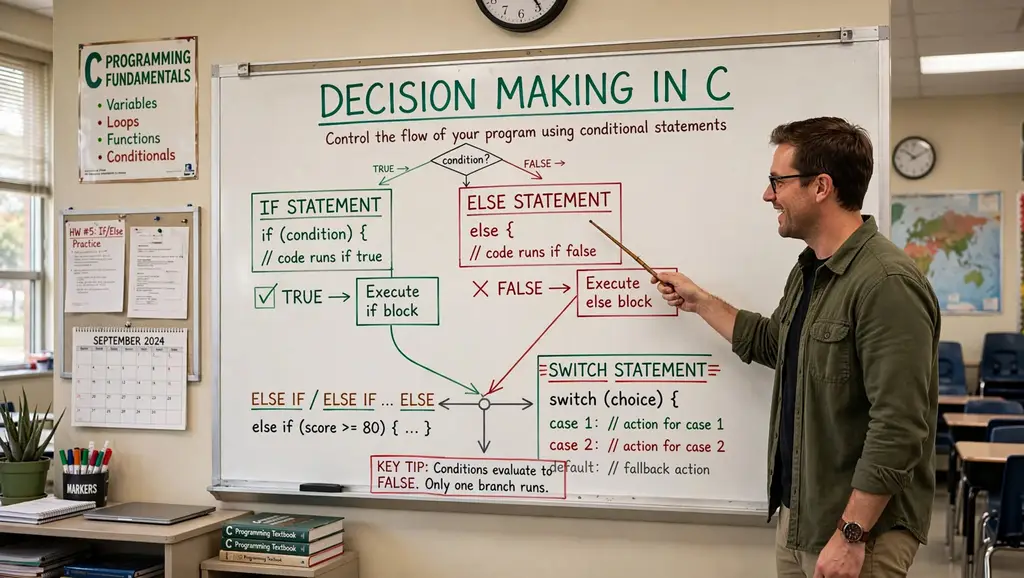
Learn C decision making: if, if-else, nested if-else, if-else-if ladder, switch, and conditional operator. Master control flow with examples.

Decision Making in C: if, if-else, Nested, Ladder

Decision Making in C: if, if-else, Nested if, if-else-if

Conditional statements are fundamental control flow structures in C that allow programs to make decisions based on specific conditions. They enable the execution of different code blocks depending on whether a condition evaluates to true or false. Mastering decision-making constructs is essential for writing dynamic, responsive, and intelligent programs.

This tutorial provides an in-depth exploration of decision-making in C: if, if-else, nested if-else, if-else-if ladder, switch, and the conditional operator. It covers syntax, practical examples, common pitfalls, and best practices.


Conceptual Introduction & Fundamentals

What is Decision Making?

Decision making in programming refers to the ability of a program to choose between different execution paths based on conditions. In C, this is achieved through conditional statements that evaluate expressions and execute specific blocks of code accordingly.

Key concepts:

  • Condition: An expression that evaluates to true (non-zero) or false (zero).
  • Branching: Diverting program flow based on condition results.
  • Blocks: Groups of statements enclosed in { } that execute together.

Why Decision Making Matters

  • Program control: Directs execution flow based on user input, data values, or system state.
  • Flexibility: Programs can respond differently to different situations.
  • Error handling: Check for invalid conditions before proceeding.
  • Logic implementation: Implement complex algorithms and business rules.

Types of Decision-Making Statements

C provides several decision-making constructs:

StatementPurpose
ifExecute block if condition is true
if-elseExecute one block if true, another if false
Nested if-elseMultiple levels of conditions inside conditions
if-else-if ladderTest multiple conditions sequentially
switchSelect from multiple cases based on value
Conditional operator ?:Shorthand for simple if-else

Boolean Representation in C

C does not have a built-in bool type in C89/C90. Conditions are evaluated as integers:

  • 0 = false
  • Non-zero (usually 1) = true

C99 introduced _Bool type (via <stdbool.h> as bool with true/false).


Syntax & Core Mechanics

1. if Statement

The simplest decision-making statement. Executes a block only when the condition is true.

Syntax:

c

if (condition) { // statements }

Example:

c

#include <stdio.h> int main(void) { int age = 20; if (age >= 18) { printf("Eligible for vote\n"); } /* Single statement without braces */ if (age > 0) printf("Age is positive\n"); return 0; }

Expected output:

text

Eligible for vote Age is positive

Important: If there’s only one statement in the body, braces can be omitted. However, using braces consistently is recommended to avoid bugs.

2. if-else Statement

Executes one block if condition is true, another if false.

Syntax:

c

if (condition) { // executed if condition is true } else { // executed if condition is false }

Example:

c

#include <stdio.h> int main(void) { int age = 10; if (age >= 18) { printf("Eligible for vote\n"); } else { printf("Not Eligible for vote\n"); } return 0; }

Expected output:

text

Not Eligible for vote

3. Nested if-else Statement

An if or if-else statement inside another if or else block.

Syntax:

c

if (condition1) { if (condition2) { // executed if both condition1 and condition2 are true } else { // executed if condition1 true, condition2 false } } else { // executed if condition1 is false }

Example:

c

#include <stdio.h> int main(void) { int age = 11; if (age >= 18) { if (age >= 60) { printf("Eligible to vote (Senior Citizen)\n"); } else { printf("Eligible for vote\n"); } } else { printf("Not eligible to vote (Under 18)\n"); if (age >= 13) { printf("Teenager\n"); } else { printf("Not a teenager\n"); } } return 0; }

Expected output:

text

Not eligible to vote (Under 18) Not a teenager

4. if-else-if Ladder

Tests multiple conditions sequentially. The first true condition’s block executes.

Syntax:

c

if (condition1) { // executed if condition1 is true } else if (condition2) { // executed if condition1 false, condition2 true } else if (condition3) { // executed if condition1 and condition2 false, condition3 true } else { // executed if all conditions are false }

Example:

c

#include <stdio.h> int main(void) { int score = 85; if (score >= 90) { printf("Grade: A\n"); } else if (score >= 80) { printf("Grade: B\n"); } else if (score >= 70) { printf("Grade: C\n"); } else if (score >= 60) { printf("Grade: D\n"); } else { printf("Grade: F\n"); } return 0; }

Expected output:

text

Grade: B

5. switch Statement

Selects from multiple cases based on an integer or character expression.

Syntax:

c

switch (expression) { case value1: // statements break; case value2: // statements break; default: // statements break; }

Example:

c

#include <stdio.h> int main(void) { int day = 3; switch (day) { case 1: printf("Monday\n"); break; case 2: printf("Tuesday\n"); break; case 3: printf("Wednesday\n"); break; case 4: printf("Thursday\n"); break; case 5: printf("Friday\n"); break; default: printf("Weekend\n"); break; } return 0; }

Expected output:

text

Wednesday

Important: The break statement is crucial; without it, execution “falls through” to subsequent cases.

6. Conditional Operator (?:)

A ternary operator for simple if-else assignments.

Syntax:

c

condition ? expression1 : expression2;

If condition is true, expression1 evaluates; otherwise, expression2 evaluates.

Example:

c

#include <stdio.h> int main(void) { int flag = 0; int var; var = (flag == 0) ? 25 : -25; printf("Value of var when flag is 0: %d\n", var); int max = (10 > 5) ? 10 : 5; printf("Max: %d\n", max); return 0; }

Expected output:

text

Value of var when flag is 0: 25 Max: 10

Full Practical Code Example with Explanation

This program demonstrates all decision-making constructs in a realistic scenario: a grade classification system with input validation.

Program: Student Grade Classifier

c

/** * grade_classifier.c * Demonstrates if, if-else, nested if-else, if-else-if ladder, * switch, and conditional operator. * Classifies student grades based on percentage score. */ #include <stdio.h> #include <stdlib.h> #include <string.h> #include <errno.h> #include <stdbool.h> #define MAX_LINE_LEN 100 /* Function prototypes */ int readInteger(const char *prompt, int *outValue); char getLetterGrade(int score); void printGradeComment(char grade); bool isValidScore(int score); int main(void) { int score; char letterGrade; bool passed; printf("=== Student Grade Classifier ===\n"); /* Read score with validation */ if (readInteger("Enter score (0-100): ", &score) != 0) { fprintf(stderr, "Failed to read score.\n"); return EXIT_FAILURE; } /* Validate score range using if */ if (!isValidScore(score)) { fprintf(stderr, "Invalid score. Must be between 0 and 100.\n"); return EXIT_FAILURE; } /* Determine letter grade using if-else-if ladder */ letterGrade = getLetterGrade(score); /* Check pass/fail using conditional operator */ passed = (score >= 60) ? true : false; /* Display results */ printf("\n--- Results ---\n"); printf("Score: %d\n", score); printf("Letter Grade: %c\n", letterGrade); /* Use nested if-else for additional comments */ if (passed) { printf("Status: PASSED\n"); if (score >= 90) { printf("Excellent work!\n"); } else if (score >= 80) { printf("Great job!\n"); } else if (score >= 70) { printf("Good effort!\n"); } else { printf("You passed. Keep improving!\n"); } } else { printf("Status: FAILED\n"); if (score >= 50) { printf("Close! You almost passed.\n"); } else if (score >= 40) { printf("Need significant improvement.\n"); } else { printf("Please seek help from the instructor.\n"); } } /* Use switch for letter grade comment */ printGradeComment(letterGrade); /* Demonstrate conditional operator for simple assignment */ int bonusPoints = (score >= 90) ? 5 : (score >= 80) ? 3 : (score >= 70) ? 1 : 0; printf("Bonus points earned: %d\n", bonusPoints); /* Use if-else-if for final message */ if (score == 100) { printf("Perfect score!\n"); } else if (score >= 90) { printf("Outstanding performance!\n"); } else if (score >= 80) { printf("Very good performance!\n"); } else if (score >= 70) { printf("Good performance!\n"); } else if (score >= 60) { printf("Satisfactory performance!\n"); } else { printf("Needs improvement!\n"); } return EXIT_SUCCESS; } /* Returns letter grade based on score using if-else-if ladder */ char getLetterGrade(int score) { if (score >= 90) { return 'A'; } else if (score >= 80) { return 'B'; } else if (score >= 70) { return 'C'; } else if (score >= 60) { return 'D'; } else { return 'F'; } } /* Prints a comment based on letter grade using switch */ void printGradeComment(char grade) { printf("Comment: "); switch (grade) { case 'A': printf("Outstanding!\n"); break; case 'B': printf("Very Good!\n"); break; case 'C': printf("Good!\n"); break; case 'D': printf("Satisfactory!\n"); break; case 'F': printf("Fail!\n"); break; default: printf("Invalid grade!\n"); break; } } /* Checks if score is in valid range */ bool isValidScore(int score) { return (score >= 0 && score <= 100); } /* Reads an integer safely */ int readInteger(const char *prompt, int *outValue) { char buffer[MAX_LINE_LEN]; char *endPtr; long val; while (1) { printf("%s", prompt); fflush(stdout); if (fgets(buffer, sizeof(buffer), stdin) == NULL) { return -1; } errno = 0; val = strtol(buffer, &endPtr, 10); if (endPtr == buffer || (*endPtr != '\n' && *endPtr != '\0')) { printf("Invalid integer. Please try again.\n"); continue; } if (errno == ERANGE || val < -2147483647 - 1 || val > 2147483647) { printf("Number out of range. Please try again.\n"); continue; } *outValue = (int)val; return 0; } }

Explanation of Decision-Making Usage

  1. if statement: Validates score range: if (!isValidScore(score)).
  2. if-else-if ladder: In getLetterGrade(), determines letter grade based on score ranges.
  3. Nested if-else: In main(), provides detailed comments based on pass/fail status and score ranges.
  4. switch: In printGradeComment(), selects comment based on letter grade.
  5. Conditional operator: Assigns passed status and bonusPoints.
  6. if-else-if for final message: Provides multiple conditions for performance feedback.

Expected Output

Sample run 1 (score = 95):

text

=== Student Grade Classifier === Enter score (0-100): 95 --- Results --- Score: 95 Letter Grade: A Status: PASSED Excellent work! Comment: Outstanding! Bonus points earned: 5 Outstanding performance!

Sample run 2 (score = 45):

text

=== Student Grade Classifier === Enter score (0-100): 45 --- Results --- Score: 45 Letter Grade: F Status: FAILED Please seek help from the instructor. Comment: Fail! Bonus points earned: 0 Needs improvement!

Sample run 3 (invalid score):

text

=== Student Grade Classifier === Enter score (0-100): 150 Invalid score. Must be between 0 and 100.

Common Pitfalls, Edge Cases & Memory Considerations

1. Using = Instead of ==

Assignment (=) in a condition always evaluates to true (non-zero) unless the assigned value is 0.

c

if (a = 10) { // Always true; assigns 10 to a }

Solution: Use == for comparison. Enable compiler warnings (-Wall).

2. Dangling else

An else always binds to the nearest unmatched if, not the one you might intend.

c

if (condition1) if (condition2) printf("Both true\n"); else printf("condition1 false or condition2 false?\n"); // This else binds to inner if

Solution: Use braces to clarify binding:

c

if (condition1) { if (condition2) printf("Both true\n"); } else { printf("condition1 false\n"); }

3. Forgetting Braces for Multiple Statements

Without braces, only the first statement after if is part of the block.

c

if (condition) statement1; statement2; // This always executes, not part of if

Solution: Always use braces, even for single statements:

c

if (condition) { statement1; statement2; }

4. switch Fall-Through

Forgetting break causes execution to continue into the next case.

c

switch (x) { case 1: printf("One\n"); case 2: printf("Two\n"); // Executes for x == 1 and x == 2 }

Solution: Always use break unless fall-through is intentional. Document intentional fall-through with a comment.

5. switch Expression Type

switch expression must be integer or character type. Floating-point or strings are not allowed.

c

switch (3.14) { // Error: switch quantity not an integer }

Solution: Use if-else-if for non-integer conditions.

6. Comparison Chaining

a < b < c does not work as expected in C.

c

if (a < b < c) { // Evaluates as (a < b) < c }

Solution: Use logical operators: if (a < b && b < c).

7. Floating-Point Equality

Comparing floating-point values for equality is unreliable due to precision.

c

float f = 0.1f + 0.2f; if (f == 0.3f) { // May be false }

Solution: Use epsilon comparison: fabs(f - 0.3f) < 0.0001f.

8. Side Effects in Conditions

Conditions with side effects can be confusing and error-prone.

c

if (i++ > 5 && array[i] > 0) { // i is incremented before array access }

Solution: Avoid side effects in conditions; perform them separately.

9. Uninitialized Variables in Conditions

Using uninitialized variables in conditions is undefined behavior.

c

int x; if (x > 10) { // x is garbage }

Solution: Always initialize variables before use.

10. Memory Considerations

  • Decision-making constructs do not allocate dynamic memory.
  • Nested conditions can increase stack usage if large local variables are declared in blocks.
  • Avoid deeply nested if-else (more than 3-4 levels) as it hurts readability; consider switch or functions instead.

Summary & Best Practices

Decision-making statements in C allow programs to execute different code paths based on conditions. Understanding the various constructs and their proper use is essential for writing clear, correct, and maintainable code.

Key Takeaways

  • if executes a block when a condition is true.
  • if-else provides an alternative block when the condition is false.
  • Nested if-else checks conditions inside other conditions.
  • if-else-if ladder tests multiple conditions sequentially.
  • switch selects from multiple cases based on an integer/character value.
  • Conditional operator ?: is a shorthand for simple if-else.
  • Always use braces to avoid dangling else and block errors.

Best Practices

  1. Use braces { } consistently for all control flow blocks, even single statements.
  2. Use == for comparison and = for assignment; enable compiler warnings.
  3. Avoid side effects in conditions; keep conditions simple and pure.
  4. Use if-else-if ladder when testing multiple ranges or discrete values.
  5. Use switch when comparing against many constant values.
  6. Use conditional operator only for simple, clear assignments.
  7. Limit nesting depth (3-4 levels max); refactor into functions if deeper.
  8. Validate inputs before using them in conditions.
  9. Use bool type (from <stdbool.h>) for boolean variables and return types.
  10. Document complex conditions with comments explaining the logic.

By mastering decision-making in C, you’ll write programs that respond intelligently to different situations, handle errors gracefully, and implement complex logic clearly.

Learn C operator precedence and associativity: complete table, examples, and common pitfalls. Master expression evaluation order in C programming.

Operator Precedence and Associativity in C: Guide

Operator Precedence and Associativity in C: A Comprehensive Tutorial

Operator precedence and associativity are fundamental rules that determine the order in which operators are evaluated in C expressions. Understanding these rules is essential for writing correct and predictable code, avoiding subtle bugs, and interpreting expressions as the compiler does.

This tutorial provides an in-depth exploration of operator precedence and associativity in C: their definitions, the complete precedence table, practical examples, common pitfalls, and best practices.


Conceptual Introduction & Fundamentals

What is Operator Precedence?

Operator precedence determines which operator is evaluated first when an expression contains multiple operators. Operators with higher precedence are evaluated before operators with lower precedence.

Example:

c

int result = 10 + 20 * 30;

In this expression, * has higher precedence than +, so multiplication is performed first:

text

10 + (20 * 30) = 10 + 600 = 610

Not:

text

(10 + 20) * 30 = 30 * 30 = 900

What is Operator Associativity?

Associativity determines the order of evaluation when two or more operators have the same precedence. Associativity can be:

  • Left-to-Right (L→R): Operations are evaluated from left to right.
  • Right-to-Left (R→L): Operations are evaluated from right to left.

Example (Left-to-Right):

c

int result = 100 / 5 % 2;

Both / and % have the same precedence. They are left-associative:

text

(100 / 5) % 2 = 20 % 2 = 0

Example (Right-to-Left):

c

int a, b, c; a = b = c = 10;

Assignment = is right-associative:

text

a = (b = (c = 10)) = a = (b = 10) = a = 10

Why Precedence and Associativity Matter

  • Correctness: Misunderstanding precedence leads to incorrect results.
  • Predictability: Knowing the rules ensures your code behaves as intended.
  • Readability: Using parentheses to clarify intent (even when not strictly needed) makes code easier to understand.
  • Portability: Precedence and associativity are standardized in C, so code behaves consistently across compilers.

Evaluation Order vs. Precedence

Precedence and associativity determine the grouping of operands with operators. They do not determine the order of evaluation of operands. For example:

c

int result = f1() + f2() * f3();

Precedence says f2() * f3() is grouped together, but the order in which f1(), f2(), and f3() are called is unspecified.


Syntax & Core Mechanics

The Complete Operator Precedence Table

The following table lists C operators from highest to lowest precedence, along with their associativity:

PrecedenceOperatorDescriptionAssociativity
1 (highest)()Function callLeft-to-Right
[]Array subscript
.Structure member access
->Structure pointer member access
++, --Postfix increment/decrement
2++, --Prefix increment/decrementRight-to-Left
+, -Unary plus/minus
!, ~Logical NOT, Bitwise NOT
(type)Cast operator
*Dereference
&Address-of
sizeofSize in bytes
3*, /, %Multiplication, division, modulusLeft-to-Right
4+, -Addition, subtractionLeft-to-Right
5<<, >>Bitwise shift left/rightLeft-to-Right
6<, <=, >, >=Relational operatorsLeft-to-Right
7==, !=Equality operatorsLeft-to-Right
8&Bitwise ANDLeft-to-Right
9^Bitwise XORLeft-to-Right
10|Bitwise ORLeft-to-Right
11&&Logical ANDLeft-to-Right
12||Logical ORLeft-to-Right
13?:Ternary conditionalRight-to-Left
14=AssignmentRight-to-Left
+=, -=, *=, /=, %=Compound assignment
<<=, >>=, &=, ^=, |=Compound assignment
15 (lowest),Comma (expression separator)Left-to-Right

Memory Trick: PUMA’S REBL TAC

An easy way to remember the precedence order:

P = Postfix
U = Unary
M = Multiplicative
A = Additive
S = Shift
R = Relational
E = Equality
B = Bitwise
L = Logical
T = Ternary
A = Assignment
C = Comma

Detailed Examples

Example 1: Multiplicative vs. Additive

c

#include <stdio.h> int main(void) { int a = 6, b = 3, c = 4; int res; // * and / have higher precedence than + // * and / are left-associative res = a + b * c / 2; // Evaluation: a + ((b * c) / 2) = 6 + ((3 * 4) / 2) = 6 + 6 = 12 printf("%d\n", res); return 0; }

Expected output:

text

12

Example 2: Left-to-Right Associativity

c

#include <stdio.h> int main(void) { // / and % have same precedence, left-to-right int result = 100 / 5 % 2; // (100 / 5) % 2 = 20 % 2 = 0 printf("%d\n", result); return 0; }

Expected output:

text

0

Example 3: Right-to-Left Associativity

c

#include <stdio.h> int main(void) { int a, b, c; // Assignment is right-associative a = b = c = 10; printf("a = %d, b = %d, c = %d\n", a, b, c); return 0; }

Expected output:

text

a = 10, b = 10, c = 10

Example 4: Using Parentheses to Change Order

c

#include <stdio.h> int main(void) { int result1 = 100 + 200 / 10 - 3 * 10; // 100 + (200/10) - (3*10) = 100 + 20 - 30 = 90 int result2 = (100 + 200) / 10 - 3 * 10; // (300) / 10 - 30 = 30 - 30 = 0 printf("result1 = %d\n", result1); printf("result2 = %d\n", result2); return 0; }

Expected output:

text

result1 = 90 result2 = 0

Example 5: Postfix vs. Prefix Increment

c

#include <stdio.h> int main(void) { int a = 5; int b = 5; // Postfix ++ has higher precedence than prefix ++ int result1 = a++ + ++a; // Undefined behavior (side effects on same variable) // Avoid such expressions! // Better: separate statements int c = 5; int d = c++; // d = 5, c = 6 int e = ++c; // e = 7, c = 7 printf("d = %d, e = %d, c = %d\n", d, e, c); return 0; }

Expected output:

text

d = 5, e = 7, c = 7

Full Practical Code Example with Explanation

This program demonstrates operator precedence and associativity in a realistic scenario: a mathematical expression evaluator that shows step-by-step evaluation.

Program: Expression Evaluation Demonstrator

c

/** * precedence_demo.c * Demonstrates operator precedence and associativity in C. * Evaluates various expressions and shows the order of operations. */ #include <stdio.h> #include <stdlib.h> #include <string.h> #include <errno.h> #define MAX_LINE_LEN 100 /* Function prototypes */ void demonstratePrecedence(void); void demonstrateAssociativity(void); void demonstrateParentheses(void); void demonstrateCommonMistakes(void); int main(void) { int choice; char buffer[MAX_LINE_LEN]; while (1) { printf("\n=== Operator Precedence and Associativity ===\n"); printf("1. Demonstrate Precedence\n"); printf("2. Demonstrate Associativity\n"); printf("3. Demonstrate Parentheses Effect\n"); printf("4. Demonstrate Common Mistakes\n"); printf("5. Exit\n"); printf("Enter choice: "); fflush(stdout); if (fgets(buffer, sizeof(buffer), stdin) == NULL) { fprintf(stderr, "Error reading choice.\n"); return EXIT_FAILURE; } choice = atoi(buffer); switch (choice) { case 1: demonstratePrecedence(); break; case 2: demonstrateAssociativity(); break; case 3: demonstrateParentheses(); break; case 4: demonstrateCommonMistakes(); break; case 5: printf("Exiting.\n"); return EXIT_SUCCESS; default: printf("Invalid choice. Please try again.\n"); break; } } return EXIT_SUCCESS; } /* Demonstrates precedence of different operator categories */ void demonstratePrecedence(void) { printf("\n=== Operator Precedence ===\n"); /* Multiplicative vs. Additive */ int a = 10 + 20 * 30; printf("10 + 20 * 30 = %d\n", a); printf(" (20 * 30 evaluated first, then + 10)\n"); /* Shift vs. Relational */ int b = 5 << 2 > 10; printf("5 << 2 > 10 = %d\n", b); printf(" ((5 << 2) > 10) = (20 > 10) = 1\n"); /* Relational vs. Equality */ int c = 5 > 3 == 1; printf("5 > 3 == 1 = %d\n", c); printf(" ((5 > 3) == 1) = (1 == 1) = 1\n"); /* Bitwise vs. Logical */ int d = 5 & 3 == 3; printf("5 & 3 == 3 = %d\n", d); printf(" (5 & (3 == 3)) = (5 & 1) = 1\n"); printf(" Note: == has higher precedence than &\n"); int e = (5 & 3) == 3; printf("(5 & 3) == 3 = %d\n", e); printf(" ((5 & 3) == 3) = (1 == 3) = 0\n"); /* Logical AND vs. Logical OR */ int f = 1 || 0 && 0; printf("1 || 0 && 0 = %d\n", f); printf(" (1 || (0 && 0)) = (1 || 0) = 1\n"); } /* Demonstrates associativity of operators */ void demonstrateAssociativity(void) { printf("\n=== Operator Associativity ===\n"); /* Left-to-right: / and % */ int a = 100 / 5 % 2; printf("100 / 5 %% 2 = %d\n", a); printf(" ((100 / 5) %% 2) = (20 %% 2) = 0\n"); /* Left-to-right: - and + */ int b = 10 - 3 + 2; printf("10 - 3 + 2 = %d\n", b); printf(" ((10 - 3) + 2) = (7 + 2) = 9\n"); /* Right-to-left: assignment */ int x, y, z; x = y = z = 42; printf("x = y = z = 42 => x=%d, y=%d, z=%d\n", x, y, z); printf(" (x = (y = (z = 42)))\n"); /* Right-to-left: ternary */ int c = 5 > 3 ? 10 : 20 > 10 ? 30 : 40; printf("5 > 3 ? 10 : 20 > 10 ? 30 : 40 = %d\n", c); printf(" (5 > 3 ? 10 : (20 > 10 ? 30 : 40)) = 10\n"); /* Right-to-left: unary */ int d = 5; int e = -~d; // ~d = -6, then unary minus = 6 printf("-~5 = %d\n", e); printf(" (-(~5)) = (-(-6)) = 6\n"); } /* Demonstrates how parentheses change evaluation order */ void demonstrateParentheses(void) { printf("\n=== Parentheses Effect ===\n"); int a = 100 + 200 / 10 - 3 * 10; printf("100 + 200 / 10 - 3 * 10 = %d\n", a); printf(" (100 + (200/10) - (3*10)) = 90\n"); int b = (100 + 200) / 10 - 3 * 10; printf("(100 + 200) / 10 - 3 * 10 = %d\n", b); printf(" ((300) / 10 - 30) = 0\n"); int c = 100 + 200 / (10 - 3) * 10; printf("100 + 200 / (10 - 3) * 10 = %d\n", c); printf(" (100 + (200 / 7) * 10) = 100 + 28*10 = 380\n"); int d = (100 + 200) / (10 - 3) * 10; printf("(100 + 200) / (10 - 3) * 10 = %d\n", d); printf(" ((300) / (7) * 10) = 42*10 = 420\n"); } /* Demonstrates common mistakes due to misunderstanding precedence */ void demonstrateCommonMistakes(void) { printf("\n=== Common Mistakes ===\n"); /* Mistake 1: No chaining comparison */ int a = 10, b = 20, c = 30; if (c > b > a) { printf("c > b > a is TRUE\n"); } else { printf("c > b > a is FALSE\n"); } printf(" ((c > b) > a) = (1 > 10) = 0\n"); /* Mistake 2: Assignment vs. comparison */ int x = 5; if (x = 10) { printf("x = 10 is TRUE (but assignment happened!)\n"); } printf(" Use x == 10 for comparison\n"); /* Mistake 3: Bitwise vs. logical */ int d = 1, e = 2; if (d & e) { printf("d & e is non-zero (bitwise AND)\n"); } if (d && e) { printf("d && e is TRUE (logical AND)\n"); } /* Mistake 4: Comma operator */ int y; y = 1, 2, 3; // Evaluated as (y = 1), 2, 3 printf("y = 1, 2, 3 => y = %d\n", y); printf(" ((y = 1), 2, 3) => y = 1\n"); }

Explanation

  1. demonstratePrecedence: Shows how different precedence levels affect evaluation.
  2. demonstrateAssociativity: Shows left-to-right and right-to-left evaluation.
  3. demonstrateParentheses: Shows how parentheses override default precedence.
  4. demonstrateCommonMistakes: Highlights typical errors like comparison chaining and assignment vs. equality.

Expected Output (partial)

text

=== Operator Precedence and Associativity === 1. Demonstrate Precedence 2. Demonstrate Associativity 3. Demonstrate Parentheses Effect 4. Demonstrate Common Mistakes 5. Exit Enter choice: 1 === Operator Precedence === 10 + 20 * 30 = 610 (20 * 30 evaluated first, then + 10) 5 << 2 > 10 = 1 ((5 << 2) > 10) = (20 > 10) = 1 5 > 3 == 1 = 1 ((5 > 3) == 1) = (1 == 1) = 1 5 & 3 == 3 = 1 (5 & (3 == 3)) = (5 & 1) = 1 Note: == has higher precedence than & (5 & 3) == 3 = 0 ((5 & 3) == 3) = (1 == 3) = 0 1 || 0 && 0 = 1 (1 || (0 && 0)) = (1 || 0) = 1

Common Pitfalls, Edge Cases & Memory Considerations

1. Comparison Chaining Does Not Work

In Python, a < b < c works as expected. In C, it evaluates as (a < b) < c.

c

int a = 10, b = 20, c = 30; if (a < b < c) { // (10 < 20) < 30 = 1 < 30 = 1 (true) } if (c > b > a) { // (30 > 20) > 10 = 1 > 10 = 0 (false) }

Solution: Use logical operators: if (a < b && b < c).

2. Assignment vs. Equality

Using = instead of == in conditions is a classic bug.

c

if (a = 10) { // Assigns 10 to a, always true }

Solution: Use == for comparison. Enable compiler warnings (-Wall).

3. Bitwise vs. Logical Operators

& has lower precedence than ==, causing unexpected grouping.

c

if (a & b == 0) { // Parsed as a & (b == 0) }

Solution: Use parentheses: if ((a & b) == 0).

4. Postfix vs. Prefix Increment

Postfix ++ has higher precedence than prefix ++, but mixing them on the same variable is undefined.

c

int a = 5; int result = a++ + ++a; // Undefined behavior

Solution: Avoid multiple side effects on the same variable in one expression.

5. Comma Operator Precedence

The comma operator has the lowest precedence. It can cause unexpected results.

c

int a = 1, 2, 3; // a = 1, then 2 and 3 discarded

Solution: Use parentheses to group comma expressions: int a = (1, 2, 3);

6. Ternary Operator Associativity

The ternary operator is right-associative, which can lead to surprising results.

c

int result = a > b ? 10 : c > d ? 20 : 30; // Parsed as: a > b ? 10 : (c > d ? 20 : 30)

Solution: Use parentheses to clarify nesting.

7. Shift Operator Precedence

Shift operators have lower precedence than arithmetic operators, which can cause unexpected results.

c

int result = 1 << 2 + 3; // Parsed as 1 << (2 + 3) = 1 << 5 = 32

Solution: Use parentheses: (1 << 2) + 3.

8. Function Call Order is Unspecified

Precedence does not determine the order in which function arguments are evaluated.

c

int result = f1() + f2() * f3(); // f1(), f2(), f3() may be called in any order

Solution: Avoid side effects in function arguments that depend on evaluation order.

9. sizeof and Side Effects

sizeof does not evaluate its operand (except for variable-length arrays in C99).

c

int a = 5; size_t s = sizeof(a++); // a is NOT incremented printf("%d\n", a); // 5

Solution: Do not rely on side effects inside sizeof.

10. Memory Considerations

  • Precedence and associativity do not affect memory directly.
  • Misunderstanding precedence can lead to logic errors, not memory errors.
  • Using parentheses improves readability without any performance cost.

Summary & Best Practices

Operator precedence and associativity are fundamental rules in C that determine how expressions are evaluated. Mastering them is essential for writing correct and predictable code.

Key Takeaways

  • Precedence determines which operator is evaluated first.
  • Associativity determines evaluation order for operators of the same precedence.
  • Parentheses have the highest precedence and can override default ordering.
  • Precedence and associativity determine grouping, not operand evaluation order.
  • Common mistakes include comparison chaining, assignment vs. equality, and bitwise vs. logical confusion.

Best Practices

  1. Use parentheses liberally to clarify intent, even when not strictly required.
  2. Avoid side effects (like ++) on the same variable in complex expressions.
  3. Use == for comparison and = for assignment; enable compiler warnings.
  4. Do not chain comparison operators; use && or ||.
  5. Parenthesize bitwise operations when mixed with relational/equality operators.
  6. Be cautious with the comma operator; use it only where intended (e.g., in for loops).
  7. Use explicit grouping in ternary operator expressions.
  8. Remember that sizeof does not evaluate its operand.
  9. Test expressions with different precedence to verify understanding.
  10. Document non-obvious expressions with comments explaining the evaluation order.

By mastering operator precedence and associativity, you’ll write C code that is both correct and easy to understand, avoiding subtle bugs that stem from misinterpreting how expressions are evaluated.

Learn C operators: arithmetic, relational, logical, bitwise, assignment, and special operators. Master precedence, associativity, and common pitfalls.

Operators in C: Arithmetic, Bitwise & More

Operators in C: A Comprehensive Tutorial for Programmers

Operators in C are special symbols that perform operations on operands (variables, constants, or expressions). They form the backbone of programming logic, enabling arithmetic calculations, comparisons, logical decisions, bit-level manipulations, and memory access. Understanding operators is essential for writing efficient and correct C programs.

This tutorial provides an in-depth exploration of C operators: their types, syntax, precedence, associativity, practical applications, common pitfalls, and best practices.


Conceptual Introduction & Fundamentals

What are Operators?

An operator is a symbol that tells the compiler to perform a specific mathematical, logical, or bitwise operation. Operators work on operands—the values or variables they operate on.

Example:

c

int sum = 10 + 20; // '+' is the operator, 10 and 20 are operands

Classification of Operators

C operators can be classified based on:

  1. Number of operands:
    • Unary: One operand (e.g., -a, ++a, !flag)
    • Binary: Two operands (e.g., a + b, a == b, a & b)
    • Ternary: Three operands (only the conditional operator ?:)
  2. Functionality:
    • Arithmetic operators
    • Relational operators
    • Logical operators
    • Bitwise operators
    • Assignment operators
    • Special operators (sizeof, comma, conditional, member, cast, address/dereference)

Operator Precedence and Associativity

Precedence determines the order in which operators are evaluated in an expression. Operators with higher precedence are evaluated first. Associativity determines the order when operators have the same precedence (left-to-right or right-to-left).

Key precedence levels (highest to lowest):

PrecedenceOperatorsAssociativity
1 (highest)(), [], ., ->, postfix ++/--Left to right
2Unary +, -, !, ~, *, &, sizeof, prefix ++/--, (type)Right to left
3*, /, %Left to right
4+, - (binary)Left to right
5<<, >>Left to right
6<, <=, >, >=Left to right
7==, !=Left to right
8& (bitwise AND)Left to right
9^ (bitwise XOR)Left to right
10| (bitwise OR)Left to right
11&&Left to right
12||Left to right
13?:Right to left
14=, +=, -=, etc.Right to left
15 (lowest), (comma)Left to right

Syntax & Core Mechanics

1. Arithmetic Operators

Arithmetic operators perform mathematical calculations.

OperatorDescriptionExample
+Additiona + b
-Subtractiona - b
*Multiplicationa * b
/Divisiona / b
%Modulus (remainder)a % b
+ (unary)Positive+a
- (unary)Negative-a
++Incrementa++, ++a
--Decrementa--, --a

Example:

c

#include <stdio.h> int main(void) { int a = 25, b = 5; printf("a + b = %d\n", a + b); // 30 printf("a - b = %d\n", a - b); // 20 printf("a * b = %d\n", a * b); // 125 printf("a / b = %d\n", a / b); // 5 (integer division) printf("a %% b = %d\n", a % b); // 0 printf("+a = %d\n", +a); // 25 printf("-a = %d\n", -a); // -25 /* Increment and decrement */ printf("a++ = %d\n", a++); // 25 (prints, then increments) printf("a = %d\n", a); // 26 printf("++a = %d\n", ++a); // 27 (increments, then prints) printf("a-- = %d\n", a--); // 27 (prints, then decrements) printf("a = %d\n", a); // 26 printf("--a = %d\n", --a); // 25 (decrements, then prints) return 0; }

Expected output:

text

a + b = 30 a - b = 20 a * b = 125 a / b = 5 a % b = 0 +a = 25 -a = -25 a++ = 25 a = 26 ++a = 27 a-- = 27 a = 26 --a = 25

Important: Integer division truncates the result (5 / 2 = 2, not 2.5).

2. Relational Operators

Relational operators compare two values and return 1 (true) or 0 (false).

OperatorDescriptionExample
<Less thana < b
>Greater thana > b
<=Less than or equala <= b
>=Greater than or equala >= b
==Equal toa == b
!=Not equal toa != b

Example:

c

#include <stdio.h> int main(void) { int a = 25, b = 5; printf("a < b : %d\n", a < b); // 0 (false) printf("a > b : %d\n", a > b); // 1 (true) printf("a <= b: %d\n", a <= b); // 0 printf("a >= b: %d\n", a >= b); // 1 printf("a == b: %d\n", a == b); // 0 printf("a != b : %d\n", a != b); // 1 return 0; }

Expected output:

text

a < b : 0 a > b : 1 a <= b: 0 a >= b: 1 a == b: 0 a != b : 1

3. Logical Operators

Logical operators combine or negate conditions.

OperatorDescriptionExample
&&Logical ANDa && b
||Logical ORa || b
!Logical NOT!a

Truth tables:

  • &&: true only if both true.
  • ||: true if at least one true.
  • !: reverses the truth value.

Example:

c

#include <stdio.h> int main(void) { int a = 25, b = 5; printf("a && b : %d\n", a && b); // 1 (both non-zero) printf("a || b : %d\n", a || b); // 1 printf("!a: %d\n", !a); // 0 (a is non-zero) /* Short-circuit evaluation */ if (a > 10 && b > 0) { printf("Both conditions true\n"); } if (a > 100 || b > 0) { printf("At least one condition true\n"); } return 0; }

Expected output:

text

a && b : 1 a || b : 1 !a: 0 Both conditions true At least one condition true

4. Bitwise Operators

Bitwise operators manipulate individual bits of integers.

OperatorDescriptionExample
&Bitwise ANDa & b
|Bitwise ORa | b
^Bitwise XORa ^ b
~Bitwise NOT (one’s complement)~a
<<Left shifta << b
>>Right shifta >> b

Example:

c

#include <stdio.h> int main(void) { int a = 25; // binary: 0001 1001 int b = 5; // binary: 0000 0101 printf("a & b = %d\n", a & b); // 1 (0000 0001) printf("a | b = %d\n", a | b); // 29 (0001 1101) printf("a ^ b = %d\n", a ^ b); // 28 (0001 1100) printf("~a = %d\n", ~a); // -26 (1110 0110 in two's complement) printf("a << 2 = %d\n", a << 2); // 100 (multiply by 4) printf("a >> 2 = %d\n", a >> 2); // 6 (divide by 4) return 0; }

Expected output:

text

a & b = 1 a | b = 29 a ^ b = 28 ~a = -26 a << 2 = 100 a >> 2 = 6

5. Assignment Operators

Assignment operators assign values to variables.

OperatorDescriptionEquivalent
=Simple assignmenta = b
+=Add and assigna = a + b
-=Subtract and assigna = a - b
*=Multiply and assigna = a * b
/=Divide and assigna = a / b
%=Modulus and assigna = a % b
&=Bitwise AND and assigna = a & b
|=Bitwise OR and assigna = a | b
^=Bitwise XOR and assigna = a ^ b
<<=Left shift and assigna = a << b
>>=Right shift and assigna = a >> b

Example:

c

#include <stdio.h> int main(void) { int a = 10; a += 5; // a = 15 printf("a += 5: %d\n", a); a -= 3; // a = 12 printf("a -= 3: %d\n", a); a *= 2; // a = 24 printf("a *= 2: %d\n", a); a /= 4; // a = 6 printf("a /= 4: %d\n", a); a %= 4; // a = 2 printf("a %%= 4: %d\n", a); a <<= 3; // a = 16 printf("a <<= 3: %d\n", a); a >>= 2; // a = 4 printf("a >>= 2: %d\n", a); a &= 6; // a = 4 (0100 & 0110 = 0100) printf("a &= 6: %d\n", a); a |= 3; // a = 7 (0100 | 0011 = 0111) printf("a |= 3: %d\n", a); a ^= 1; // a = 6 (0111 ^ 0001 = 0110) printf("a ^= 1: %d\n", a); return 0; }

Expected output:

text

a += 5: 15 a -= 3: 12 a *= 2: 24 a /= 4: 6 a %= 4: 2 a <<= 3: 16 a >>= 2: 4 a &= 6: 4 a |= 3: 7 a ^= 1: 6

6. Special Operators

sizeof Operator

Returns the size of a type or expression in bytes. Compile-time operator.

c

int num = 10; printf("sizeof(num) = %zu bytes\n", sizeof(num)); printf("sizeof(int) = %zu bytes\n", sizeof(int));

Comma Operator (,)

Evaluates both operands, returns the right operand’s value.

c

int x = (1, 2, 3); // x = 3

Conditional Operator (?:)

The only ternary operator in C.

c

int max = (a > b) ? a : b;

Member Operators (. and ->)

Access members of structures/unions.

c

struct Point p = {10, 20}; struct Point *ptr = &p; printf("%d\n", p.x); // dot operator printf("%d\n", ptr->y); // arrow operator

Cast Operator (type)

Converts one data type to another.

c

int x = (int)3.99; // x = 3

Address-of (&) and Dereference (*) Operators

c

int num = 42; int *ptr = &num; // & gets address printf("%d\n", *ptr); // * dereferences

Full Practical Code Example with Explanation

This program demonstrates all categories of operators in a realistic scenario: a simple calculator that performs arithmetic, bitwise, logical, and relational operations.

Program: Advanced Calculator

c

/** * advanced_calculator.c * Demonstrates all operator types in C. * Performs arithmetic, bitwise, relational, and logical operations. */ #include <stdio.h> #include <stdlib.h> #include <string.h> #include <errno.h> #include <stdbool.h> #define MAX_LINE_LEN 100 /* Function prototypes */ int readInteger(const char *prompt, int *outValue); void demonstrateArithmetic(int a, int b); void demonstrateRelational(int a, int b); void demonstrateLogical(int a, int b); void demonstrateBitwise(int a, int b); void demonstrateAssignment(int a, int b); void demonstrateSpecial(int a); int main(void) { int a, b; int choice; char buffer[MAX_LINE_LEN]; printf("=== Advanced Calculator ===\n"); /* Read two numbers */ if (readInteger("Enter first number: ", &a) != 0) { fprintf(stderr, "Invalid input for first number.\n"); return EXIT_FAILURE; } if (readInteger("Enter second number: ", &b) != 0) { fprintf(stderr, "Invalid input for second number.\n"); return EXIT_FAILURE; } /* Menu-driven demonstration */ while (1) { printf("\n--- Operations Menu ---\n"); printf("1. Arithmetic Operations\n"); printf("2. Relational Operations\n"); printf("3. Logical Operations\n"); printf("4. Bitwise Operations\n"); printf("5. Assignment Operations\n"); printf("6. Special Operators\n"); printf("7. Exit\n"); printf("Enter choice: "); fflush(stdout); if (fgets(buffer, sizeof(buffer), stdin) == NULL) { fprintf(stderr, "Error reading choice.\n"); return EXIT_FAILURE; } choice = atoi(buffer); switch (choice) { case 1: demonstrateArithmetic(a, b); break; case 2: demonstrateRelational(a, b); break; case 3: demonstrateLogical(a, b); break; case 4: demonstrateBitwise(a, b); break; case 5: demonstrateAssignment(a, b); break; case 6: demonstrateSpecial(a); break; case 7: printf("Exiting.\n"); return EXIT_SUCCESS; default: printf("Invalid choice. Please try again.\n"); break; } } return EXIT_SUCCESS; } /* Demonstrates arithmetic operators */ void demonstrateArithmetic(int a, int b) { printf("\n=== Arithmetic Operators ===\n"); printf("%d + %d = %d\n", a, b, a + b); printf("%d - %d = %d\n", a, b, a - b); printf("%d * %d = %d\n", a, b, a * b); if (b != 0) { printf("%d / %d = %d\n", a, b, a / b); printf("%d %% %d = %d\n", a, b, a % b); } else { printf("Division and modulus by zero are undefined.\n"); } printf("+%d = %d\n", a, +a); printf("-%d = %d\n", a, -a); int temp = a; printf("%d++ = %d\n", temp, temp++); printf("Now temp = %d\n", temp); temp = a; printf("++%d = %d\n", temp, ++temp); printf("Now temp = %d\n", temp); } /* Demonstrates relational operators */ void demonstrateRelational(int a, int b) { printf("\n=== Relational Operators ===\n"); printf("%d < %d : %d\n", a, b, a < b); printf("%d > %d : %d\n", a, b, a > b); printf("%d <= %d: %d\n", a, b, a <= b); printf("%d >= %d: %d\n", a, b, a >= b); printf("%d == %d: %d\n", a, b, a == b); printf("%d != %d: %d\n", a, b, a != b); } /* Demonstrates logical operators */ void demonstrateLogical(int a, int b) { printf("\n=== Logical Operators ===\n"); printf("(%d && %d) : %d\n", a, b, a && b); printf("(%d || %d) : %d\n", a, b, a || b); printf("!%d: %d\n", a, !a); printf("!%d: %d\n", b, !b); /* Short-circuit evaluation */ if (a > 10 && b > 0) { printf("Both conditions true (a > 10 && b > 0)\n"); } else { printf("At least one condition false (a > 10 && b > 0)\n"); } if (a > 100 || b > 0) { printf("At least one condition true (a > 100 || b > 0)\n"); } } /* Demonstrates bitwise operators */ void demonstrateBitwise(int a, int b) { printf("\n=== Bitwise Operators ===\n"); printf("Binary of %d: ", a); for (int i = 31; i >= 0; i--) { printf("%d", (a >> i) & 1); } printf("\n"); printf("Binary of %d: ", b); for (int i = 31; i >= 0; i--) { printf("%d", (b >> i) & 1); } printf("\n"); printf("%d & %d = %d\n", a, b, a & b); printf("%d | %d = %d\n", a, b, a | b); printf("%d ^ %d = %d\n", a, b, a ^ b); printf("~%d = %d\n", a, ~a); printf("%d << 2 = %d\n", a, a << 2); printf("%d >> 2 = %d\n", a, a >> 2); } /* Demonstrates assignment operators */ void demonstrateAssignment(int a, int b) { printf("\n=== Assignment Operators ===\n"); int result = a; printf("result = %d\n", result); result += b; printf("result += %d: %d\n", b, result); result -= b; printf("result -= %d: %d\n", b, result); result *= b; printf("result *= %d: %d\n", b, result); if (b != 0) { result /= b; printf("result /= %d: %d\n", b, result); } result %= b; printf("result %%= %d: %d\n", b, result); result <<= 2; printf("result <<= 2: %d\n", result); result >>= 1; printf("result >>= 1: %d\n", result); result &= b; printf("result &= %d: %d\n", b, result); result |= b; printf("result |= %d: %d\n", b, result); result ^= b; printf("result ^= %d: %d\n", b, result); } /* Demonstrates special operators */ void demonstrateSpecial(int a) { printf("\n=== Special Operators ===\n"); /* sizeof */ printf("sizeof(%d) = %zu bytes\n", a, sizeof(a)); printf("sizeof(int) = %zu bytes\n", sizeof(int)); /* Address-of and dereference */ int *ptr = &a; printf("Address of a = %p\n", (void*)&a); printf("Value through pointer = %d\n", *ptr); /* Conditional operator */ int result = (a > 10) ? 100 : 200; printf("(a > 10) ? 100 : 200 = %d\n", result); /* Comma operator */ int x = (1, 2, 3); printf("Comma operator (1, 2, 3) = %d\n", x); /* Cast operator */ float f = 3.99f; int casted = (int)f; printf("(int)3.99 = %d\n", casted); } /* Reads an integer safely using fgets and strtol */ int readInteger(const char *prompt, int *outValue) { char buffer[MAX_LINE_LEN]; char *endPtr; long val; while (1) { printf("%s", prompt); fflush(stdout); if (fgets(buffer, sizeof(buffer), stdin) == NULL) { return -1; } errno = 0; val = strtol(buffer, &endPtr, 10); if (endPtr == buffer || (*endPtr != '\n' && *endPtr != '\0')) { printf("Invalid integer. Please try again.\n"); continue; } if (errno == ERANGE || val < -2147483647 - 1 || val > 2147483647) { printf("Number out of range. Please try again.\n"); continue; } *outValue = (int)val; return 0; } }

Explanation of Operator Usage

  • Arithmetic: Addition, subtraction, multiplication, division, modulus, unary plus/minus, increment/decrement.
  • Relational: All six comparison operators return 0 or 1.
  • Logical: &&, ||, ! with short-circuit behavior.
  • Bitwise: &, |, ^, ~, <<, >> with binary representation display.
  • Assignment: Simple and compound assignment operators.
  • Special: sizeof, &, *, ?:, comma, cast.

Expected Output (sample run)

text

=== Advanced Calculator === Enter first number: 25 Enter second number: 5 --- Operations Menu --- 1. Arithmetic Operations 2. Relational Operations 3. Logical Operations 4. Bitwise Operations 5. Assignment Operations 6. Special Operators 7. Exit Enter choice: 1 === Arithmetic Operators === 25 + 5 = 30 25 - 5 = 20 25 * 5 = 125 25 / 5 = 5 25 % 5 = 0 +25 = 25 -25 = -25 25++ = 25 Now temp = 26 ++25 = 26 Now temp = 26

Common Pitfalls, Edge Cases & Memory Considerations

1. Integer Division Truncation

5 / 2 evaluates to 2, not 2.5. This is a common source of bugs.

c

int a = 5, b = 2; double result = a / b; // 2.0, not 2.5

Solution: Cast one operand: (double)a / b.

2. Modulus with Negative Numbers

The result of % with negative operands is implementation-defined in C89, but defined in C99 (result has the sign of the dividend).

c

printf("%d\n", -5 % 2); // -1 (C99) printf("%d\n", 5 % -2); // 1 (C99)

Solution: Avoid modulus with negative numbers, or document the expected behavior.

3. Division by Zero

Division or modulus by zero is undefined behavior for integers and may cause a crash.

c

int a = 10, b = 0; int c = a / b; // Undefined behavior

Solution: Always check b != 0 before division/modulus.

4. Overflow in Arithmetic

Arithmetic can overflow, especially with signed integers (undefined behavior).

c

int max = INT_MAX; int result = max + 1; // Undefined behavior

Solution: Check ranges before operations: if (a > INT_MAX - b).

5. Bitwise Operator Precedence

Bitwise operators have lower precedence than relational operators, causing unexpected results.

c

if (a & b == 0) { // Parsed as a & (b == 0), not (a & b) == 0 }

Solution: Use parentheses: if ((a & b) == 0).

6. Logical vs. Bitwise Operators

&& and || are logical; & and | are bitwise. They are not interchangeable.

c

if (a & 0x1) { // Bitwise: checks if bit 0 is set } if (a && 0x1) { // Logical: checks if both are non-zero (always true for 0x1) }

7. Assignment vs. Comparison

Using = instead of == in conditions is a classic bug.

c

if (a = 10) { // Assigns 10 to a, condition always true } if (a == 10) { // Correct comparison }

Solution: Enable compiler warnings (-Wall) to catch this.

8. Side Effects in Expressions

Multiple side effects on the same variable in one expression are undefined.

c

int a = 5; int result = a++ + ++a; // Undefined behavior

Solution: Avoid multiple side effects on the same variable in one expression.

9. Shift Operator with Negative or Excessive Amounts

Shifting by a negative amount or by more than the number of bits is undefined behavior.

c

int x = 1; int y = x << 40; // Undefined if int is 32 bits int z = x << -1; // Undefined

Solution: Ensure shift amounts are between 0 and sizeof(int)*8 - 1.

10. Memory Considerations

  • Bitwise operators are fast and use minimal memory.
  • Compound assignment operators may generate more efficient code.
  • Using sizeof is compile-time; no runtime overhead.
  • Cast operators do not allocate memory; they reinterpret values.

Summary & Best Practices

Operators in C are the building blocks of expressions. Mastering them is essential for writing efficient, correct, and maintainable code.

Key Takeaways

  • C provides arithmetic, relational, logical, bitwise, assignment, and special operators.
  • Operators can be unary, binary, or ternary.
  • Precedence and associativity determine evaluation order.
  • Integer division truncates; modulus works with integers only.
  • Bitwise operators work at the bit level for low-level programming.
  • Compound assignment operators improve readability and efficiency.

Best Practices

  1. Use parentheses to clarify precedence, even when not strictly required.
  2. Check for division by zero before performing division or modulus.
  3. Avoid side effects in complex expressions; keep expressions simple.
  4. Use compound assignment operators (+=, <<=) for concise code.
  5. Prefer bitwise operators for flags and masks in low-level code.
  6. Enable compiler warnings (-Wall -Wextra) to catch common mistakes.
  7. Use relational operators with parentheses in complex conditions.
  8. Be aware of integer overflow; use larger types or check ranges.
  9. Use sizeof instead of hardcoding sizes.
  10. Document non-obvious bitwise or ternary operations with comments.

By mastering operators, you’ll write C programs that are both efficient and correct, from simple calculations to complex bit manipulations.

Learn C compound literals: syntax, arrays, structures, unions, scope rules, and common pitfalls. Write concise C99 code with unnamed objects.

Compound Literals in C: Complete Guide with Examples

Compound Literals in C: A Comprehensive Tutorial

Compound literals are a powerful feature introduced in the C99 standard that allows you to create unnamed objects (arrays, structures, unions) directly in expressions. They provide a convenient way to create temporary objects without declaring named variables, making code more concise and readable, especially when passing complex data to functions.

This tutorial provides an in-depth exploration of compound literals in C: their syntax, usage with different types, scope and lifetime rules, practical applications, common pitfalls, and best practices.


Conceptual Introduction & Fundamentals

What are Compound Literals?

A compound literal is an unnamed object of a specified type created in an expression. It has the syntax:

c

(type_name){ initializer_list }

This creates an object of type_name initialized with the values in initializer_list. The object is “unnamed” because it doesn’t have an identifier; you access it through its address or by copying it.

Example:

c

int *p = (int []){2, 4, 6}; // Creates an unnamed array of 3 integers

This is equivalent to:

c

int arr[] = {2, 4, 6}; int *p = arr;

But without the need to declare a separate named array.

Why Use Compound Literals?

  • Conciseness: Avoid declaring temporary variables just to pass them to functions.
  • Readability: Creates objects at the point of use, making intent clearer.
  • Efficiency: For const compound literals, the compiler may place them in read-only memory.
  • Function calls: Especially useful for passing structures and arrays to functions without separate declarations.
  • Reduced namespace pollution: No need for extra variable names.

History and Standard Compliance

Compound literals were introduced in C99. They are not part of C89/C90. They are also not standard C++ (though some compilers support them as extensions). To use compound literals, ensure your compiler supports C99 or later and compile with -std=c99 or -std=c11.

bash

gcc -std=c99 program.c -o program

Syntax & Core Mechanics

Basic Syntax

The general form of a compound literal is:

c

(type_name){ initializer_list }

Where type_name can be:

  • Array type: (int []){1, 2, 3}
  • Structure type: (struct Point){2, 3}
  • Union type: (union Data){.i = 10}
  • Scalar types (less common): (int){42}

Compound Literal for Arrays

c

#include <stdio.h> int main(void) { // Creates an unnamed array of 3 integers int *p = (int []){2, 4, 6}; printf("%d %d %d\n", p[0], p[1], p[2]); // Compound literal with explicit size int *q = (int [5]){1, 2, 3, 4, 5}; for (int i = 0; i < 5; i++) { printf("%d ", q[i]); } printf("\n"); // Partially initialized compound literal int *r = (int [5]){1, 2}; // Remaining elements are 0 printf("%d %d %d\n", r[0], r[1], r[2]); // 1 2 0 return 0; }

Expected output:

text

2 4 6 1 2 3 4 5 1 2 0

Compound Literal for Structures

c

#include <stdio.h> struct Point { int x, y; }; void printPoint(struct Point p) { printf("Point: (%d, %d)\n", p.x, p.y); } int main(void) { // Pass a compound literal directly to a function printPoint((struct Point){2, 3}); // Store address of compound literal struct Point *ptr = &(struct Point){10, 20}; printf("Through pointer: (%d, %d)\n", ptr->x, ptr->y); // Compound literal with designated initializers struct Point p = (struct Point){.y = 30, .x = 40}; printf("Designated: (%d, %d)\n", p.x, p.y); return 0; }

Expected output:

text

Point: (2, 3) Through pointer: (10, 20) Designated: (40, 30)

Compound Literal for Unions

c

#include <stdio.h> union Data { int i; float f; char str[20]; }; int main(void) { // Compound literal for union with designated initializer union Data d1 = (union Data){.i = 42}; printf("d1.i = %d\n", d1.i); // Compound literal for union with string union Data d2 = (union Data){.str = "Hello"}; printf("d2.str = %s\n", d2.str); return 0; }

Expected output:

text

d1.i = 42 d2.str = Hello

Compound Literal for Scalar Types

While less common, compound literals can be used with scalar types:

c

int *p = &(int){42}; double *d = &(double){3.14}; char *c = &(char){'A'}; printf("%d %f %c\n", *p, *d, *c);

Expected output:

text

42 3.140000 A

Const Compound Literals

You can create read-only compound literals with const:

c

const int *p = (const int []){1, 2, 3}; // p[0] = 10; // Error: read-only

Const compound literals may be stored in read-only memory, and the compiler can optimize them better.


Full Practical Code Example with Explanation

This program demonstrates compound literals in a realistic scenario: a simple game that manages player statistics and 2D coordinates. It shows how compound literals simplify code when working with structures and arrays.

Program: Game Entity Manager

c

/** * game_entities.c * Demonstrates compound literals for game entity management. * Uses structures and arrays created inline for conciseness. */ #include <stdio.h> #include <stdlib.h> #include <string.h> #include <math.h> #define MAX_NAME_LEN 50 #define MAX_ENTITIES 10 /* Structure for 2D position */ typedef struct { double x; double y; } Position; /* Structure for game entity */ typedef struct { char name[MAX_NAME_LEN]; Position pos; int health; int level; } Entity; /* Function prototypes */ void printEntity(const Entity *e); double distance(const Position *a, const Position *b); void initializeEntity(Entity *e, const char *name, Position pos, int health, int level); int main(void) { /* Array of entities initialized with compound literals */ Entity entities[MAX_ENTITIES]; /* Initialize entities using compound literals */ initializeEntity(&entities[0], "Warrior", (Position){10.0, 20.0}, 100, 5); initializeEntity(&entities[1], "Mage", (Position){15.5, 8.2}, 80, 7); initializeEntity(&entities[2], "Archer", (Position){5.0, 30.0}, 90, 6); int entityCount = 3; /* Print all entities */ printf("=== Game Entities ===\n"); for (int i = 0; i < entityCount; i++) { printEntity(&entities[i]); printf("\n"); } /* Calculate distance between two entities using compound literals */ Position waypoint = {25.0, 25.0}; /* Regular variable */ double dist = distance(&entities[0].pos, &(Position){25.0, 25.0}); printf("Distance from Warrior to waypoint: %.2f\n", dist); /* Use compound literal directly in expression */ printf("Distance between (0,0) and (3,4): %.2f\n", distance(&(Position){0.0, 0.0}, &(Position){3.0, 4.0})); /* Compound literal array for inventory */ const char *inventory[] = {"Sword", "Shield", "Potion"}; printf("\nWarrior inventory:\n"); for (int i = 0; i < 3; i++) { printf(" %s\n", inventory[i]); } /* Demonstrate compound literal for array of structures */ Position path[] = { (Position){0.0, 0.0}, (Position){10.0, 0.0}, (Position){10.0, 10.0}, (Position){0.0, 10.0} }; printf("\nPath waypoints:\n"); for (int i = 0; i < 4; i++) { printf(" (%g, %g)\n", path[i].x, path[i].y); } /* Const compound literal */ const int *magicNumbers = (const int []){3, 7, 42}; printf("\nMagic numbers: %d, %d, %d\n", magicNumbers[0], magicNumbers[1], magicNumbers[2]); // magicNumbers[0] = 10; // Error: read-only return EXIT_SUCCESS; } /* Initializes an entity with given values */ void initializeEntity(Entity *e, const char *name, Position pos, int health, int level) { strncpy(e->name, name, MAX_NAME_LEN - 1); e->name[MAX_NAME_LEN - 1] = '\0'; // Ensure null termination e->pos = pos; e->health = health; e->level = level; } /* Prints entity details */ void printEntity(const Entity *e) { printf("Name: %s\n", e->name); printf("Position: (%.1f, %.1f)\n", e->pos.x, e->pos.y); printf("Health: %d\n", e->health); printf("Level: %d\n", e->level); } /* Calculates Euclidean distance between two positions */ double distance(const Position *a, const Position *b) { double dx = a->x - b->x; double dy = a->y - b->y; return sqrt(dx * dx + dy * dy); }

Explanation of Compound Literal Usage

  1. Position compound literals: (Position){10.0, 20.0} creates an unnamed Position structure and passes it directly to initializeEntity.
  2. Inline distance calculation: &(Position){25.0, 25.0} creates a temporary Position and passes its address to distance, avoiding a separate variable.
  3. Array of compound literals: path[] is initialized with multiple (Position){...} literals.
  4. Const compound literal: (const int []){3, 7, 42} creates a read-only array; attempting to modify it is a compile-time error.

Expected Output

text

=== Game Entities === Name: Warrior Position: (10.0, 20.0) Health: 100 Level: 5 Name: Mage Position: (15.5, 8.2) Health: 80 Level: 7 Name: Archer Position: (5.0, 30.0) Health: 90 Level: 6 Distance from Warrior to waypoint: 15.81 Distance between (0,0) and (3,4): 5.00 Warrior inventory: Sword Shield Potion Path waypoints: (0, 0) (10, 0) (10, 10) (0, 10) Magic numbers: 3, 7, 42

Common Pitfalls, Edge Cases & Memory Considerations

1. Scope and Lifetime of Compound Literals

A compound literal has block scope (if inside a block) or file scope (if outside all blocks). Its lifetime is:

  • Automatic: Inside a block, it lives until the block exits (for non-const).
  • Static: At file scope or with static keyword, it lives for the entire program.
  • Const: The compiler may place it in read-only memory, but lifetime is still automatic unless at file scope.

Pitfall: Returning a pointer to a compound literal from a function is undefined behavior (same as returning a pointer to a local variable).

c

int *createArray(void) { return (int []){1, 2, 3}; // BUG: array is destroyed when function returns }

Solution: Use static for file-scope compound literals, or allocate dynamically with malloc.

2. Modifying Compound Literals

Non-const compound literals are modifiable. However, if the same compound literal appears in a loop, the compiler may reuse the same memory, causing unexpected behavior.

c

for (int i = 0; i < 3; i++) { int *p = (int []){i, i+1, i+2}; printf("%d %d %d\n", p[0], p[1], p[2]); }

Output: 0 1 2, 1 2 3, 2 3 4 (each iteration creates a new compound literal).

3. Const Compound Literals May Be Shared

The compiler may merge identical const compound literals, meaning two occurrences could share the same memory address.

c

const int *a = (const int []){1, 2, 3}; const int *b = (const int []){1, 2, 3}; // a and b may point to the same array

Solution: Do not rely on distinct addresses for const compound literals.

4. Compound Literal with Empty Initializer

Empty initializers are not allowed for compound literals (same as for regular declarations).

c

int *p = (int []){}; // Error: empty initializer

5. Type Safety and Casts

The type of a compound literal must be explicit and correct. Mismatched types can cause undefined behavior.

c

int *p = (int []){1.5, 2.5}; // Warning: float to int conversion

Solution: Use the correct type: (float []){1.5f, 2.5f}.

6. Using Compound Literals with sizeof

You can use sizeof on a compound literal to get its size.

c

size_t size = sizeof((int []){1, 2, 3, 4, 5}); printf("%zu\n", size); // 20 (5 * 4 bytes)

7. Compound Literals in Function Calls

When passing a compound literal to a function, the literal is evaluated before the function call, and its lifetime extends through the function call. This is safe.

c

printPoint((struct Point){2, 3}); // Safe: literal lives during function call

8. Memory Allocation

Non-const compound literals inside blocks are allocated on the stack (automatic storage). Large compound literals can cause stack overflow.

c

void func(void) { int *big = (int [1000000]){0}; // 4 MB on stack, may overflow }

Solution: Use static for large compound literals or allocate dynamically.

9. Compound Literals and C++

Compound literals are not standard C++. Some compilers (like GCC) support them as extensions, but code using them is not portable to all C++ compilers.

Solution: Use C compound literals only in C code. For C++, use std::initializer_list or constructors.

10. Debugging Compound Literals

Since compound literals are unnamed, debugging can be harder. You cannot set a watch on them by name. However, you can inspect them through pointers.

Solution: Use temporary named variables during debugging, then replace with compound literals once code is verified.


Summary & Best Practices

Compound literals in C provide a concise way to create unnamed objects in expressions. They are especially useful for passing structures and arrays to functions without declaring separate variables.

Key Takeaways

  • Compound literals have the form (type){initializer_list}.
  • Introduced in C99; not standard C++.
  • Can create arrays, structures, unions, and scalar objects.
  • Have block scope and automatic lifetime (unless static or file scope).
  • Can be const for read-only compound literals.
  • Useful for function arguments, array initialization, and avoiding temporary variables.

Best Practices

  1. Use compound literals for function arguments to avoid temporary variables:cprintPoint((struct Point){2, 3});
  2. Use const compound literals when the object should not be modified:cconst int *p = (const int []){1, 2, 3};
  3. Do not return pointers to compound literals from functions; their lifetime ends when the block exits.
  4. Use static for large compound literals to avoid stack overflow:cstatic const int lookup[] = (const int []){0, 1, 2, 3};
  5. Be aware of type conversions when using compound literals; use the correct type.
  6. Use designated initializers for clarity:c(struct Point){.x = 10, .y = 20}
  7. Document non-obvious compound literals with comments to aid readability.
  8. Compile with C99 or later (-std=c99 or -std=c11).
  9. Avoid using compound literals in C++; they are not standard.
  10. Test edge cases like empty initializers and large arrays to ensure correct behavior.

By mastering compound literals, you’ll write more concise and readable C code, especially when working with structures and arrays in function calls.

Learn C literals: integer prefixes/suffixes, floating-point notation, character escape sequences, and string literals. Master types, bases, and memory.

Literals in C: Integer, Float, Character & String

Literals in C: A Comprehensive Tutorial for Programmers

Literals are fixed values that appear directly in C source code. They represent constants of various types—integers, floating-point numbers, characters, and strings—that cannot be modified during program execution. Understanding literals is essential for writing correct expressions, avoiding type mismatches, and controlling how values are interpreted by the compiler.

This tutorial provides an in-depth exploration of C literals: their types, syntax, prefixes and suffixes, escape sequences, memory considerations, and common pitfalls.


Conceptual Introduction & Fundamentals

What are Literals?

A literal is a notation for representing a fixed value in source code. Unlike variables, literals do not have a name or a memory address that can be referenced; they are the values themselves. For example, in:

c

int x = 5;

5 is an integer literal, while x is a variable that stores the value 5.

Literals vs. Constants

The terms “literal” and “constant” are often used interchangeably, but they have distinct meanings:

AspectLiteralConstant
DefinitionA fixed value written directly in codeA named value that cannot be modified
Example42, 3.14, 'A', "hello"const int x = 42; or #define MAX 100
Has address?No (except string literals)Yes (for const variables)
Lvalue/RvalueRvalue (appears on right of assignment)Lvalue (can appear on left, but assignment prohibited)
MemoryStored in read-only data segment (strings) or encoded in instructionsAllocated on stack or data segment

Why Literals Matter

  • Expressing values: Without literals, you couldn’t write numbers, characters, or strings.
  • Type inference: The compiler infers a type from the literal’s form (e.g., 10 is int, 10.0 is double).
  • Base control: Prefixes specify numeric base (decimal, octal, hexadecimal, binary).
  • Type control: Suffixes specify the exact type (e.g., 10L for long, 10U for unsigned int).
  • Readability: Proper literals make code self-documenting.

Syntax & Core Mechanics

C provides four main types of literals:

  1. Integer literals
  2. Floating-point literals
  3. Character literals
  4. String literals

Integer Literals

Integer literals represent whole numbers. They can be expressed in different bases using prefixes:

BasePrefixValid DigitsExample
Decimalnone0-956, 78, 0
Octal00-7045, 076
Hexadecimal0x or 0X0-9, a-f, A-F0x23A, 0Xb4C
Binary (C23/GCC extension)0b or 0B0-10b101, 0B111

Suffixes specify the type of the integer literal:

SuffixType
noneint (or larger if value doesn’t fit)
u or Uunsigned int
l or Llong int
ul or ULunsigned long int
ll or LLlong long int
ull or ULLunsigned long long int

Example:

c

#include <stdio.h> int main(void) { int decimal = 12; /* decimal literal */ int octal = 012; /* octal literal: 1*8 + 2 = 10 decimal */ int hex = 0x10; /* hexadecimal: 16 decimal */ int binary = 0b1010; /* binary: 10 decimal (C23/GCC) */ long int big = 12345678901234LL; /* long long literal */ unsigned int u = 42U; /* unsigned literal */ unsigned long ul = 42UL; /* unsigned long literal */ printf("decimal = %d\n", decimal); printf("octal = %d\n", octal); printf("hex = %d\n", hex); printf("binary = %d\n", binary); printf("big = %lld\n", big); printf("u = %u\n", u); printf("ul = %lu\n", ul); return 0; }

Expected output:

text

decimal = 12 octal = 10 hex = 16 binary = 10 big = 12345678901234 u = 42 ul = 42

Important: A leading 0 indicates octal, not decimal. 012 is 10 decimal, not 12.

Floating-Point Literals

Floating-point literals represent real numbers. They can be written in:

  • Decimal form: 12.34, 0.56, 100.0, .5, 5.
  • Exponential form: 1.2e3 (= 1200.0), 10.5E-3 (= 0.0105)

Rules:

  • In decimal form, at least the integer part or fractional part must be present.
  • In exponential form, both the significand (mantissa) and exponent must be included.

Suffixes specify the type:

SuffixType
nonedouble
f or Ffloat
l or Llong double

Valid examples:

c

10.125 /* double */ 1.215e-10L /* long double */ 10.5E-3 /* double */ 0.5 /* double */ 5. /* double (5.0) */ .5 /* double (0.5) */ 3.14f /* float */ 2.71828F /* float */

Invalid examples:

c

123E /* missing exponent */ 1250f /* valid float actually! (correcting: 1250f is valid) */ 0.e879 /* missing fractional part? Actually 0.e879 is invalid because significand missing */

Example:

c

#include <stdio.h> int main(void) { float floatVal = 4.14f; /* float literal */ double doubleVal = 4.14; /* double literal */ long double ldVal = 4.14L; /* long double literal */ double expVal = 1.2e3; /* 1200.0 */ printf("floatVal = %.2f\n", floatVal); printf("doubleVal = %.2f\n", doubleVal); printf("ldVal = %.2Lf\n", ldVal); printf("expVal = %.2f\n", expVal); return 0; }

Expected output:

text

floatVal = 4.14 doubleVal = 4.14 ldVal = 4.14 expVal = 1200.00

Character Literals

Character literals represent a single character enclosed in single quotes. They have type int in C (unlike C++ where they are char), but they are typically stored in char variables.

Examples:

c

'A', 'a', '5', '#', ' ', '\n', '\t', '\\', '\''

Escape sequences represent special characters:

EscapeMeaning
\nNewline
\tHorizontal tab
\rCarriage return
\bBackspace
\fForm feed
\vVertical tab
\\Backslash
\'Single quote
\"Double quote
\?Question mark
\0Null character
\xhhHexadecimal character code (e.g., \x41 = ‘A’)
\oooOctal character code (e.g., \101 = ‘A’)

Example:

c

#include <stdio.h> int main(void) { char letter = 'A'; char digit = '5'; char newline = '\n'; char tab = '\t'; char backslash = '\\'; printf("letter = %c\n", letter); printf("digit = %c\n", digit); printf("newline = %c", newline); /* prints newline */ printf("tab = %c\n", tab); /* prints tab */ printf("backslash = %c\n", backslash); return 0; }

Expected output:

text

letter = A digit = 5 newline = tab = backslash = \

String Literals

String literals are sequences of characters enclosed in double quotes. They are automatically null-terminated (\0). String literals have type char[] in C (array of characters) and are stored in read-only memory.

Examples:

c

"Hello, World!" "C Programming" "" /* empty string */ "Line1\nLine2" /* string with escape sequence */

Example:

c

#include <stdio.h> int main(void) { const char str[] = "Welcome\nTo\nGeeks\tFor\tGeeks"; printf("%s\n", str); /* String literal directly in printf */ printf("Direct: %s\n", "Hello"); /* Adjacent string literals are concatenated */ const char *combined = "Hello " "World"; printf("Combined: %s\n", combined); return 0; }

Expected output:

text

Welcome To Geeks For Geeks Direct: Hello Combined: Hello World

Important: String literals are stored in read-only memory. Attempting to modify them is undefined behavior:

c

char *s = "hello"; /* s points to read-only memory */ s[0] = 'H'; /* Undefined behavior */

Use a character array if you need to modify the string:

c

char s[] = "hello"; /* modifiable array */ s[0] = 'H'; /* OK */

Full Practical Code Example with Explanation

This program demonstrates all types of literals in a realistic scenario: a temperature conversion utility that uses integer, floating-point, character, and string literals with proper formatting.

Program: Temperature Converter

c

/** * temperature_converter.c * Demonstrates various literal types: integer, float, char, string. * Converts Celsius to Fahrenheit and vice versa. */ #include <stdio.h> #include <stdlib.h> #include <string.h> #include <errno.h> #define MAX_LINE_LEN 100 /* Function prototypes */ int readDouble(const char *prompt, double *outValue); int readInteger(const char *prompt, int *outValue); int main(void) { /* Integer literals used throughout */ const int freezingC = 0; /* decimal */ const int boilingC = 100; /* decimal */ const int hexValue = 0x20; /* hexadecimal literal (32) */ const int octalValue = 040; /* octal literal (32) */ /* Floating-point literals */ const double absoluteZeroF = -459.67; /* double literal */ const float conversionFactor = 1.8f; /* float literal */ const long double precisePi = 3.14159265358979323846L; /* long double */ /* Character literals */ const char degreeSymbol = '\xF8'; /* hex escape for degree symbol (not portable) */ const char newline = '\n'; const char tab = '\t'; /* String literals */ const char welcomeMessage[] = "Temperature Converter\n"; const char menuText[] = "1. Celsius to Fahrenheit\n" "2. Fahrenheit to Celsius\n" "3. Exit\n" "Enter choice: "; int choice; double temperature, converted; /* Print welcome using string literal */ printf("%s", welcomeMessage); while (1) { printf("%s", menuText); fflush(stdout); if (readInteger("", &choice) != 0) { fprintf(stderr, "Failed to read choice.\n"); return EXIT_FAILURE; } switch (choice) { case 1: if (readDouble("Enter temperature in Celsius: ", &temperature) != 0) { fprintf(stderr, "Invalid temperature.\n"); break; } converted = (temperature * conversionFactor) + 32.0; /* F = C*1.8+32 */ printf("%.2f Celsius = %.2f Fahrenheit\n", temperature, converted); break; case 2: if (readDouble("Enter temperature in Fahrenheit: ", &temperature) != 0) { fprintf(stderr, "Invalid temperature.\n"); break; } if (temperature < absoluteZeroF) { printf("Temperature below absolute zero!%c", newline); break; } converted = (temperature - 32.0) / conversionFactor; /* C = (F-32)/1.8 */ printf("%.2f Fahrenheit = %.2f Celsius\n", temperature, converted); break; case 3: printf("Exiting. Goodbye!%c", newline); return EXIT_SUCCESS; default: printf("Invalid choice. Please try again.%c", newline); break; } } return EXIT_SUCCESS; } /* Reads an integer safely using fgets and strtol */ int readInteger(const char *prompt, int *outValue) { char buffer[MAX_LINE_LEN]; char *endPtr; long val; while (1) { if (prompt[0] != '\0') { printf("%s", prompt); fflush(stdout); } if (fgets(buffer, sizeof(buffer), stdin) == NULL) { return -1; } if (strchr(buffer, '\n') == NULL && !feof(stdin)) { int ch; while ((ch = getchar()) != '\n' && ch != EOF); printf("Input too long, please try again.\n"); continue; } errno = 0; val = strtol(buffer, &endPtr, 10); if (endPtr == buffer || (*endPtr != '\n' && *endPtr != '\0')) { printf("Invalid integer. Please try again.\n"); continue; } if (errno == ERANGE || val < -2147483647 - 1 || val > 2147483647) { printf("Number out of range. Please try again.\n"); continue; } *outValue = (int)val; return 0; } } /* Reads a double safely using fgets and strtod */ int readDouble(const char *prompt, double *outValue) { char buffer[MAX_LINE_LEN]; char *endPtr; double val; while (1) { if (prompt[0] != '\0') { printf("%s", prompt); fflush(stdout); } if (fgets(buffer, sizeof(buffer), stdin) == NULL) { return -1; } if (strchr(buffer, '\n') == NULL && !feof(stdin)) { int ch; while ((ch = getchar()) != '\n' && ch != EOF); printf("Input too long, please try again.\n"); continue; } errno = 0; val = strtod(buffer, &endPtr); if (endPtr == buffer || (*endPtr != '\n' && *endPtr != '\0')) { printf("Invalid number. Please try again.\n"); continue; } if (errno == ERANGE) { printf("Number out of range. Please try again.\n"); continue; } *outValue = val; return 0; } }

Explanation of Literal Usage

  • Integer literals: 0, 100, 0x20 (hex), 040 (octal) demonstrate different bases.
  • Floating-point literals: -459.67 (double), 1.8f (float suffix), 3.14159265358979323846L (long double).
  • Character literals: '\xF8' (hex escape), '\n' (newline), '\t' (tab).
  • String literals: "Temperature Converter\n", menu text with adjacent string concatenation.
  • Format specifiers in printf match the literal types.

Expected Output

Sample interaction:

text

Temperature Converter 1. Celsius to Fahrenheit 2. Fahrenheit to Celsius 3. Exit Enter choice: 1 Enter temperature in Celsius: 25 25.00 Celsius = 77.00 Fahrenheit 1. Celsius to Fahrenheit 2. Fahrenheit to Celsius 3. Exit Enter choice: 2 Enter temperature in Fahrenheit: 212 212.00 Fahrenheit = 100.00 Celsius 1. Celsius to Fahrenheit 2. Fahrenheit to Celsius 3. Exit Enter choice: 3 Exiting. Goodbye!

Common Pitfalls, Edge Cases & Memory Considerations

1. Leading Zero Means Octal

A leading 0 before an integer literal makes it octal (base 8), not decimal. This is a common source of bugs.

c

int x = 010; /* Octal: 8 decimal, not 10! */ printf("%d\n", x); /* prints 8 */

Solution: Never write leading zeros for decimal numbers. If you need octal, use the 0 prefix intentionally.

2. Integer Literal Type

By default, an integer literal has type int. If the value doesn’t fit in int, the compiler tries long, then long long. Suffixes override this.

c

printf("%zu\n", sizeof(10)); /* int: 4 bytes */ printf("%zu\n", sizeof(10L)); /* long: 8 bytes */ printf("%zu\n", sizeof(10LL)); /* long long: 8 bytes */ printf("%zu\n", sizeof(10U)); /* unsigned int: 4 bytes */

Using the wrong suffix can cause type mismatches in expressions.

3. Floating-Point Literal Type

Floating-point literals without a suffix are double by default. Assigning them to float variables may cause precision loss or warnings.

c

float f = 3.14; /* 3.14 is double, converted to float (may warn) */ float f2 = 3.14f; /* Correct: float literal */

4. Character Literals are int in C

In C, character literals have type int, not char. This can cause surprises with sizeof.

c

printf("%zu\n", sizeof('A')); /* Prints 4 (int), not 1 (char) */

Solution: Be aware of this when using character literals in expressions.

5. String Literals are Read-Only

String literals are stored in read-only memory. Modifying them causes undefined behavior (often a segmentation fault).

c

char *s = "hello"; s[0] = 'H'; /* Undefined behavior */

Solution: Use const char * for string literals, or declare a modifiable array:

c

const char *s = "hello"; /* safe: read-only */ char arr[] = "hello"; /* modifiable */ arr[0] = 'H'; /* OK */

6. Adjacent String Literal Concatenation

Adjacent string literals are concatenated at compile time. This is useful for splitting long strings but can cause unintended results if commas are forgotten.

c

const char *s = "Hello " "World"; /* "Hello World" */ const char *t = "Hello ", "World"; /* Error: expected ';' */

7. Escape Sequence Errors

Invalid escape sequences produce warnings or unexpected behavior.

c

char c = '\q'; /* Warning: unknown escape sequence */

Solution: Use only valid escape sequences: \n, \t, \\, \', \", \0, \xhh, \ooo.

8. Hexadecimal and Octal Character Codes

Using \xhh or \ooo can be confusing because the escape continues until a non-hex/octal digit is found.

c

char c = '\x41'; /* 'A' */ char d = '\101'; /* 'A' */ char e = '\x41B'; /* This is 0x41B, not 'A' followed by 'B' */

Solution: Use separate literals or break the escape: "\x41" "B".

9. Memory Considerations

  • Integer literals: No runtime memory; they are encoded in instructions.
  • Floating-point literals: Stored in read-only data segment.
  • Character literals: Encoded in instructions or data.
  • String literals: Stored in read-only data segment (.rodata). Each distinct string literal occupies memory for its length plus null terminator.

Large numbers of string literals can increase binary size. Use const char * to reference them without duplication.

10. Binary Literals (Non-Standard)

Binary literals (0b1010) are not part of standard C99/C11. They are a GCC extension and part of C23. Using them reduces portability.

Solution: Use hexadecimal or decimal literals for maximum portability, or enable C23 features if supported.


Summary & Best Practices

Literals are the building blocks of C expressions. Understanding their types, bases, and memory behavior is essential for writing correct and portable code.

Key Takeaways

  • Integer literals can be decimal, octal (0 prefix), hexadecimal (0x prefix), or binary (0b prefix, C23/GCC).
  • Integer suffixes specify type: U, L, LL, and combinations.
  • Floating-point literals are double by default; use f for float, L for long double.
  • Character literals have type int in C; escape sequences represent special characters.
  • String literals are null-terminated arrays stored in read-only memory.
  • Adjacent string literals are concatenated.

Best Practices

  1. Use suffixes to make types explicit (e.g., 10U, 3.14f, 100LL).
  2. Avoid leading zeros unless you intend octal.
  3. Use const char * for string literals to prevent modification attempts.
  4. Use character arrays if you need to modify strings.
  5. Match format specifiers to literal types in printf/scanf.
  6. Be careful with escape sequences; use only valid ones.
  7. Prefer decimal or hexadecimal over binary for portability.
  8. Use sizeof to check literal sizes when writing portable code.
  9. Document the intended base when using non-decimal literals.
  10. Compile with warnings (-Wall -Wextra) to catch type mismatches and invalid literals.

By mastering literals, you’ll write clearer, more efficient, and more portable C code.

Learn C identifiers: naming rules, valid and invalid examples, conventions, scope, and common pitfalls. Write clean, maintainable C code with best practices.

Identifiers in C: Rules, Naming Conventions & Examples

Identifiers in C: A Comprehensive Tutorial for Programmers

In C programming, an identifier is a name used to identify a variable, function, array, structure, union, enumeration, label, or any other user-defined item. Identifiers are fundamental building blocks—they allow programmers to refer to program elements by meaningful names rather than raw memory addresses. Choosing appropriate identifiers is critical for code readability, maintainability, and correctness.

This tutorial provides an in-depth exploration of identifiers in C: the rules that govern them, naming conventions, how they interact with the compilation process, common pitfalls, and best practices for writing clean, robust code.


Conceptual Introduction & Fundamentals

What is an Identifier?

An identifier is a sequence of characters that uniquely names a program entity. When you write:

c

int age = 25;

age is an identifier that represents a memory location holding an integer value. Similarly, in:

c

double calculateArea(double radius) { ... }

calculateArea and radius are identifiers.

Identifiers are compile-time symbols. After compilation, they are translated into memory addresses or offsets; they do not exist in the executable as text strings (except for debugging information). However, they are essential during development for human understanding and for the compiler to associate names with declarations and definitions.

Purpose of Identifiers

  • Uniquely name variables, functions, and types.
  • Enable referencing those entities later in the program.
  • Improve readability by conveying intent (e.g., totalCost vs x).
  • Support modular programming by providing names for functions and structures across translation units.

Difference Between Identifiers and Keywords

Keywords are reserved words that have special meaning to the C compiler (e.g., int, if, while, return). They cannot be used as identifiers because the compiler would interpret them as language constructs, not user-defined names. Identifiers, on the other hand, are programmer-defined names that follow specific rules.

Scope and Lifetime (Brief Overview)

Identifiers have scope—the region of the program where the identifier is visible. C supports:

  • Block scope: Identifiers declared inside a block { } are visible only within that block.
  • File scope: Identifiers declared outside any function are visible from the declaration to the end of the file.
  • Function prototype scope: Parameter names in a function prototype are visible only within the prototype.
  • Function scope: Labels (used with goto) have function scope.

Lifetime refers to how long the storage associated with an identifier persists: automatic (stack), static, allocated, or thread-local. While scope and lifetime are distinct concepts, the identifier itself is just a name; these rules determine when and where the name can be used.


Syntax & Core Mechanics

Rules for Naming Identifiers

The C standard (C99/C11) defines the following rules for identifiers:

  1. Allowed characters:
    • Uppercase letters A–Z
    • Lowercase letters a–z
    • Digits 0–9
    • Underscore _
  2. First character: Must be a letter (uppercase or lowercase) or an underscore. It cannot be a digit.
  3. Case sensitivity: C is case-sensitive. myVar, MyVar, and MYVAR are three distinct identifiers.
  4. Keywords are prohibited: You cannot use any of the 32 C keywords (e.g., int, return, if, while, struct, enum, etc.) as an identifier.
  5. No length limit specified by the standard: The standard requires compilers to support at least 31 significant initial characters for external identifiers and 63 for internal identifiers (C99). Many compilers support longer names, but it is wise to keep names reasonably short.
  6. Reserved identifiers: The C standard reserves certain identifier patterns for the implementation. You should avoid using:
    • Identifiers that begin with an underscore followed by an uppercase letter (e.g., _Foo).
    • Identifiers that begin with two underscores (e.g., __myvar).
    • Identifiers that begin with an underscore at file scope (e.g., _global).
    These are reserved for the compiler and standard library; using them can cause conflicts.

Valid and Invalid Examples

Valid IdentifiersInvalid IdentifiersReason
count2countStarts with digit
_tempintKeyword
myVariablemy-variableHyphen not allowed
MAX_SIZEmy variableSpace not allowed
func1$value$ not allowed
_whileKeyword

Note: Although an identifier can consist of a single underscore _, it is often reserved; avoid it for clarity.

Naming Conventions

Naming conventions are not enforced by the compiler but are widely adopted to improve code readability. Common styles include:

  • camelCase: First word lowercase, subsequent words capitalized. Used for variables and functions.
    Example: frequencyCount, getUserName.
  • PascalCase: Every word capitalized. Used for structure names, enum types, and sometimes function names.
    Example: struct Car, enum Color.
  • UPPER_SNAKE_CASE: All uppercase with underscores between words. Used for constants and macros.
    Example: #define MAX_BUFFER_SIZE 1024, const double PI = 3.14159;
  • lower_snake_case: All lowercase with underscores. Sometimes used for variables in embedded or kernel code.
    Example: int total_count;

Choose one style and apply it consistently across a project.

Using Identifiers in Declarations

Identifiers appear in declarations and definitions to associate a type with a name.

c

int number; // variable declaration double calculateArea(double r); // function prototype (identifier 'calculateArea' and parameter 'r') struct Point { int x; int y; }; // structure tag 'Point', members 'x', 'y' typedef unsigned long size_t; // typedef name 'size_t'

The same identifier can be reused in different scopes without conflict, but within the same scope, it must be unique among variables, functions, tags, and labels (with some exceptions for structure tags, which have a separate namespace).


Full Practical Code Example with Explanation

This section presents a complete, robust C program that demonstrates the proper use of identifiers following recommended conventions. The program calculates the area of a circle using a structure, a function, constants, and interactive input. It includes error handling and portable code (C99 compliant).

Program: Circle Area Calculator

c

/** * circle_area.c * Calculates the area of a circle given its radius. * Demonstrates identifier usage, naming conventions, and robust input. */ #include <stdio.h> #include <stdlib.h> #include <math.h> // for M_PI if available; otherwise we define our own constant /* Use a constant for PI. If M_PI is not defined by the system, define it. */ #ifndef M_PI #define M_PI 3.14159265358979323846 #endif /* Define a structure to represent a circle. */ typedef struct { double radius; } Circle; /* Function prototype: calculates area of a circle. * The function takes a pointer to Circle for efficiency. */ double calculateArea(const Circle *c); int main(void) { char inputBuffer[64]; // buffer for user input double radiusValue; char *endPtr; // for strtod error checking /* Prompt user for radius */ printf("Enter the radius of the circle: "); fflush(stdout); // ensure prompt is displayed /* Read a line of input using fgets (safe) */ if (fgets(inputBuffer, sizeof(inputBuffer), stdin) == NULL) { fprintf(stderr, "Error reading input.\n"); return EXIT_FAILURE; } /* Convert string to double with error checking */ radiusValue = strtod(inputBuffer, &endPtr); /* Check for conversion errors: * - endPtr == inputBuffer: no digits found * - *endPtr != '\n' and *endPtr != '\0': extra characters after number * - radiusValue <= 0: radius must be positive */ if (endPtr == inputBuffer || (*endPtr != '\n' && *endPtr != '\0') || radiusValue <= 0) { fprintf(stderr, "Invalid input. Please enter a positive number.\n"); return EXIT_FAILURE; } /* Create a Circle object */ Circle myCircle; myCircle.radius = radiusValue; /* Calculate area using the function */ double area = calculateArea(&myCircle); /* Display result */ printf("Area of circle with radius %.2f is %.4f\n", myCircle.radius, area); return EXIT_SUCCESS; } /* Function definition: calculates area = pi * r^2 */ double calculateArea(const Circle *c) { /* Use the constant M_PI and the structure member radius */ return M_PI * c->radius * c->radius; }

Explanation of Identifiers Used

  • Macro constant M_PI: If not provided by <math.h>, we define it using #define M_PI .... All uppercase with underscores—typical for constants.
  • Structure tag Circle: PascalCase, a noun, as it represents a data type.
  • Typedef name Circle: Same as structure tag, but in C, structure tags and typedef names share the same namespace for ordinary identifiers (they cannot be the same). Here we use typedef struct { ... } Circle;—the tag is not given a separate name, so Circle is the typedef name.
  • Member radius: camelCase, descriptive of the data it holds.
  • Function calculateArea: camelCase, a verb phrase describing the action.
  • Parameter c: Short but clear in context (pointer to Circle). In a real project, you might name it circlePtr.
  • Variables inputBuffer, radiusValue, endPtr, area, myCircle: Descriptive names following camelCase convention.
  • Constant M_PI is used directly.

Expected Output

Sample run 1 (valid input):

text

Enter the radius of the circle: 5.0 Area of circle with radius 5.00 is 78.5398

Sample run 2 (invalid input):

text

Enter the radius of the circle: abc Invalid input. Please enter a positive number.

Sample run 3 (negative radius):

text

Enter the radius of the circle: -3 Invalid input. Please enter a positive number.

The program demonstrates robust input handling, proper use of identifiers, and standard C library functions (fgets, strtod) that avoid unsafe operations.


Common Pitfalls, Edge Cases & Memory Considerations

Identifiers may seem simple, but misuse can lead to compile-time errors, subtle bugs, and maintenance nightmares. Below are the most common pitfalls and important considerations.

1. Using Keywords as Identifiers

C reserves 32 keywords for its own use. Attempting to name a variable int, return, if, while, or const will cause a compilation error.

c

int const = 90; // Error: 'const' is a keyword

Solution: Always check the list of C keywords before naming. Use an editor with syntax highlighting that flags keywords.

2. Starting Identifiers with Digits

The first character must be a letter or underscore. 2fast or 3dPoint are invalid. The compiler will likely report an error like “expected identifier”.

3. Case Sensitivity Confusion

C treats myVar and myvar as completely different identifiers. This can lead to hard-to-find bugs:

c

int total = 100; Total = 200; // Error: 'Total' not declared (case mismatch)

Solution: Be consistent with casing. Use descriptive names that are unlikely to be confused by case alone.

4. Using Reserved Identifiers

Identifiers beginning with an underscore followed by an uppercase letter or another underscore are reserved for the implementation. Similarly, all identifiers beginning with an underscore at file scope are reserved. Using them can conflict with compiler internals or standard library macros.

c

int _MyVariable; // Undefined behavior if used at file scope int __count; // Reserved

Best practice: Avoid leading underscores entirely, except for local variables where _ prefix is sometimes used by convention (but still risky).

5. Naming Conflicts with Standard Library Functions

If you declare a variable or function with the same name as a standard library function (e.g., printf, malloc), you may shadow it or cause link errors. For example:

c

int printf = 5; // This hides the standard printf in this scope printf("Hello"); // Error: called object 'printf' is not a function

Solution: Do not use names of standard library functions for your own identifiers.

6. Too Short or Cryptic Names

Using single-letter names like a, b, x, temp makes code difficult to understand. While i, j, k are acceptable for loop counters, most variables deserve meaningful names.

c

int a = 10; // What is 'a'? int age = 10; // Clear

7. Exceeding Implementation Limits

The C standard guarantees at least 31 significant characters for external identifiers and 63 for internal identifiers. If you use names longer than the compiler’s significant limit, two different identifiers might be considered the same, leading to collisions. Most modern compilers support much longer names, but it is prudent to keep names under 31 characters for maximum portability.

8. Shadowing in Inner Scopes

Declaring a variable with the same name as an outer variable in an inner block shadows the outer variable. The outer variable becomes inaccessible inside the block. This can lead to unintended modifications if not careful.

c

int count = 10; { int count = 5; // Inner count shadows outer printf("%d\n", count); // prints 5 } printf("%d\n", count); // prints 10

Solution: Avoid reusing names in nested scopes unless intentional and well-documented.

9. Multiple Definitions Across Translation Units

For external identifiers (global variables or functions with external linkage), the same identifier cannot be defined more than once across all translation units that are linked together. This is a violation of the One Definition Rule (ODR).

c

// file1.c int globalCounter = 0; // file2.c int globalCounter = 1; // Link error: multiple definition

Solution: Use extern declarations in headers and define the variable in a single source file.

10. Memory Considerations

Identifiers themselves do not occupy runtime memory. They are compile-time symbols mapped to addresses or offsets. However, the scope and storage class of an identifier determine when and where memory is allocated for the associated object.

  • Automatic variables (local non-static) are allocated on the stack each time the block is entered and deallocated when the block exits. Using too many large automatic variables can lead to stack overflow.
  • Static variables (local or global) are allocated in the data segment for the lifetime of the program.
  • Allocated memory (via malloc) is managed manually and must be freed; the identifier (pointer) holds the address.

Choosing the correct storage class for an identifier is crucial for performance and resource usage. For example, a large array should be declared static or allocated dynamically rather than as a huge local variable.


Summary & Best Practices

Identifiers are the names you give to program elements. Following the rules and adopting good naming conventions is essential for writing correct, maintainable C code.

Key Takeaways

  • Identifiers must start with a letter or underscore, may contain letters, digits, and underscores, and are case-sensitive.
  • They cannot be C keywords and should not use reserved patterns (leading underscore with uppercase or double underscore).
  • Naming conventions (camelCase, PascalCase, UPPER_SNAKE_CASE) improve readability; choose a style and be consistent.
  • Scope rules determine where an identifier is visible; avoid shadowing.
  • Identifiers are compile-time symbols; they do not consume runtime memory, but their associated storage class affects memory allocation.

Best Practices

  1. Use descriptive, meaningful names. A name like totalStudents is far better than ts.
  2. Follow a consistent naming convention across the project. Document the convention.
  3. Avoid leading underscores to prevent conflicts with reserved identifiers.
  4. Do not reuse standard library names for your own identifiers.
  5. Keep names reasonably short (under 31 characters for external identifiers) to ensure portability.
  6. Use const and #define for constants and name them in UPPER_SNAKE_CASE.
  7. Use verbs for function names (e.g., calculateTotal, printReport) and nouns for variables and structures.
  8. Avoid shadowing by giving variables unique names, especially in nested scopes.
  9. For global variables, use a prefix to avoid collisions (e.g., g_ for global, s_ for static).
  10. Compile with warnings enabled (-Wall -Wextra -pedantic) to catch misuse of identifiers (e.g., unused variables, shadowing warnings).

By mastering identifiers, you lay a solid foundation for writing clean, efficient, and professional C code.

Learn C language introduction: history, features, syntax, pointers, dynamic memory, and file I/O. Complete tutorial with practical examples and error handling.

C Language Introduction: Comprehensive Tutorial

C Language Introduction: A Comprehensive Tutorial for Programmers

C is a general-purpose, procedural programming language developed by Dennis Ritchie at Bell Laboratories in 1972. It was originally designed for implementing the UNIX operating system but quickly became one of the most influential and widely used languages in the history of computing. C provides a unique blend of high‑level constructs (functions, control structures, data types) and low‑level capabilities (direct memory access, bit manipulation), making it the language of choice for systems programming, embedded development, and performance‑critical applications.

This tutorial covers the fundamentals of C, its core syntax, a complete practical example with robust error handling, common pitfalls, and best practices for writing safe, efficient, and portable code.


Conceptual Introduction & Fundamentals

What is C?

C is a statically typed, compiled, procedural programming language. It supports structured programming through functions and blocks, but also allows direct manipulation of memory via pointers. This dual nature gives programmers fine‑grained control over hardware resources, which is essential for developing operating systems, device drivers, and real‑time systems.

Historical Significance

  • Dennis M. Ritchie created C at Bell Laboratories in 1972 while working on the UNIX operating system.
  • Before C, UNIX was written in assembly language, which was non‑portable and difficult to maintain. C enabled the OS to be rewritten in a high‑level language that could be recompiled for different hardware architectures.
  • C’s design heavily influenced many later languages, including C++, Java, C#, JavaScript, PHP, and Python. For this reason, C is often called the “mother of all programming languages.”

Key Features of C

  • Procedural and structured: Programs are built from functions and control structures.
  • Fast execution speed: Compiled to native machine code with minimal runtime overhead.
  • Low‑level memory access: Pointers allow direct manipulation of memory addresses.
  • Portability: Standard C code can be compiled on virtually any platform with a compliant compiler.
  • Rich set of operators: Including bitwise, arithmetic, logical, and pointer operators.
  • Small core language: The language itself is compact; functionality is extended through libraries.
  • Static typing: Variable types are checked at compile time, catching many errors early.

Applications of C

C is used in a wide variety of domains:

  • Operating Systems: Linux, Windows kernel components, macOS.
  • Embedded Systems: Microcontrollers, IoT devices, automotive control.
  • System Software: Device drivers, assemblers, linkers, system utilities.
  • Compiler Development: Many compilers and interpreters are written in C (e.g., GCC, LLVM, CPython).
  • Database Systems: MySQL, PostgreSQL core engines.
  • Game Development: Performance‑critical engines and physics simulations.
  • Networking: TCP/IP stacks, routers, firewalls, protocol implementations.
  • Scientific Applications: High‑performance computing, simulations.
  • Cybersecurity Tools: Penetration testing, network analyzers, security software.
  • GUI Applications: Desktop software using libraries like GTK or Win32 API.

Structure of a C Program

Every C program consists of:

  1. Preprocessor directives (#include, #define) – processed before compilation.
  2. Function definitions – including the mandatory main function, the entry point.
  3. Statements – executable instructions inside functions.
  4. Comments – documentation ignored by the compiler.

The main function returns an integer to the operating system: 0 typically indicates success, non‑zero indicates an error.


Syntax & Core Mechanics

Basic Program: Hello World

c

#include <stdio.h> // Preprocessor: include standard I/O functions int main(void) { // Entry point; returns an integer status // This is a single-line comment printf("Hello World\n"); // Print text to console return 0; // Indicate successful execution }

Expected output:

text

Hello World

Header Files

Header files declare functions, macros, and types used by the program. Common headers:

HeaderPurpose
<stdio.h>Standard I/O: printf, scanf, fgets, fopen, etc.
<stdlib.h>Memory allocation, conversion, exit, qsort
<string.h>String manipulation: strcpy, strlen, strcmp
<math.h>Mathematical functions: sqrt, pow, sin
<ctype.h>Character classification: isdigit, tolower

Include them with #include <header.h>.

Data Types and Variables

C provides basic types and modifiers to control size and signedness.

TypeTypical Size (bytes)Description
char1Single character or small integer
int4Integer (platform‑dependent)
float4Single‑precision floating point
double8Double‑precision floating point
voidN/ANo value (for functions, pointers)

Modifiers: short, long, signed, unsigned, long long.

c

int age = 25; float price = 19.99f; char grade = 'A'; unsigned long long big = 18446744073709551615ULL; const double PI = 3.141592653589793;

Variables must be declared before use. const indicates that the value cannot be modified after initialization.

Operators

  • Arithmetic: +, -, *, /, % (modulo)
  • Relational: ==, !=, <, >, <=, >=
  • Logical: &&, ||, !
  • Bitwise: &, |, ^, ~, <<, >>
  • Assignment: =, +=, -=, *=, /=, %=
  • Increment/Decrement: ++, --
  • Ternary: condition ? expr1 : expr2

Control Flow

if / else if / else

c

int score = 85; if (score >= 90) { printf("A\n"); } else if (score >= 80) { printf("B\n"); } else { printf("C or below\n"); }

Output: B

switch

c

int choice = 2; switch (choice) { case 1: printf("One\n"); break; case 2: printf("Two\n"); break; default: printf("Other\n"); }

Output: Two

Loops

c

// for loop for (int i = 0; i < 5; i++) { printf("%d ", i); } printf("\n"); // while loop int j = 0; while (j < 5) { printf("%d ", j); j++; } printf("\n"); // do-while (executes at least once) int k = 0; do { printf("%d ", k); k++; } while (k < 5); printf("\n");

Expected output:

text

0 1 2 3 4 0 1 2 3 4 0 1 2 3 4

Functions

Functions must be declared (prototype) before use, unless defined earlier.

c

#include <stdio.h> int add(int a, int b); // prototype int add(int a, int b) { return a + b; } int main(void) { int result = add(3, 4); printf("Result: %d\n", result); return 0; }

Output: Result: 7

Arrays and Strings

Arrays are contiguous blocks of memory; strings are arrays of char terminated by '\0'.

c

int numbers[5] = {10, 20, 30, 40, 50}; char name[20] = "Alice"; // contains 'A','l','i','c','e','\0' printf("First number: %d\n", numbers[0]); printf("Name: %s\n", name);

Pointers

Pointers store memory addresses. They are essential for dynamic memory, efficient array processing, and low‑level programming.

c

int x = 42; int *ptr = &x; // ptr holds address of x printf("x = %d\n", x); printf("Address of x = %p\n", (void*)&x); printf("ptr = %p\n", (void*)ptr); printf("*ptr = %d\n", *ptr); // dereference *ptr = 100; // modify x through pointer printf("x now = %d\n", x);

Pointer arithmetic: Adding an integer to a pointer advances it by n * sizeof(type).

c

int arr[3] = {1, 2, 3}; int *p = arr; // arr decays to &arr[0] printf("%d\n", *(p + 1)); // prints 2

Structures

Structures group variables of different types under one name.

c

struct Point { int x; int y; }; struct Point p1 = {10, 20}; printf("p1 = (%d, %d)\n", p1.x, p1.y);

Dynamic Memory Allocation

Use malloc, calloc, realloc, and free from <stdlib.h>. Always check for allocation failure.

c

#include <stdio.h> #include <stdlib.h> int main(void) { int *arr = malloc(5 * sizeof(int)); if (arr == NULL) { fprintf(stderr, "Memory allocation failed\n"); return 1; } for (int i = 0; i < 5; i++) { arr[i] = i * 10; } for (int i = 0; i < 5; i++) { printf("%d ", arr[i]); } printf("\n"); free(arr); // always release memory return 0; }

Expected output:

text

0 10 20 30 40

File I/O

Use fopen, fclose, fgets, fputs, fprintf, fscanf, etc.

c

#include <stdio.h> int main(void) { FILE *fp = fopen("test.txt", "w"); if (fp == NULL) { perror("fopen"); return 1; } fputs("Hello, file!\n", fp); fclose(fp); fp = fopen("test.txt", "r"); if (fp == NULL) { perror("fopen"); return 1; } char buffer[100]; if (fgets(buffer, sizeof(buffer), fp) != NULL) { printf("Read: %s", buffer); } fclose(fp); return 0; }

Output: Read: Hello, file!

Preprocessor Directives

  • #include – insert contents of a header file.
  • #define – define macros or constants.
  • #ifdef, #ifndef, #endif – conditional compilation.

c

#define DEBUG 1 #if DEBUG #define LOG(msg) printf("DEBUG: %s\n", msg) #else #define LOG(msg) #endif int main(void) { LOG("Starting program"); return 0; }

Full Practical Code Example with Explanation

This section presents a complete, robust program that demonstrates many core C concepts: dynamic memory allocation, file I/O, sorting, command‑line arguments, and error handling. The program reads integers from a text file (one per line), dynamically allocates an array to store them, sorts the array using the standard library qsort, and writes the sorted numbers to an output file. It also calculates and prints the minimum, maximum, and average.

Program: Sort and Analyze Integers from a File

c

/** * file_analyzer.c * Reads integers from a text file, sorts them, and writes to another file. * Also calculates min, max, and average. * Demonstrates: dynamic arrays, file I/O, qsort with function pointer, * error checking, and memory management. */ #include <stdio.h> #include <stdlib.h> #include <limits.h> /* for INT_MAX, INT_MIN */ /* Comparator function for qsort (ascending order) */ int compare_ints(const void *a, const void *b) { int int_a = *(const int*)a; int int_b = *(const int*)b; /* Return negative if a < b, zero if equal, positive if a > b */ return (int_a > int_b) - (int_a < int_b); } int main(int argc, char *argv[]) { /* Validate command-line arguments */ if (argc != 3) { fprintf(stderr, "Usage: %s <input_file> <output_file>\n", argv[0]); return EXIT_FAILURE; } const char *input_filename = argv[1]; const char *output_filename = argv[2]; /* Open input file for reading */ FILE *infile = fopen(input_filename, "r"); if (infile == NULL) { perror("Error opening input file"); return EXIT_FAILURE; } /* Dynamic array to hold integers */ int *numbers = NULL; size_t capacity = 0; /* current allocated size */ size_t count = 0; /* number of integers stored */ /* Temporary buffer for reading lines (safe: fgets) */ char line[64]; int value; /* Read file line by line */ while (fgets(line, sizeof(line), infile) != NULL) { /* Convert line to integer; skip empty lines or non-numeric data */ if (sscanf(line, "%d", &value) != 1) { fprintf(stderr, "Warning: skipping invalid line: %s", line); continue; } /* Check if we need to grow the array */ if (count == capacity) { /* Double the capacity (or start with 8) */ size_t new_capacity = (capacity == 0) ? 8 : capacity * 2; int *new_numbers = realloc(numbers, new_capacity * sizeof(int)); if (new_numbers == NULL) { fprintf(stderr, "Memory reallocation failed\n"); free(numbers); fclose(infile); return EXIT_FAILURE; } numbers = new_numbers; capacity = new_capacity; } /* Store the integer */ numbers[count++] = value; } /* Close input file */ fclose(infile); if (count == 0) { printf("No valid integers found in input file.\n"); free(numbers); return EXIT_SUCCESS; } /* Sort the array using qsort */ qsort(numbers, count, sizeof(int), compare_ints); /* Calculate statistics (min is numbers[0], max is numbers[count-1]) */ int min = numbers[0]; int max = numbers[count - 1]; double sum = 0.0; for (size_t i = 0; i < count; i++) { sum += numbers[i]; } double average = sum / count; /* Open output file for writing */ FILE *outfile = fopen(output_filename, "w"); if (outfile == NULL) { perror("Error opening output file"); free(numbers); return EXIT_FAILURE; } /* Write sorted numbers, one per line */ for (size_t i = 0; i < count; i++) { fprintf(outfile, "%d\n", numbers[i]); } /* Close output file */ fclose(outfile); /* Print summary to console */ printf("Successfully processed %zu integers.\n", count); printf("Minimum: %d\n", min); printf("Maximum: %d\n", max); printf("Average: %.2f\n", average); printf("Sorted numbers written to '%s'.\n", output_filename); /* Free allocated memory */ free(numbers); return EXIT_SUCCESS; }

Explanation of the Code

  1. Includes and comparator
    • <stdio.h> for I/O, <stdlib.h> for memory and qsort, <limits.h> for integer limits (not strictly needed but included).
    • compare_ints is a comparator function for qsort. It must return a negative, zero, or positive value. The expression (int_a > int_b) - (int_a < int_b) avoids potential overflow from simple subtraction.
  2. Command‑line argument validation
    • The program requires exactly two arguments: input file and output file. If not provided, it prints usage and exits with EXIT_FAILURE (defined in <stdlib.h>).
  3. File opening
    • fopen returns NULL on failure. perror prints a descriptive message based on the global errno.
  4. Dynamic array growth
    • numbers starts as NULL, capacity as 0. When count == capacity, the array is resized using realloc. Starting capacity is 8, then doubled each time, amortizing the cost of reallocation.
    • realloc can fail; if it does, we free the existing memory, close the file, and exit.
  5. Safe line reading and parsing
    • fgets reads at most sizeof(line)-1 characters, preventing buffer overflow.
    • sscanf parses the integer; if it returns 0 or EOF, the line is skipped with a warning.
  6. Sorting and statistics
    • qsort sorts the array in place. After sorting, numbers[0] is the minimum and numbers[count-1] is the maximum. Sum is computed for average.
  7. Output
    • Sorted integers are written to the output file, and statistics are printed to the console.
  8. Cleanup
    • All files are closed, and dynamically allocated memory is freed.

Expected Output

Assume input.txt contains:

text

42 7 19 100 3 -5

Running:

bash

$ ./file_analyzer input.txt output.txt

Console output:

text

Successfully processed 6 integers. Minimum: -5 Maximum: 100 Average: 27.67 Sorted numbers written to 'output.txt'.

output.txt contains:

text

-5 3 7 19 42 100

If the input file contains invalid lines (e.g., abc), the program will print warnings and continue.


Common Pitfalls, Edge Cases & Memory Considerations

C gives you immense power, but with that power comes responsibility. The following are the most common mistakes that lead to bugs, crashes, or security vulnerabilities.

1. Buffer Overflows

Using unsafe functions like gets (removed in C11) or strcpy without bounds checking can overflow buffers.

Solution: Use fgets for strings, strncpy with explicit length, or snprintf.

c

char buf[10]; fgets(buf, sizeof(buf), stdin); // safe snprintf(buf, sizeof(buf), "%s", src);

2. Off‑by‑One Errors

Arrays are zero‑indexed. Accessing arr[n] where n is the array size is out of bounds.

c

int arr[5]; for (int i = 0; i <= 5; i++) // BUG: i == 5 is out of range arr[i] = i;

Always loop i < size.

3. Uninitialized Pointers and Dangling Pointers

  • Uninitialized pointer: Contains garbage; dereferencing it causes undefined behavior.
  • Dangling pointer: Points to freed memory. Accessing it is undefined.

c

int *p; *p = 10; // BUG: p not initialized int *q = malloc(sizeof(int)); free(q); *q = 20; // BUG: q is dangling

Initialize pointers to NULL; set them to NULL after free.

4. Memory Leaks

Forgetting to free dynamically allocated memory causes leaks, especially in long‑running programs.

c

void leak(void) { int *p = malloc(100 * sizeof(int)); // no free(p) }

Always pair malloc/calloc/realloc with free; consider using tools like Valgrind.

5. Double Free

Calling free twice on the same pointer corrupts the heap.

c

int *p = malloc(10); free(p); free(p); // BUG

Set pointer to NULL after freeing; free(NULL) is safe.

6. Integer Overflow

Signed integer overflow is undefined behavior; unsigned overflow wraps around.

c

int a = INT_MAX; a++; // undefined behavior

Use larger types, check before operations, or use compiler sanitizers.

7. String Termination

C strings must be null‑terminated. Forgetting the '\0' leads to reading beyond the intended buffer.

c

char str[5]; strncpy(str, "Hello", 5); // No room for '\0' printf("%s", str); // BUG: may run past buffer

Ensure buffer has at least strlen(src) + 1 bytes.

8. Pointer Arithmetic Mistakes

Adding an integer to a pointer advances by n * sizeof(type), not n bytes unless the type is char.

c

int arr[3] = {1,2,3}; int *p = arr; p = p + 1; // points to arr[1], not arr[0]+1 byte

Understand pointer scaling.

9. File I/O Errors Not Checked

Always check return values of fopen, fread, fwrite, fclose. A failed fopen returns NULL; ignoring it causes segmentation faults.

c

FILE *fp = fopen("missing.txt", "r"); fgets(buf, sizeof(buf), fp); // BUG: fp is NULL

10. Uninitialized Variables

Reading an uninitialized automatic variable is undefined.

c

int x; printf("%d\n", x); // garbage

Initialize at declaration.


Summary & Best Practices

C remains an indispensable language for systems programming, embedded development, and performance‑critical applications. Its direct access to memory and hardware, combined with a minimal runtime, makes it both powerful and demanding.

Key Takeaways

  • C was created by Dennis Ritchie in 1972 at Bell Labs for UNIX development.
  • It is a mid‑level language: high‑level constructs with low‑level control.
  • Learning C deepens your understanding of memory, pointers, and the machine.
  • Core syntax includes data types, control flow, functions, arrays, pointers, structures, and dynamic memory.
  • Proper error handling and memory management are mandatory to write robust C code.

Best Practices

  1. Compile with warnings enabled: Use -Wall -Wextra -pedantic (GCC/Clang) to catch potential issues early.
  2. Use const liberally for variables that should not change.
  3. Check the return value of every library call that can fail (malloc, fopen, fgets, etc.).
  4. Prefer safe functions: fgets over gets; snprintf over sprintf; strncpy/strlcpy over strcpy.
  5. Initialize all variables and pointers.
  6. Set pointers to NULL after freeing.
  7. Avoid magic numbers: Use #define or enum.
  8. Keep functions small and focused to improve readability and testing.
  9. Document assumptions and invariants in comments.
  10. Use tools like Valgrind, AddressSanitizer, and UBSan to detect memory errors and undefined behavior.
  11. Write portable code: Use standard types (size_t, int32_t) and avoid platform‑specific assumptions.
  12. Always free dynamically allocated memory and close opened files.

C may be over 50 years old, but its relevance has not diminished. Mastering C is a rite of passage for any serious software engineer, providing a foundation that will serve you throughout your career, no matter which languages you use later.