CoreTechED

Loading

Learn C decision making: if, if-else, nested if-else, if-else-if ladder, switch, and conditional operator. Master control flow with examples.

Decision Making in C: if, if-else, Nested, Ladder

Decision Making in C: if, if-else, Nested if, if-else-if

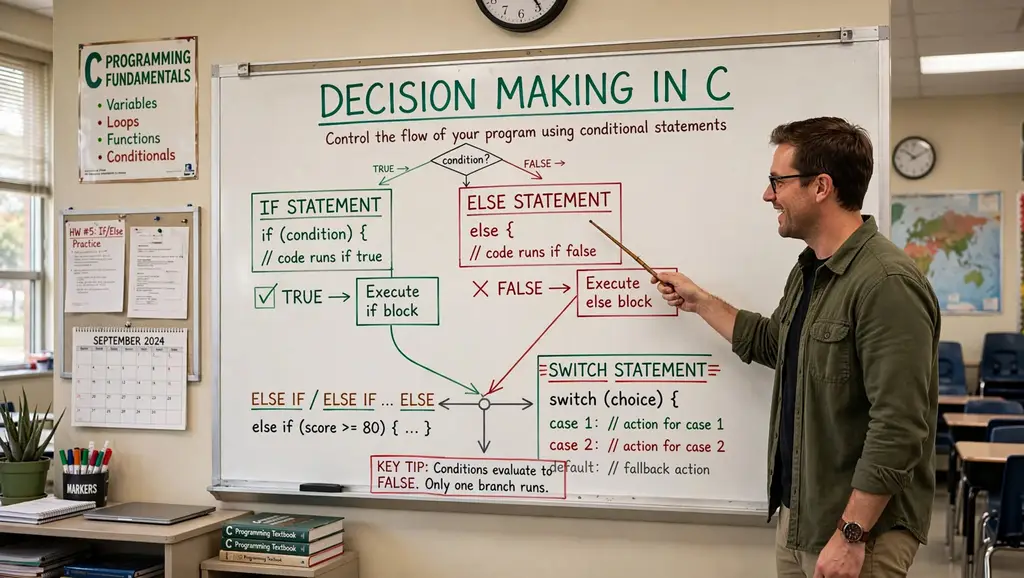
Conditional statements are fundamental control flow structures in C that allow programs to make decisions based on specific conditions. They enable the execution of different code blocks depending on whether a condition evaluates to true or false. Mastering decision-making constructs is essential for writing dynamic, responsive, and intelligent programs.

This tutorial provides an in-depth exploration of decision-making in C: if, if-else, nested if-else, if-else-if ladder, switch, and the conditional operator. It covers syntax, practical examples, common pitfalls, and best practices.


Conceptual Introduction & Fundamentals

What is Decision Making?

Decision making in programming refers to the ability of a program to choose between different execution paths based on conditions. In C, this is achieved through conditional statements that evaluate expressions and execute specific blocks of code accordingly.

Key concepts:

  • Condition: An expression that evaluates to true (non-zero) or false (zero).
  • Branching: Diverting program flow based on condition results.
  • Blocks: Groups of statements enclosed in { } that execute together.

Why Decision Making Matters

  • Program control: Directs execution flow based on user input, data values, or system state.
  • Flexibility: Programs can respond differently to different situations.
  • Error handling: Check for invalid conditions before proceeding.
  • Logic implementation: Implement complex algorithms and business rules.

Types of Decision-Making Statements

C provides several decision-making constructs:

StatementPurpose
ifExecute block if condition is true
if-elseExecute one block if true, another if false
Nested if-elseMultiple levels of conditions inside conditions
if-else-if ladderTest multiple conditions sequentially
switchSelect from multiple cases based on value
Conditional operator ?:Shorthand for simple if-else

Boolean Representation in C

C does not have a built-in bool type in C89/C90. Conditions are evaluated as integers:

  • 0 = false
  • Non-zero (usually 1) = true

C99 introduced _Bool type (via <stdbool.h> as bool with true/false).

Syntax & Core Mechanics

1. if Statement

The simplest decision-making statement. Executes a block only when the condition is true.

Syntax:

c

if (condition) { // statements }

Example:

c

#include <stdio.h> int main(void) { int age = 20; if (age >= 18) { printf("Eligible for vote\n"); } /* Single statement without braces */ if (age > 0) printf("Age is positive\n"); return 0; }

Expected output:

text

Eligible for vote Age is positive

Important: If there’s only one statement in the body, braces can be omitted. However, using braces consistently is recommended to avoid bugs.

2. if-else Statement

Executes one block if condition is true, another if false.

Syntax:

c

if (condition) { // executed if condition is true } else { // executed if condition is false }

Example:

c

#include <stdio.h> int main(void) { int age = 10; if (age >= 18) { printf("Eligible for vote\n"); } else { printf("Not Eligible for vote\n"); } return 0; }

Expected output:

text

Not Eligible for vote

3. Nested if-else Statement

An if or if-else statement inside another if or else block.

Syntax:

c

if (condition1) { if (condition2) { // executed if both condition1 and condition2 are true } else { // executed if condition1 true, condition2 false } } else { // executed if condition1 is false }

Example:

c

#include <stdio.h> int main(void) { int age = 11; if (age >= 18) { if (age >= 60) { printf("Eligible to vote (Senior Citizen)\n"); } else { printf("Eligible for vote\n"); } } else { printf("Not eligible to vote (Under 18)\n"); if (age >= 13) { printf("Teenager\n"); } else { printf("Not a teenager\n"); } } return 0; }

Expected output:

text

Not eligible to vote (Under 18) Not a teenager

4. if-else-if Ladder

Tests multiple conditions sequentially. The first true condition’s block executes.

Syntax:

c

if (condition1) { // executed if condition1 is true } else if (condition2) { // executed if condition1 false, condition2 true } else if (condition3) { // executed if condition1 and condition2 false, condition3 true } else { // executed if all conditions are false }

Example:

c

#include <stdio.h> int main(void) { int score = 85; if (score >= 90) { printf("Grade: A\n"); } else if (score >= 80) { printf("Grade: B\n"); } else if (score >= 70) { printf("Grade: C\n"); } else if (score >= 60) { printf("Grade: D\n"); } else { printf("Grade: F\n"); } return 0; }

Expected output:

text

Grade: B

5. switch Statement

Selects from multiple cases based on an integer or character expression.

Syntax:

c

switch (expression) { case value1: // statements break; case value2: // statements break; default: // statements break; }

Example:

c

#include <stdio.h> int main(void) { int day = 3; switch (day) { case 1: printf("Monday\n"); break; case 2: printf("Tuesday\n"); break; case 3: printf("Wednesday\n"); break; case 4: printf("Thursday\n"); break; case 5: printf("Friday\n"); break; default: printf("Weekend\n"); break; } return 0; }

Expected output:

text

Wednesday

Important: The break statement is crucial; without it, execution “falls through” to subsequent cases.

6. Conditional Operator (?:)

A ternary operator for simple if-else assignments.

Syntax:

c

condition ? expression1 : expression2;

If condition is true, expression1 evaluates; otherwise, expression2 evaluates.

Example:

c

#include <stdio.h> int main(void) { int flag = 0; int var; var = (flag == 0) ? 25 : -25; printf("Value of var when flag is 0: %d\n", var); int max = (10 > 5) ? 10 : 5; printf("Max: %d\n", max); return 0; }

Expected output:

text

Value of var when flag is 0: 25 Max: 10

Full Practical Code Example with Explanation

This program demonstrates all decision-making constructs in a realistic scenario: a grade classification system with input validation.

Program: Student Grade Classifier

c

/** * grade_classifier.c * Demonstrates if, if-else, nested if-else, if-else-if ladder, * switch, and conditional operator. * Classifies student grades based on percentage score. */ #include <stdio.h> #include <stdlib.h> #include <string.h> #include <errno.h> #include <stdbool.h> #define MAX_LINE_LEN 100 /* Function prototypes */ int readInteger(const char *prompt, int *outValue); char getLetterGrade(int score); void printGradeComment(char grade); bool isValidScore(int score); int main(void) { int score; char letterGrade; bool passed; printf("=== Student Grade Classifier ===\n"); /* Read score with validation */ if (readInteger("Enter score (0-100): ", &score) != 0) { fprintf(stderr, "Failed to read score.\n"); return EXIT_FAILURE; } /* Validate score range using if */ if (!isValidScore(score)) { fprintf(stderr, "Invalid score. Must be between 0 and 100.\n"); return EXIT_FAILURE; } /* Determine letter grade using if-else-if ladder */ letterGrade = getLetterGrade(score); /* Check pass/fail using conditional operator */ passed = (score >= 60) ? true : false; /* Display results */ printf("\n--- Results ---\n"); printf("Score: %d\n", score); printf("Letter Grade: %c\n", letterGrade); /* Use nested if-else for additional comments */ if (passed) { printf("Status: PASSED\n"); if (score >= 90) { printf("Excellent work!\n"); } else if (score >= 80) { printf("Great job!\n"); } else if (score >= 70) { printf("Good effort!\n"); } else { printf("You passed. Keep improving!\n"); } } else { printf("Status: FAILED\n"); if (score >= 50) { printf("Close! You almost passed.\n"); } else if (score >= 40) { printf("Need significant improvement.\n"); } else { printf("Please seek help from the instructor.\n"); } } /* Use switch for letter grade comment */ printGradeComment(letterGrade); /* Demonstrate conditional operator for simple assignment */ int bonusPoints = (score >= 90) ? 5 : (score >= 80) ? 3 : (score >= 70) ? 1 : 0; printf("Bonus points earned: %d\n", bonusPoints); /* Use if-else-if for final message */ if (score == 100) { printf("Perfect score!\n"); } else if (score >= 90) { printf("Outstanding performance!\n"); } else if (score >= 80) { printf("Very good performance!\n"); } else if (score >= 70) { printf("Good performance!\n"); } else if (score >= 60) { printf("Satisfactory performance!\n"); } else { printf("Needs improvement!\n"); } return EXIT_SUCCESS; } /* Returns letter grade based on score using if-else-if ladder */ char getLetterGrade(int score) { if (score >= 90) { return 'A'; } else if (score >= 80) { return 'B'; } else if (score >= 70) { return 'C'; } else if (score >= 60) { return 'D'; } else { return 'F'; } } /* Prints a comment based on letter grade using switch */ void printGradeComment(char grade) { printf("Comment: "); switch (grade) { case 'A': printf("Outstanding!\n"); break; case 'B': printf("Very Good!\n"); break; case 'C': printf("Good!\n"); break; case 'D': printf("Satisfactory!\n"); break; case 'F': printf("Fail!\n"); break; default: printf("Invalid grade!\n"); break; } } /* Checks if score is in valid range */ bool isValidScore(int score) { return (score >= 0 && score <= 100); } /* Reads an integer safely */ int readInteger(const char *prompt, int *outValue) { char buffer[MAX_LINE_LEN]; char *endPtr; long val; while (1) { printf("%s", prompt); fflush(stdout); if (fgets(buffer, sizeof(buffer), stdin) == NULL) { return -1; } errno = 0; val = strtol(buffer, &endPtr, 10); if (endPtr == buffer || (*endPtr != '\n' && *endPtr != '\0')) { printf("Invalid integer. Please try again.\n"); continue; } if (errno == ERANGE || val < -2147483647 - 1 || val > 2147483647) { printf("Number out of range. Please try again.\n"); continue; } *outValue = (int)val; return 0; } }

Explanation of Decision-Making Usage

  1. if statement: Validates score range: if (!isValidScore(score)).
  2. if-else-if ladder: In getLetterGrade(), determines letter grade based on score ranges.
  3. Nested if-else: In main(), provides detailed comments based on pass/fail status and score ranges.
  4. switch: In printGradeComment(), selects comment based on letter grade.
  5. Conditional operator: Assigns passed status and bonusPoints.
  6. if-else-if for final message: Provides multiple conditions for performance feedback.

Expected Output

Sample run 1 (score = 95):

text

=== Student Grade Classifier === Enter score (0-100): 95 --- Results --- Score: 95 Letter Grade: A Status: PASSED Excellent work! Comment: Outstanding! Bonus points earned: 5 Outstanding performance!

Sample run 2 (score = 45):

text

=== Student Grade Classifier === Enter score (0-100): 45 --- Results --- Score: 45 Letter Grade: F Status: FAILED Please seek help from the instructor. Comment: Fail! Bonus points earned: 0 Needs improvement!

Sample run 3 (invalid score):

text

=== Student Grade Classifier === Enter score (0-100): 150 Invalid score. Must be between 0 and 100.

Common Pitfalls, Edge Cases & Memory Considerations

1. Using = Instead of ==

Assignment (=) in a condition always evaluates to true (non-zero) unless the assigned value is 0.

c

if (a = 10) { // Always true; assigns 10 to a }

Solution: Use == for comparison. Enable compiler warnings (-Wall).

2. Dangling else

An else always binds to the nearest unmatched if, not the one you might intend.

c

if (condition1) if (condition2) printf("Both true\n"); else printf("condition1 false or condition2 false?\n"); // This else binds to inner if

Solution: Use braces to clarify binding:

c

if (condition1) { if (condition2) printf("Both true\n"); } else { printf("condition1 false\n"); }

3. Forgetting Braces for Multiple Statements

Without braces, only the first statement after if is part of the block.

c

if (condition) statement1; statement2; // This always executes, not part of if

Solution: Always use braces, even for single statements:

c

if (condition) { statement1; statement2; }

4. switch Fall-Through

Forgetting break causes execution to continue into the next case.

c

switch (x) { case 1: printf("One\n"); case 2: printf("Two\n"); // Executes for x == 1 and x == 2 }

Solution: Always use break unless fall-through is intentional. Document intentional fall-through with a comment.

5. switch Expression Type

switch expression must be integer or character type. Floating-point or strings are not allowed.

c

switch (3.14) { // Error: switch quantity not an integer }

Solution: Use if-else-if for non-integer conditions.

6. Comparison Chaining

a < b < c does not work as expected in C.

c

if (a < b < c) { // Evaluates as (a < b) < c }

Solution: Use logical operators: if (a < b && b < c).

7. Floating-Point Equality

Comparing floating-point values for equality is unreliable due to precision.

c

float f = 0.1f + 0.2f; if (f == 0.3f) { // May be false }

Solution: Use epsilon comparison: fabs(f - 0.3f) < 0.0001f.

8. Side Effects in Conditions

Conditions with side effects can be confusing and error-prone.

c

if (i++ > 5 && array[i] > 0) { // i is incremented before array access }

Solution: Avoid side effects in conditions; perform them separately.

9. Uninitialized Variables in Conditions

Using uninitialized variables in conditions is undefined behavior.

c

int x; if (x > 10) { // x is garbage }

Solution: Always initialize variables before use.

10. Memory Considerations

  • Decision-making constructs do not allocate dynamic memory.
  • Nested conditions can increase stack usage if large local variables are declared in blocks.
  • Avoid deeply nested if-else (more than 3-4 levels) as it hurts readability; consider switch or functions instead.

Summary & Best Practices

Decision-making statements in C allow programs to execute different code paths based on conditions. Understanding the various constructs and their proper use is essential for writing clear, correct, and maintainable code.

Key Takeaways

  • if executes a block when a condition is true.
  • if-else provides an alternative block when the condition is false.
  • Nested if-else checks conditions inside other conditions.
  • if-else-if ladder tests multiple conditions sequentially.
  • switch selects from multiple cases based on an integer/character value.
  • Conditional operator ?: is a shorthand for simple if-else.
  • Always use braces to avoid dangling else and block errors.

Best Practices

  1. Use braces { } consistently for all control flow blocks, even single statements.
  2. Use == for comparison and = for assignment; enable compiler warnings.
  3. Avoid side effects in conditions; keep conditions simple and pure.
  4. Use if-else-if ladder when testing multiple ranges or discrete values.
  5. Use switch when comparing against many constant values.
  6. Use conditional operator only for simple, clear assignments.
  7. Limit nesting depth (3-4 levels max); refactor into functions if deeper.
  8. Validate inputs before using them in conditions.
  9. Use bool type (from <stdbool.h>) for boolean variables and return types.
  10. Document complex conditions with comments explaining the logic.

By mastering decision-making in C, you’ll write programs that respond intelligently to different situations, handle errors gracefully, and implement complex logic clearly.

Learn C language introduction: history, features, syntax, pointers, dynamic memory, and file I/O. Complete tutorial with practical examples and error handling.

C Language Introduction: Comprehensive Tutorial

C Language Introduction: A Comprehensive Tutorial for Programmers

C is a general-purpose, procedural programming language developed by Dennis Ritchie at Bell Laboratories in 1972. It was originally designed for implementing the UNIX operating system but quickly became one of the most influential and widely used languages in the history of computing. C provides a unique blend of high‑level constructs (functions, control structures, data types) and low‑level capabilities (direct memory access, bit manipulation), making it the language of choice for systems programming, embedded development, and performance‑critical applications.

This tutorial covers the fundamentals of C, its core syntax, a complete practical example with robust error handling, common pitfalls, and best practices for writing safe, efficient, and portable code.


Conceptual Introduction & Fundamentals

What is C?

C is a statically typed, compiled, procedural programming language. It supports structured programming through functions and blocks, but also allows direct manipulation of memory via pointers. This dual nature gives programmers fine‑grained control over hardware resources, which is essential for developing operating systems, device drivers, and real‑time systems.

Historical Significance

  • Dennis M. Ritchie created C at Bell Laboratories in 1972 while working on the UNIX operating system.
  • Before C, UNIX was written in assembly language, which was non‑portable and difficult to maintain. C enabled the OS to be rewritten in a high‑level language that could be recompiled for different hardware architectures.
  • C’s design heavily influenced many later languages, including C++, Java, C#, JavaScript, PHP, and Python. For this reason, C is often called the “mother of all programming languages.”

Key Features of C

  • Procedural and structured: Programs are built from functions and control structures.
  • Fast execution speed: Compiled to native machine code with minimal runtime overhead.
  • Low‑level memory access: Pointers allow direct manipulation of memory addresses.
  • Portability: Standard C code can be compiled on virtually any platform with a compliant compiler.
  • Rich set of operators: Including bitwise, arithmetic, logical, and pointer operators.
  • Small core language: The language itself is compact; functionality is extended through libraries.
  • Static typing: Variable types are checked at compile time, catching many errors early.

Applications of C

C is used in a wide variety of domains:

  • Operating Systems: Linux, Windows kernel components, macOS.
  • Embedded Systems: Microcontrollers, IoT devices, automotive control.
  • System Software: Device drivers, assemblers, linkers, system utilities.
  • Compiler Development: Many compilers and interpreters are written in C (e.g., GCC, LLVM, CPython).
  • Database Systems: MySQL, PostgreSQL core engines.
  • Game Development: Performance‑critical engines and physics simulations.
  • Networking: TCP/IP stacks, routers, firewalls, protocol implementations.
  • Scientific Applications: High‑performance computing, simulations.
  • Cybersecurity Tools: Penetration testing, network analyzers, security software.
  • GUI Applications: Desktop software using libraries like GTK or Win32 API.

Structure of a C Program

Every C program consists of:

  1. Preprocessor directives (#include, #define) – processed before compilation.
  2. Function definitions – including the mandatory main function, the entry point.
  3. Statements – executable instructions inside functions.
  4. Comments – documentation ignored by the compiler.

The main function returns an integer to the operating system: 0 typically indicates success, non‑zero indicates an error.


Syntax & Core Mechanics

Basic Program: Hello World

c

#include <stdio.h> // Preprocessor: include standard I/O functions int main(void) { // Entry point; returns an integer status // This is a single-line comment printf("Hello World\n"); // Print text to console return 0; // Indicate successful execution }

Expected output:

text

Hello World

Header Files

Header files declare functions, macros, and types used by the program. Common headers:

HeaderPurpose
<stdio.h>Standard I/O: printf, scanf, fgets, fopen, etc.
<stdlib.h>Memory allocation, conversion, exit, qsort
<string.h>String manipulation: strcpy, strlen, strcmp
<math.h>Mathematical functions: sqrt, pow, sin
<ctype.h>Character classification: isdigit, tolower

Include them with #include <header.h>.

Data Types and Variables

C provides basic types and modifiers to control size and signedness.

TypeTypical Size (bytes)Description
char1Single character or small integer
int4Integer (platform‑dependent)
float4Single‑precision floating point
double8Double‑precision floating point
voidN/ANo value (for functions, pointers)

Modifiers: short, long, signed, unsigned, long long.

c

int age = 25; float price = 19.99f; char grade = 'A'; unsigned long long big = 18446744073709551615ULL; const double PI = 3.141592653589793;

Variables must be declared before use. const indicates that the value cannot be modified after initialization.

Operators

  • Arithmetic: +, -, *, /, % (modulo)
  • Relational: ==, !=, <, >, <=, >=
  • Logical: &&, ||, !
  • Bitwise: &, |, ^, ~, <<, >>
  • Assignment: =, +=, -=, *=, /=, %=
  • Increment/Decrement: ++, --
  • Ternary: condition ? expr1 : expr2

Control Flow

if / else if / else

c

int score = 85; if (score >= 90) { printf("A\n"); } else if (score >= 80) { printf("B\n"); } else { printf("C or below\n"); }

Output: B

switch

c

int choice = 2; switch (choice) { case 1: printf("One\n"); break; case 2: printf("Two\n"); break; default: printf("Other\n"); }

Output: Two

Loops

c

// for loop for (int i = 0; i < 5; i++) { printf("%d ", i); } printf("\n"); // while loop int j = 0; while (j < 5) { printf("%d ", j); j++; } printf("\n"); // do-while (executes at least once) int k = 0; do { printf("%d ", k); k++; } while (k < 5); printf("\n");

Expected output:

text

0 1 2 3 4 0 1 2 3 4 0 1 2 3 4

Functions

Functions must be declared (prototype) before use, unless defined earlier.

c

#include <stdio.h> int add(int a, int b); // prototype int add(int a, int b) { return a + b; } int main(void) { int result = add(3, 4); printf("Result: %d\n", result); return 0; }

Output: Result: 7

Arrays and Strings

Arrays are contiguous blocks of memory; strings are arrays of char terminated by '\0'.

c

int numbers[5] = {10, 20, 30, 40, 50}; char name[20] = "Alice"; // contains 'A','l','i','c','e','\0' printf("First number: %d\n", numbers[0]); printf("Name: %s\n", name);

Pointers

Pointers store memory addresses. They are essential for dynamic memory, efficient array processing, and low‑level programming.

c

int x = 42; int *ptr = &x; // ptr holds address of x printf("x = %d\n", x); printf("Address of x = %p\n", (void*)&x); printf("ptr = %p\n", (void*)ptr); printf("*ptr = %d\n", *ptr); // dereference *ptr = 100; // modify x through pointer printf("x now = %d\n", x);

Pointer arithmetic: Adding an integer to a pointer advances it by n * sizeof(type).

c

int arr[3] = {1, 2, 3}; int *p = arr; // arr decays to &arr[0] printf("%d\n", *(p + 1)); // prints 2

Structures

Structures group variables of different types under one name.

c

struct Point { int x; int y; }; struct Point p1 = {10, 20}; printf("p1 = (%d, %d)\n", p1.x, p1.y);

Dynamic Memory Allocation

Use malloc, calloc, realloc, and free from <stdlib.h>. Always check for allocation failure.

c

#include <stdio.h> #include <stdlib.h> int main(void) { int *arr = malloc(5 * sizeof(int)); if (arr == NULL) { fprintf(stderr, "Memory allocation failed\n"); return 1; } for (int i = 0; i < 5; i++) { arr[i] = i * 10; } for (int i = 0; i < 5; i++) { printf("%d ", arr[i]); } printf("\n"); free(arr); // always release memory return 0; }

Expected output:

text

0 10 20 30 40

File I/O

Use fopen, fclose, fgets, fputs, fprintf, fscanf, etc.

c

#include <stdio.h> int main(void) { FILE *fp = fopen("test.txt", "w"); if (fp == NULL) { perror("fopen"); return 1; } fputs("Hello, file!\n", fp); fclose(fp); fp = fopen("test.txt", "r"); if (fp == NULL) { perror("fopen"); return 1; } char buffer[100]; if (fgets(buffer, sizeof(buffer), fp) != NULL) { printf("Read: %s", buffer); } fclose(fp); return 0; }

Output: Read: Hello, file!

Preprocessor Directives

  • #include – insert contents of a header file.
  • #define – define macros or constants.
  • #ifdef, #ifndef, #endif – conditional compilation.

c

#define DEBUG 1 #if DEBUG #define LOG(msg) printf("DEBUG: %s\n", msg) #else #define LOG(msg) #endif int main(void) { LOG("Starting program"); return 0; }

Full Practical Code Example with Explanation

This section presents a complete, robust program that demonstrates many core C concepts: dynamic memory allocation, file I/O, sorting, command‑line arguments, and error handling. The program reads integers from a text file (one per line), dynamically allocates an array to store them, sorts the array using the standard library qsort, and writes the sorted numbers to an output file. It also calculates and prints the minimum, maximum, and average.

Program: Sort and Analyze Integers from a File

c

/** * file_analyzer.c * Reads integers from a text file, sorts them, and writes to another file. * Also calculates min, max, and average. * Demonstrates: dynamic arrays, file I/O, qsort with function pointer, * error checking, and memory management. */ #include <stdio.h> #include <stdlib.h> #include <limits.h> /* for INT_MAX, INT_MIN */ /* Comparator function for qsort (ascending order) */ int compare_ints(const void *a, const void *b) { int int_a = *(const int*)a; int int_b = *(const int*)b; /* Return negative if a < b, zero if equal, positive if a > b */ return (int_a > int_b) - (int_a < int_b); } int main(int argc, char *argv[]) { /* Validate command-line arguments */ if (argc != 3) { fprintf(stderr, "Usage: %s <input_file> <output_file>\n", argv[0]); return EXIT_FAILURE; } const char *input_filename = argv[1]; const char *output_filename = argv[2]; /* Open input file for reading */ FILE *infile = fopen(input_filename, "r"); if (infile == NULL) { perror("Error opening input file"); return EXIT_FAILURE; } /* Dynamic array to hold integers */ int *numbers = NULL; size_t capacity = 0; /* current allocated size */ size_t count = 0; /* number of integers stored */ /* Temporary buffer for reading lines (safe: fgets) */ char line[64]; int value; /* Read file line by line */ while (fgets(line, sizeof(line), infile) != NULL) { /* Convert line to integer; skip empty lines or non-numeric data */ if (sscanf(line, "%d", &value) != 1) { fprintf(stderr, "Warning: skipping invalid line: %s", line); continue; } /* Check if we need to grow the array */ if (count == capacity) { /* Double the capacity (or start with 8) */ size_t new_capacity = (capacity == 0) ? 8 : capacity * 2; int *new_numbers = realloc(numbers, new_capacity * sizeof(int)); if (new_numbers == NULL) { fprintf(stderr, "Memory reallocation failed\n"); free(numbers); fclose(infile); return EXIT_FAILURE; } numbers = new_numbers; capacity = new_capacity; } /* Store the integer */ numbers[count++] = value; } /* Close input file */ fclose(infile); if (count == 0) { printf("No valid integers found in input file.\n"); free(numbers); return EXIT_SUCCESS; } /* Sort the array using qsort */ qsort(numbers, count, sizeof(int), compare_ints); /* Calculate statistics (min is numbers[0], max is numbers[count-1]) */ int min = numbers[0]; int max = numbers[count - 1]; double sum = 0.0; for (size_t i = 0; i < count; i++) { sum += numbers[i]; } double average = sum / count; /* Open output file for writing */ FILE *outfile = fopen(output_filename, "w"); if (outfile == NULL) { perror("Error opening output file"); free(numbers); return EXIT_FAILURE; } /* Write sorted numbers, one per line */ for (size_t i = 0; i < count; i++) { fprintf(outfile, "%d\n", numbers[i]); } /* Close output file */ fclose(outfile); /* Print summary to console */ printf("Successfully processed %zu integers.\n", count); printf("Minimum: %d\n", min); printf("Maximum: %d\n", max); printf("Average: %.2f\n", average); printf("Sorted numbers written to '%s'.\n", output_filename); /* Free allocated memory */ free(numbers); return EXIT_SUCCESS; }

Explanation of the Code

  1. Includes and comparator
    • <stdio.h> for I/O, <stdlib.h> for memory and qsort, <limits.h> for integer limits (not strictly needed but included).
    • compare_ints is a comparator function for qsort. It must return a negative, zero, or positive value. The expression (int_a > int_b) - (int_a < int_b) avoids potential overflow from simple subtraction.
  2. Command‑line argument validation
    • The program requires exactly two arguments: input file and output file. If not provided, it prints usage and exits with EXIT_FAILURE (defined in <stdlib.h>).
  3. File opening
    • fopen returns NULL on failure. perror prints a descriptive message based on the global errno.
  4. Dynamic array growth
    • numbers starts as NULL, capacity as 0. When count == capacity, the array is resized using realloc. Starting capacity is 8, then doubled each time, amortizing the cost of reallocation.
    • realloc can fail; if it does, we free the existing memory, close the file, and exit.
  5. Safe line reading and parsing
    • fgets reads at most sizeof(line)-1 characters, preventing buffer overflow.
    • sscanf parses the integer; if it returns 0 or EOF, the line is skipped with a warning.
  6. Sorting and statistics
    • qsort sorts the array in place. After sorting, numbers[0] is the minimum and numbers[count-1] is the maximum. Sum is computed for average.
  7. Output
    • Sorted integers are written to the output file, and statistics are printed to the console.
  8. Cleanup
    • All files are closed, and dynamically allocated memory is freed.

Expected Output

Assume input.txt contains:

text

42 7 19 100 3 -5

Running:

bash

$ ./file_analyzer input.txt output.txt

Console output:

text

Successfully processed 6 integers. Minimum: -5 Maximum: 100 Average: 27.67 Sorted numbers written to 'output.txt'.

output.txt contains:

text

-5 3 7 19 42 100

If the input file contains invalid lines (e.g., abc), the program will print warnings and continue.


Common Pitfalls, Edge Cases & Memory Considerations

C gives you immense power, but with that power comes responsibility. The following are the most common mistakes that lead to bugs, crashes, or security vulnerabilities.

1. Buffer Overflows

Using unsafe functions like gets (removed in C11) or strcpy without bounds checking can overflow buffers.

Solution: Use fgets for strings, strncpy with explicit length, or snprintf.

c

char buf[10]; fgets(buf, sizeof(buf), stdin); // safe snprintf(buf, sizeof(buf), "%s", src);

2. Off‑by‑One Errors

Arrays are zero‑indexed. Accessing arr[n] where n is the array size is out of bounds.

c

int arr[5]; for (int i = 0; i <= 5; i++) // BUG: i == 5 is out of range arr[i] = i;

Always loop i < size.

3. Uninitialized Pointers and Dangling Pointers

  • Uninitialized pointer: Contains garbage; dereferencing it causes undefined behavior.
  • Dangling pointer: Points to freed memory. Accessing it is undefined.

c

int *p; *p = 10; // BUG: p not initialized int *q = malloc(sizeof(int)); free(q); *q = 20; // BUG: q is dangling

Initialize pointers to NULL; set them to NULL after free.

4. Memory Leaks

Forgetting to free dynamically allocated memory causes leaks, especially in long‑running programs.

c

void leak(void) { int *p = malloc(100 * sizeof(int)); // no free(p) }

Always pair malloc/calloc/realloc with free; consider using tools like Valgrind.

5. Double Free

Calling free twice on the same pointer corrupts the heap.

c

int *p = malloc(10); free(p); free(p); // BUG

Set pointer to NULL after freeing; free(NULL) is safe.

6. Integer Overflow

Signed integer overflow is undefined behavior; unsigned overflow wraps around.

c

int a = INT_MAX; a++; // undefined behavior

Use larger types, check before operations, or use compiler sanitizers.

7. String Termination

C strings must be null‑terminated. Forgetting the '\0' leads to reading beyond the intended buffer.

c

char str[5]; strncpy(str, "Hello", 5); // No room for '\0' printf("%s", str); // BUG: may run past buffer

Ensure buffer has at least strlen(src) + 1 bytes.

8. Pointer Arithmetic Mistakes

Adding an integer to a pointer advances by n * sizeof(type), not n bytes unless the type is char.

c

int arr[3] = {1,2,3}; int *p = arr; p = p + 1; // points to arr[1], not arr[0]+1 byte

Understand pointer scaling.

9. File I/O Errors Not Checked

Always check return values of fopen, fread, fwrite, fclose. A failed fopen returns NULL; ignoring it causes segmentation faults.

c

FILE *fp = fopen("missing.txt", "r"); fgets(buf, sizeof(buf), fp); // BUG: fp is NULL

10. Uninitialized Variables

Reading an uninitialized automatic variable is undefined.

c

int x; printf("%d\n", x); // garbage

Initialize at declaration.


Summary & Best Practices

C remains an indispensable language for systems programming, embedded development, and performance‑critical applications. Its direct access to memory and hardware, combined with a minimal runtime, makes it both powerful and demanding.

Key Takeaways

  • C was created by Dennis Ritchie in 1972 at Bell Labs for UNIX development.
  • It is a mid‑level language: high‑level constructs with low‑level control.
  • Learning C deepens your understanding of memory, pointers, and the machine.
  • Core syntax includes data types, control flow, functions, arrays, pointers, structures, and dynamic memory.
  • Proper error handling and memory management are mandatory to write robust C code.

Best Practices

  1. Compile with warnings enabled: Use -Wall -Wextra -pedantic (GCC/Clang) to catch potential issues early.
  2. Use const liberally for variables that should not change.
  3. Check the return value of every library call that can fail (malloc, fopen, fgets, etc.).
  4. Prefer safe functions: fgets over gets; snprintf over sprintf; strncpy/strlcpy over strcpy.
  5. Initialize all variables and pointers.
  6. Set pointers to NULL after freeing.
  7. Avoid magic numbers: Use #define or enum.
  8. Keep functions small and focused to improve readability and testing.
  9. Document assumptions and invariants in comments.
  10. Use tools like Valgrind, AddressSanitizer, and UBSan to detect memory errors and undefined behavior.
  11. Write portable code: Use standard types (size_t, int32_t) and avoid platform‑specific assumptions.
  12. Always free dynamically allocated memory and close opened files.

C may be over 50 years old, but its relevance has not diminished. Mastering C is a rite of passage for any serious software engineer, providing a foundation that will serve you throughout your career, no matter which languages you use later.

C programming language

C Programming Language: Comprehensive Tutorial

C Programming Language: A Comprehensive Tutorial for Systems Programmers

C is a general-purpose, mid-level programming language developed by Dennis M. Ritchie at Bell Laboratories in 1972. Originally designed for implementing the UNIX operating system, C has become one of the most influential and widely used languages in the history of computing. This tutorial provides an in-depth, developer-focused exploration of C, covering its conceptual foundations, core syntax, a full practical example, and critical pitfalls to avoid.


Conceptual Introduction & Fundamentals

What is C?

C is a procedural, statically typed, and compiled programming language. It combines the low‑level capabilities of assembly language (direct memory access, bit manipulation) with high‑level constructs such as functions, control structures, and structured data types. This dual nature makes C both powerful and demanding—it gives you full control over the machine, but requires you to manage resources explicitly.

Historical Significance

  • Dennis M. Ritchie developed C at Bell Laboratories in 1972.
  • It was created to rewrite the UNIX operating system in a portable, high‑level language, replacing assembly code.
  • C’s design influenced countless later languages: Java, PHP, JavaScript, C++, C#, Objective‑C, and many others borrow syntax and concepts directly or indirectly from C.
  • Because of its foundational role, C is often called the “mother of all programming languages.”

Why Learn C First?

Learning C provides a deeper understanding of how computers work:

  • Pointers and manual memory management expose the actual layout of data in memory.
  • No automatic garbage collection forces you to think about resource lifetimes and ownership.
  • Close‑to‑hardware features (bitwise operations, inline assembly) reveal the boundary between software and hardware.
  • Operating system interactions (system calls, file descriptors) become transparent.
  • Once you master C, learning any modern language becomes significantly easier because you understand the underlying abstractions.

Where is C Used Today?

C remains the language of choice for performance‑critical and resource‑constrained environments:

  • Operating systems (Linux, Windows kernel components, macOS)
  • Embedded systems (microcontrollers, IoT devices)
  • Compilers and interpreters (GCC, LLVM, CPython)
  • Databases (MySQL, PostgreSQL)
  • Networking (TCP/IP stacks, routers, firewalls)
  • Game engines (core runtime, physics engines)
  • Real‑time systems (avionics, automotive control)

Key Features

  • Portability: Write once, compile on many architectures with minimal changes.
  • Efficiency: Minimal runtime overhead; code can be optimized to near assembly speed.
  • Rich set of operators: Including bitwise and pointer arithmetic.
  • Small core language: The standard library is separate; you can build exactly what you need.
  • Modularity: Functions and separate compilation units.

Syntax & Core Mechanics

Basic Program Structure

Every C program consists of preprocessor directives, function definitions, and statements. The entry point is the main function.

c

#include <stdio.h> // Preprocessor: include standard I/O declarations int main(void) { // main returns an integer status to the OS printf("Hello, C!\n"); // statement return 0; // successful termination }

Expected output:

text

Hello, C!

Data Types and Modifiers

C provides basic types and modifiers to control size and signedness.

TypeTypical Size (bytes)Range (on 32‑bit)
char1-128 to 127 or 0 to 255
int4-2,147,483,648 to 2,147,483,647
float4~6 decimal digits precision
double8~15 decimal digits precision
voidN/Ano value

Modifiers: short, long, signed, unsigned, long long.

c

unsigned long long big = 18446744073709551615ULL;

Variables and Constants

Variables must be declared before use. Constants can be defined with #define or const.

c

#define PI 3.141592653589793 const int MAX_USERS = 100; int age = 25; float price = 19.99f; char grade = 'A';

Operators

  • Arithmetic: +, -, *, /, %
  • Relational: ==, !=, <, >, <=, >=
  • Logical: &&, ||, !
  • Bitwise: &, |, ^, ~, <<, >>
  • Assignment: =, +=, -=, *=, /=, %=, <<=, >>=, &=, |=, ^=
  • Ternary: condition ? expr1 : expr2

Control Flow

if / else if / else

c

if (score >= 90) { printf("A\n"); } else if (score >= 80) { printf("B\n"); } else { printf("C or below\n"); }

switch

c

switch (choice) { case 1: printf("One\n"); break; case 2: printf("Two\n"); break; default: printf("Other\n"); }

Loops

c

// for loop for (int i = 0; i < 5; i++) { printf("%d ", i); } printf("\n"); // while loop int j = 0; while (j < 5) { printf("%d ", j); j++; } printf("\n"); // do-while loop (executes at least once) int k = 0; do { printf("%d ", k); k++; } while (k < 5); printf("\n");

Expected output:

text

0 1 2 3 4 0 1 2 3 4 0 1 2 3 4

Functions

Functions must be declared before use (prototype) unless defined earlier.

c

#include <stdio.h> int add(int a, int b); // prototype int add(int a, int b) { return a + b; } int main(void) { int sum = add(3, 4); printf("Sum = %d\n", sum); return 0; }

Arrays and Strings

Arrays are contiguous blocks of memory. Strings are arrays of char terminated by '\0'.

c

int numbers[5] = {10, 20, 30, 40, 50}; char name[20] = "Alice"; // contains 'A','l','i','c','e','\0' printf("First number: %d\n", numbers[0]); printf("Name: %s\n", name);

Pointers

Pointers store memory addresses. They are central to C’s power and complexity.

c

int x = 42; int *ptr = &x; // ptr holds address of x printf("x = %d\n", x); printf("Address of x = %p\n", (void*)&x); printf("ptr = %p\n", (void*)ptr); printf("*ptr = %d\n", *ptr); // dereference *ptr = 100; // modify x through pointer printf("x now = %d\n", x);

Pointer arithmetic: When you add 1 to a pointer, it advances by the size of the pointed‑to type.

c

int arr[3] = {1, 2, 3}; int *p = arr; // arr decays to &arr[0] printf("%d\n", *(p + 1)); // prints 2

Structures and Unions

Structures group variables of different types. Unions store different types in the same memory location.

c

struct Point { int x; int y; }; struct Point p1 = {10, 20}; printf("p1 = (%d, %d)\n", p1.x, p1.y); union Data { int i; float f; }; union Data d; d.i = 42; printf("d.i = %d\n", d.i);

Dynamic Memory Allocation

Use malloc, calloc, realloc, and free from <stdlib.h>.

c

#include <stdio.h> #include <stdlib.h> int main(void) { int *arr = malloc(5 * sizeof(int)); if (arr == NULL) { fprintf(stderr, "Memory allocation failed\n"); return 1; } for (int i = 0; i < 5; i++) { arr[i] = i * 10; } for (int i = 0; i < 5; i++) { printf("%d ", arr[i]); } printf("\n"); free(arr); // always free allocated memory return 0; }

Expected output:

text

0 10 20 30 40

File I/O

Use fopen, fclose, fread, fwrite, fgets, fputs, etc.

c

#include <stdio.h> int main(void) { FILE *fp = fopen("test.txt", "w"); if (fp == NULL) { perror("fopen"); return 1; } fputs("Hello, file!\n", fp); fclose(fp); fp = fopen("test.txt", "r"); if (fp == NULL) { perror("fopen"); return 1; } char buffer[100]; if (fgets(buffer, sizeof(buffer), fp) != NULL) { printf("Read: %s", buffer); } fclose(fp); return 0; }

Expected output:

text

Read: Hello, file!

Preprocessor

  • #include – include headers.
  • #define – macro substitution.
  • #ifdef, #ifndef, #endif – conditional compilation.

c

#define DEBUG 1 #if DEBUG #define LOG(msg) printf("DEBUG: %s\n", msg) #else #define LOG(msg) #endif int main(void) { LOG("Starting program"); return 0; }

Full Practical Code Example with Explanation

This section presents a complete, robust program that demonstrates many core C concepts: dynamic memory allocation, file I/O, function pointers, sorting, and error handling. The program reads integers from a text file (one per line), dynamically allocates an array to store them, sorts the array using qsort, and writes the sorted numbers to an output file.

Program: Sort Integers from a File

c

/** * file_sort.c * Reads integers from a text file, sorts them, and writes to another file. * Demonstrates: dynamic arrays, file I/O, qsort with function pointer, * error checking, and memory management. */ #include <stdio.h> #include <stdlib.h> /* Comparator function for qsort (ascending order) */ int compare_ints(const void *a, const void *b) { int int_a = *(const int*)a; int int_b = *(const int*)b; /* Return negative if a < b, zero if equal, positive if a > b */ return (int_a > int_b) - (int_a < int_b); } int main(int argc, char *argv[]) { /* Check command-line arguments */ if (argc != 3) { fprintf(stderr, "Usage: %s <input_file> <output_file>\n", argv[0]); return EXIT_FAILURE; } const char *input_filename = argv[1]; const char *output_filename = argv[2]; /* Open input file for reading */ FILE *infile = fopen(input_filename, "r"); if (infile == NULL) { perror("Error opening input file"); return EXIT_FAILURE; } /* Dynamic array to hold integers */ int *numbers = NULL; size_t capacity = 0; /* current allocated size */ size_t count = 0; /* number of integers stored */ /* Temporary buffer for reading lines (safe: fgets) */ char line[64]; int value; /* Read file line by line */ while (fgets(line, sizeof(line), infile) != NULL) { /* Convert line to integer; skip empty lines or non-numeric data */ if (sscanf(line, "%d", &value) != 1) { fprintf(stderr, "Warning: skipping invalid line: %s", line); continue; } /* Check if we need to grow the array */ if (count == capacity) { /* Double the capacity (or start with 8) */ size_t new_capacity = (capacity == 0) ? 8 : capacity * 2; int *new_numbers = realloc(numbers, new_capacity * sizeof(int)); if (new_numbers == NULL) { fprintf(stderr, "Memory reallocation failed\n"); free(numbers); fclose(infile); return EXIT_FAILURE; } numbers = new_numbers; capacity = new_capacity; } /* Store the integer */ numbers[count++] = value; } /* Close input file */ fclose(infile); if (count == 0) { printf("No valid integers found in input file.\n"); free(numbers); return EXIT_SUCCESS; } /* Sort the array using qsort */ qsort(numbers, count, sizeof(int), compare_ints); /* Open output file for writing */ FILE *outfile = fopen(output_filename, "w"); if (outfile == NULL) { perror("Error opening output file"); free(numbers); return EXIT_FAILURE; } /* Write sorted numbers, one per line */ for (size_t i = 0; i < count; i++) { fprintf(outfile, "%d\n", numbers[i]); } /* Close output file */ fclose(outfile); /* Free allocated memory */ free(numbers); printf("Successfully sorted %zu integers from '%s' to '%s'.\n", count, input_filename, output_filename); return EXIT_SUCCESS; }

Explanation of the Code

  1. Includes and comparator
    • stdio.h and stdlib.h provide I/O and memory functions.
    • compare_ints is a function pointer passed to qsort. It must return a negative, zero, or positive value. The expression (int_a > int_b) - (int_a < int_b) avoids potential overflow from simple subtraction.
  2. Command‑line argument validation
    • The program expects exactly two arguments: input file and output file. If not provided, it prints usage and exits with EXIT_FAILURE (a portable failure code defined in <stdlib.h>).
  3. File opening with error check
    • fopen may return NULL on failure (file not found, permissions, etc.). perror prints a descriptive message based on the global errno.
  4. Dynamic array growth
    • numbers starts as NULL, capacity as 0.
    • When count == capacity, the array is resized using realloc. Starting capacity is 8, then doubled each time. This amortizes the cost of reallocation.
    • realloc returns a new pointer; if it fails, we free the old memory, close the file, and exit to avoid leaks.
  5. Safe line reading
    • fgets reads at most sizeof(line)-1 characters, preventing buffer overflow.
    • sscanf parses the integer; if it returns 0 or EOF, the line is invalid and skipped with a warning.
  6. Sorting
    • qsort sorts the array in place. The fourth argument is the comparator function.
  7. Output file
    • Sorted integers are written one per line using fprintf.
  8. Cleanup
    • Files are closed, memory freed, and a success message printed.

Expected Output

Assume the input file input.txt contains:

text

42 7 19 100 3 -5

Running the program:

bash

$ ./file_sort input.txt output.txt Successfully sorted 6 integers from 'input.txt' to 'output.txt'.

The contents of output.txt will be:

text

-5 3 7 19 42 100

If the input file contains invalid lines (e.g., abc), the program will print warnings and continue.


Common Pitfalls, Edge Cases & Memory Considerations

C gives you immense power, but with that power comes responsibility. The following are the most common mistakes that lead to bugs, crashes, or security vulnerabilities.

1. Buffer Overflows

Using unsafe functions like gets (removed in C11) or strcpy without bounds checking can overflow buffers.

Solution: Use fgets for strings, strncpy with explicit length, or snprintf.

c

char buf[10]; fgets(buf, sizeof(buf), stdin); // safe snprintf(buf, sizeof(buf), "%s", src);

2. Off‑by‑One Errors

Arrays are zero‑indexed. Accessing arr[n] where n is the array size is out of bounds.

c

int arr[5]; for (int i = 0; i <= 5; i++) // BUG: i == 5 is out of range arr[i] = i;

Always loop i < size.

3. Uninitialized Pointers and Dangling Pointers

  • Uninitialized pointer: Contains garbage; dereferencing it causes undefined behavior.
  • Dangling pointer: Points to freed memory. Accessing it is undefined.

c

int *p; *p = 10; // BUG: p not initialized int *q = malloc(sizeof(int)); free(q); *q = 20; // BUG: q is dangling

Initialize pointers to NULL; set them to NULL after free.

4. Memory Leaks

Forgetting to free dynamically allocated memory causes leaks, especially in long‑running programs.

c

void leak(void) { int *p = malloc(100 * sizeof(int)); // no free(p) }

Always pair malloc/calloc/realloc with free; consider using tools like Valgrind.

5. Double Free

Calling free twice on the same pointer corrupts the heap.

c

int *p = malloc(10); free(p); free(p); // BUG

Set pointer to NULL after freeing; free(NULL) is safe.

6. Integer Overflow

Signed integer overflow is undefined behavior; unsigned overflow wraps around.

c

int a = INT_MAX; a++; // undefined behavior

Use larger types, check before operations, or use compiler sanitizers.

7. String Termination

C strings must be null‑terminated. Forgetting the '\0' leads to reading beyond the intended buffer.

c

char str[5]; strncpy(str, "Hello", 5); // No room for '\0' printf("%s", str); // BUG: may run past buffer

Ensure buffer has at least strlen(src) + 1 bytes.

8. Pointer Arithmetic Mistakes

Adding an integer to a pointer advances by n * sizeof(type), not n bytes unless the type is char.

c

int arr[3] = {1,2,3}; int *p = arr; p = p + 1; // points to arr[1], not arr[0]+1 byte

Understand pointer scaling.

9. File I/O Errors Not Checked

Always check return values of fopen, fread, fwrite, fclose. A failed fopen returns NULL; ignoring it causes segmentation faults.

c

FILE *fp = fopen("missing.txt", "r"); fgets(buf, sizeof(buf), fp); // BUG: fp is NULL

10. Uninitialized Variables

Reading an uninitialized automatic variable is undefined.

c

int x; printf("%d\n", x); // garbage

Initialize at declaration.


Summary & Best Practices

C remains an indispensable language for systems programming, embedded development, and performance‑critical applications. Its direct access to memory and hardware, combined with a minimal runtime, makes it both powerful and demanding.

Key Takeaways

  • C was created by Dennis Ritchie in 1972 for UNIX development.
  • It is a mid‑level language: high‑level constructs with low‑level control.
  • Learning C deepens your understanding of memory, pointers, and the machine.
  • Core syntax includes data types, control flow, functions, arrays, pointers, structures, and dynamic memory.
  • Proper error handling and memory management are mandatory to write robust C code.

Best Practices

  1. Compile with warnings enabled: Use -Wall -Wextra -pedantic (GCC/Clang) to catch potential issues early.
  2. Use const liberally for variables that should not change.
  3. Check the return value of every library call that can fail (malloc, fopen, fgets, etc.).
  4. Prefer safe functions: fgets over gets; snprintf over sprintf; strncpy/strlcpy over strcpy.
  5. Initialize all variables and pointers.
  6. Set pointers to NULL after freeing.
  7. Avoid magic numbers: Use #define or enum.
  8. Keep functions small and focused to improve readability and testing.
  9. Document assumptions and invariants in comments.
  10. Use tools like Valgrind, AddressSanitizer, and UBSan to detect memory errors and undefined behavior.
  11. Write portable code: Use standard types (size_t, int32_t) and avoid platform‑specific assumptions.
  12. Always free dynamically allocated memory and close opened files.

C may be over 50 years old, but its relevance has not diminished. Mastering C is a rite of passage for any serious software engineer, providing a foundation that will serve you throughout your career, no matter which languages you use later.