CoreTechED

Loading

Learn array applications, advantages, and disadvantages. Master when to use arrays with practical C examples and best practices.

Applications, Advantages and Disadvantages of Array

Applications, Advantages and Disadvantages of Array: A Comprehensive Tutorial

An array is a linear data structure that is a collection of data elements of the same type. Arrays are stored in contiguous memory locations and are static data structures with a fixed size. Understanding the applications, advantages, and disadvantages of arrays is essential for choosing the right data structure for specific problems.

This tutorial provides an in-depth exploration of arrays: their applications, advantages, disadvantages, practical implementations in C, common pitfalls, and best practices.


Conceptual Introduction & Fundamentals

What is an Array?

An array is a collection of elements of the same data type stored in contiguous memory locations. It provides:

  • Random access: O(1) time to access any element.
  • Cache friendliness: Locality of reference for faster processing.
  • Fixed size: Size determined at creation (static data structure).

Why Understanding Array Properties Matters

  • Algorithm selection: Choose arrays when random access is needed.
  • Performance optimization: Leverage cache efficiency.
  • Memory management: Understand fixed-size limitations.
  • Data structure design: Arrays as building blocks for other structures.

Applications of Arrays

1. Storing and Accessing Data

Arrays store elements in order with O(1) access.

c

#include <stdio.h> int main(void) { int scores[5] = {85, 92, 78, 95, 88}; /* O(1) random access */ printf("First score: %d\n", scores[0]); printf("Third score: %d\n", scores[2]); return 0; }

2. Searching (Sorted Arrays)

Binary search on sorted arrays: O(log n).

c

#include <stdio.h> int binarySearch(int arr[], int n, int target) { int left = 0, right = n - 1; while (left <= right) { int mid = left + (right - left) / 2; if (arr[mid] == target) return mid; if (arr[mid] < target) left = mid + 1; else right = mid - 1; } return -1; } int main(void) { int arr[] = {1, 3, 5, 7, 9, 11, 13}; int n = sizeof(arr) / sizeof(arr[0]); int target = 7; int result = binarySearch(arr, n, target); printf("Found %d at index %d (O(log n))\n", target, result); return 0; }

3. Matrices

Two-dimensional arrays for matrices.

c

#include <stdio.h> #define ROWS 3 #define COLS 3 void multiplyMatrices(int a[][COLS], int b[][COLS], int result[][COLS]) { for (int i = 0; i < ROWS; i++) { for (int j = 0; j < COLS; j++) { result[i][j] = 0; for (int k = 0; k < COLS; k++) { result[i][j] += a[i][k] * b[k][j]; } } } } int main(void) { int a[ROWS][COLS] = {{1, 2, 3}, {4, 5, 6}, {7, 8, 9}}; int b[ROWS][COLS] = {{9, 8, 7}, {6, 5, 4}, {3, 2, 1}}; int result[ROWS][COLS] = {{0}}; multiplyMatrices(a, b, result); printf("Matrix multiplication result:\n"); for (int i = 0; i < ROWS; i++) { for (int j = 0; j < COLS; j++) { printf("%d ", result[i][j]); } printf("\n"); } return 0; }

4. Implementing Other Data Structures

Arrays as underlying storage for stacks.

c

#include <stdio.h> #define MAX_STACK 100 typedef struct { int data[MAX_STACK]; int top; } Stack; void initStack(Stack *s) { s->top = -1; } int push(Stack *s, int value) { if (s->top >= MAX_STACK - 1) return -1; s->data[++s->top] = value; return 0; } int pop(Stack *s, int *value) { if (s->top < 0) return -1; *value = s->data[s->top--]; return 0; } int main(void) { Stack stack; initStack(&stack); push(&stack, 10); push(&stack, 20); push(&stack, 30); int value; while (pop(&stack, &value) == 0) { printf("%d ", value); } printf("\n"); return 0; }

5. Dynamic Programming

Arrays store intermediate results.

c

#include <stdio.h> /* Fibonacci using DP array: O(n) time, O(n) space */ int fibonacciDP(int n) { if (n <= 1) return n; int dp[n + 1]; dp[0] = 0; dp[1] = 1; for (int i = 2; i <= n; i++) { dp[i] = dp[i - 1] + dp[i - 2]; } return dp[n]; } int main(void) { int n = 10; printf("Fibonacci(%d) = %d\n", n, fibonacciDP(n)); return 0; }

Advantages of Arrays

1. Efficient and Fast Access

O(1) constant-time access to any element.

c

#include <stdio.h> #include <time.h> int main(void) { int arr[1000000] = {0}; clock_t start = clock(); /* O(1) access */ int value = arr[500000]; clock_t end = clock(); printf("Access time: %.6f seconds\n", ((double)(end - start)) / CLOCKS_PER_SEC); printf("O(1) constant time access\n"); return 0; }

2. Memory Efficiency

Contiguous memory allocation, no extra linking storage.

c

#include <stdio.h> int main(void) { int arr[10]; printf("Size of array: %zu bytes\n", sizeof(arr)); printf("Size of one element: %zu bytes\n", sizeof(arr[0])); printf("No extra memory for linking pointers.\n"); return 0; }

3. Versatility

Store various data types.

c

#include <stdio.h> int main(void) { int intArr[] = {1, 2, 3}; float floatArr[] = {1.5f, 2.5f, 3.5f}; char charArr[] = {'A', 'B', 'C'}; printf("Integer array: %d %d %d\n", intArr[0], intArr[1], intArr[2]); printf("Float array: %.1f %.1f %.1f\n", floatArr[0], floatArr[1], floatArr[2]); printf("Char array: %c %c %c\n", charArr[0], charArr[1], charArr[2]); return 0; }

4. Hardware Compatibility

Arrays work well with hardware architectures.


Disadvantages of Arrays

1. Fixed Size

Arrays have a fixed size at creation.

c

#include <stdio.h> #include <stdlib.h> int main(void) { int arr[5] = {1, 2, 3, 4, 5}; printf("Array has fixed size 5.\n"); printf("Cannot add a 6th element without creating new array.\n"); /* Would require copying to a larger array */ int newArr[6]; for (int i = 0; i < 5; i++) { newArr[i] = arr[i]; } newArr[5] = 6; printf("New array: "); for (int i = 0; i < 6; i++) printf("%d ", newArr[i]); printf("\n"); return 0; }

2. Memory Allocation Issues

Large arrays can exhaust memory.

c

#include <stdio.h> #include <stdlib.h> int main(void) { /* Attempting very large allocation */ size_t hugeSize = (size_t)-1; // Very large int *arr = malloc(hugeSize); if (arr == NULL) { printf("Memory allocation failed for huge array.\n"); } else { printf("Allocated successfully.\n"); free(arr); } return 0; }

3. Insertion and Deletion Challenges

Shifting elements is inefficient.

c

#include <stdio.h> void insertAtPosition(int arr[], int *n, int position, int value, int capacity) { if (*n >= capacity) { printf("Array full.\n"); return; } /* Shift elements right */ for (int i = *n; i > position; i--) { arr[i] = arr[i - 1]; } arr[position] = value; (*n)++; } int main(void) { int arr[10] = {1, 2, 3, 4, 5}; int n = 5; printf("Before insertion: "); for (int i = 0; i < n; i++) printf("%d ", arr[i]); printf("\n"); insertAtPosition(arr, &n, 2, 99, 10); printf("After insertion at position 2: "); for (int i = 0; i < n; i++) printf("%d ", arr[i]); printf("\n"); printf("Insertion required shifting elements: O(n)\n"); return 0; }

Full Practical Code Example with Explanation

This program demonstrates array applications, advantages, and disadvantages with a comprehensive example.

Program: Array Applications Analyzer

c

/** * array_applications.c * Demonstrates array applications, advantages, and disadvantages. * Includes random access, binary search, matrix operations, and more. */ #include <stdio.h> #include <stdlib.h> #include <string.h> #include <time.h> #include <errno.h> #define MAX_LINE_LEN 100 /* Function prototypes */ void demonstrateRandomAccess(void); void demonstrateBinarySearch(void); void demonstrateMatrixOperation(void); void demonstrateStackUsingArray(void); void demonstrateDynamicProgramming(void); void demonstrateAdvantages(void); void demonstrateDisadvantages(void); int main(void) { int choice; char buffer[MAX_LINE_LEN]; printf("=== Array Applications and Properties ===\n"); while (1) { printf("\n--- Menu ---\n"); printf("1. Random Access (O(1))\n"); printf("2. Binary Search on Sorted Array\n"); printf("3. Matrix Operation\n"); printf("4. Stack Implementation Using Array\n"); printf("5. Dynamic Programming (Fibonacci)\n"); printf("6. Advantages Demonstration\n"); printf("7. Disadvantages Demonstration\n"); printf("8. Exit\n"); printf("Enter choice: "); fflush(stdout); if (fgets(buffer, sizeof(buffer), stdin) == NULL) { fprintf(stderr, "Error reading choice.\n"); return EXIT_FAILURE; } choice = atoi(buffer); switch (choice) { case 1: demonstrateRandomAccess(); break; case 2: demonstrateBinarySearch(); break; case 3: demonstrateMatrixOperation(); break; case 4: demonstrateStackUsingArray(); break; case 5: demonstrateDynamicProgramming(); break; case 6: demonstrateAdvantages(); break; case 7: demonstrateDisadvantages(); break; case 8: printf("Exiting.\n"); return EXIT_SUCCESS; default: printf("Invalid choice. Please try again.\n"); break; } } return EXIT_SUCCESS; } /* Demonstrates O(1) random access */ void demonstrateRandomAccess(void) { printf("\n=== Random Access O(1) ===\n"); int arr[1000000] = {0}; clock_t start = clock(); int value = arr[999999]; // O(1) clock_t end = clock(); printf("Access time: %.9f seconds\n", ((double)(end - start)) / CLOCKS_PER_SEC); printf("Random access: O(1) constant time.\n"); } /* Demonstrates binary search */ void demonstrateBinarySearch(void) { printf("\n=== Binary Search O(log n) ===\n"); int arr[] = {1, 3, 5, 7, 9, 11, 13, 15, 17, 19}; int n = sizeof(arr) / sizeof(arr[0]); int target = 13; int left = 0, right = n - 1; int found = -1; while (left <= right) { int mid = left + (right - left) / 2; if (arr[mid] == target) { found = mid; break; } if (arr[mid] < target) left = mid + 1; else right = mid - 1; } printf("Found %d at index %d\n", target, found); printf("Requires sorted array for O(log n) search.\n"); } /* Demonstrates matrix multiplication */ void demonstrateMatrixOperation(void) { printf("\n=== Matrix Operation ===\n"); int a[2][3] = {{1, 2, 3}, {4, 5, 6}}; int b[3][2] = {{7, 8}, {9, 10}, {11, 12}}; int result[2][2] = {{0}}; for (int i = 0; i < 2; i++) { for (int j = 0; j < 2; j++) { for (int k = 0; k < 3; k++) { result[i][j] += a[i][k] * b[k][j]; } } } printf("Matrix multiplication result:\n"); for (int i = 0; i < 2; i++) { for (int j = 0; j < 2; j++) { printf("%d ", result[i][j]); } printf("\n"); } } /* Demonstrates stack using array */ void demonstrateStackUsingArray(void) { printf("\n=== Stack Using Array ===\n"); int stack[10]; int top = -1; /* Push */ stack[++top] = 10; stack[++top] = 20; stack[++top] = 30; printf("Stack elements (LIFO): "); while (top >= 0) { printf("%d ", stack[top--]); } printf("\n"); } /* Demonstrates dynamic programming */ void demonstrateDynamicProgramming(void) { printf("\n=== Dynamic Programming ===\n"); int n = 15; int dp[n + 1]; dp[0] = 0; dp[1] = 1; for (int i = 2; i <= n; i++) { dp[i] = dp[i - 1] + dp[i - 2]; } printf("Fibonacci sequence up to %d:\n", n); for (int i = 0; i <= n; i++) { printf("%d ", dp[i]); } printf("\n"); printf("Uses array for intermediate results.\n"); } /* Demonstrates advantages */ void demonstrateAdvantages(void) { printf("\n=== Advantages ===\n"); int arr[10]; printf("1. Fast access: arr[i] is O(1)\n"); printf("2. Memory efficient: %zu bytes for 10 integers\n", sizeof(arr)); printf("3. Versatile: can store int, float, char, pointers\n"); printf("4. Hardware compatible\n"); /* Demonstrate contiguity */ printf("\nAddresses (contiguous memory):\n"); for (int i = 0; i < 5; i++) { printf("arr[%d]: %p\n", i, (void*)&arr[i]); } } /* Demonstrates disadvantages */ void demonstrateDisadvantages(void) { printf("\n=== Disadvantages ===\n"); int arr[5] = {1, 2, 3, 4, 5}; printf("1. Fixed size: cannot add 6th element without new array\n"); /* Insert at middle requires shifting */ printf("\n2. Insertion requires shifting (O(n)):\n"); printf(" Before: "); for (int i = 0; i < 5; i++) printf("%d ", arr[i]); printf("\n"); /* Simulate insertion at index 2 */ int newArr[6]; for (int i = 0; i < 2; i++) newArr[i] = arr[i]; newArr[2] = 99; for (int i = 2; i < 5; i++) newArr[i + 1] = arr[i]; printf(" After: "); for (int i = 0; i < 6; i++) printf("%d ", newArr[i]); printf("\n"); printf("\n3. Large arrays can exhaust memory\n"); }

Expected Output (partial)

text

=== Array Applications and Properties === --- Menu --- 1. Random Access (O(1)) 2. Binary Search on Sorted Array 3. Matrix Operation 4. Stack Implementation Using Array 5. Dynamic Programming (Fibonacci) 6. Advantages Demonstration 7. Disadvantages Demonstration 8. Exit Enter choice: 6 === Advantages === 1. Fast access: arr[i] is O(1) 2. Memory efficient: 40 bytes for 10 integers 3. Versatile: can store int, float, char, pointers 4. Hardware compatible Addresses (contiguous memory): arr[0]: 0x7ffc1234 arr[1]: 0x7ffc1238 arr[2]: 0x7ffc123c arr[3]: 0x7ffc1240 arr[4]: 0x7ffc1244

Common Pitfalls, Edge Cases & Memory Considerations

1. Array Index Out of Bounds

Accessing beyond array bounds.

Solution: Check index >= 0 && index < size.

2. Not Handling Fixed Size Limitation

Assuming arrays can grow dynamically.

Solution: Use malloc/realloc or linked lists for dynamic sizing.

3. Memory Leaks with Dynamic Arrays

Forgetting to free malloc‘d arrays.

Solution: Always free allocated memory.

4. Large Array on Stack

Stack overflow with huge automatic arrays.

Solution: Use static or malloc for large arrays.

5. Insertion/Deletion Inefficiency

Shifting elements is O(n).

Solution: Use linked lists for frequent insertions/deletions.

6. Not Validating Input

Invalid input causes crashes.

Solution: Validate user input.

7. Integer Overflow

Large sums or products overflow.

Solution: Use long long or size_t.

8. Empty Array Operations

Operations on empty arrays fail.

Solution: Check size before operations.

9. Not Considering Cache Performance

Access patterns affect cache efficiency.

Solution: Use row-major traversal for 2D arrays.

10. Memory Considerations

  • Size = n × sizeof(element).
  • Contiguous allocation.
  • No extra linking memory.
  • Stack arrays: automatic lifetime.
  • Heap arrays: manual lifetime.

Summary & Best Practices

Arrays are versatile data structures with O(1) random access and cache efficiency. They serve as building blocks for other structures but have fixed-size limitations.

Key Takeaways

  • Arrays: contiguous, same-type elements.
  • Applications: data storage, searching, matrices, stacks, DP.
  • Advantages: fast access, memory efficient, versatile.
  • Disadvantages: fixed size, insertion/deletion costly.
  • Use for random access and fixed collections.
  • Building block for other data structures.

Best Practices

  1. Use arrays for random access.
  2. Use dynamic allocation for variable sizes.
  3. Check bounds to prevent overflow.
  4. Use row-major traversal for cache efficiency.
  5. Free allocated memory.
  6. Handle edge cases.
  7. Document array assumptions.
  8. Choose appropriate data structure based on needs.
  9. Test with boundary values.
  10. Profile performance for large arrays.

By mastering arrays, you’ll choose the right data structure for each problem and write efficient, robust code.

Learn array data structure: fundamentals, operations, searching, sorting, and common problems. Master arrays in C with practical examples.

Array Data Structure: Complete Guide

Array Data Structure: A Comprehensive Tutorial

An array is a fundamental and linear data structure that stores items at contiguous memory locations. It offers random access, cache friendliness, and serves as the building block for other data structures. Understanding arrays is essential for mastering algorithms and data structures.

This tutorial provides an in-depth exploration of the array data structure: fundamentals, advantages, operations, common problems, practical implementations in C, and best practices.


Conceptual Introduction & Fundamentals

What is an Array?

An array is a collection of elements of the same data type stored in contiguous memory locations. Each element is accessed using an index (position), allowing O(1) random access.

Key characteristics:

  • Fixed size (static arrays)
  • Same data type for all elements
  • Contiguous memory allocation
  • Zero-based indexing
  • Random access in O(1)

Advantages of Arrays

AdvantageDescription
Random Accessi-th item accessed in O(1) time
Cache FriendlinessLocality of reference due to contiguous storage
SimpleEasy to understand and use
FoundationBuilding block for other data structures

When to Use Arrays

Good for:

  • Random access operations
  • Iterating through elements
  • Storing fixed-size collections
  • Building other data structures (Stack, Queue, Heap)

Not ideal for:

  • Insert in middle
  • Delete from middle
  • Search in unsorted data

Applications

  • Implementing other data structures (Stack, Queue, Graph, Hash Table)
  • Matrices and tables
  • Buffer management
  • Lookup tables
  • Sorting and searching algorithms

Syntax & Core Mechanics

Declaration and Initialization

c

#include <stdio.h> int main(void) { /* Declaration */ int arr1[5]; /* Declaration with initialization */ int arr2[5] = {10, 20, 30, 40, 50}; /* Size inferred from initializer */ int arr3[] = {1, 2, 3, 4, 5}; /* Partial initialization (rest become 0) */ int arr4[5] = {1, 2}; /* Designated initialization (C99) */ int arr5[5] = {[0] = 10, [3] = 40}; printf("arr2: "); for (int i = 0; i < 5; i++) printf("%d ", arr2[i]); printf("\n"); printf("arr4: "); for (int i = 0; i < 5; i++) printf("%d ", arr4[i]); printf("\n"); return 0; }

Expected output:

text

arr2: 10 20 30 40 50 arr4: 1 2 0 0 0

Accessing Elements

c

#include <stdio.h> int main(void) { int arr[] = {10, 20, 30, 40, 50}; int n = sizeof(arr) / sizeof(arr[0]); /* Random access: O(1) */ printf("First element: %d\n", arr[0]); printf("Third element: %d\n", arr[2]); printf("Last element: %d\n", arr[n - 1]); return 0; }

Traversal

c

#include <stdio.h> int main(void) { int arr[] = {10, 20, 30, 40, 50}; int n = sizeof(arr) / sizeof(arr[0]); /* Forward traversal */ printf("Forward: "); for (int i = 0; i < n; i++) { printf("%d ", arr[i]); } printf("\n"); /* Reverse traversal */ printf("Reverse: "); for (int i = n - 1; i >= 0; i--) { printf("%d ", arr[i]); } printf("\n"); return 0; }

Common Operations

c

#include <stdio.h> /* Search: O(n) */ int linearSearch(int arr[], int n, int target) { for (int i = 0; i < n; i++) { if (arr[i] == target) return i; } return -1; } /* Find maximum: O(n) */ int findMax(int arr[], int n) { int max = arr[0]; for (int i = 1; i < n; i++) { if (arr[i] > max) max = arr[i]; } return max; } /* Reverse array: O(n) */ void reverseArray(int arr[], int n) { for (int i = 0; i < n / 2; i++) { int temp = arr[i]; arr[i] = arr[n - 1 - i]; arr[n - 1 - i] = temp; } } int main(void) { int arr[] = {5, 2, 8, 1, 9}; int n = sizeof(arr) / sizeof(arr[0]); printf("Search 8: index %d\n", linearSearch(arr, n, 8)); printf("Max: %d\n", findMax(arr, n)); reverseArray(arr, n); printf("Reversed: "); for (int i = 0; i < n; i++) printf("%d ", arr[i]); printf("\n"); return 0; }

Full Practical Code Example with Explanation

This program demonstrates array operations with a comprehensive array utility.

Program: Array Operations Manager

c

/** * array_operations.c * Demonstrates fundamental array operations. * Includes traversal, searching, sorting, and common problems. */ #include <stdio.h> #include <stdlib.h> #include <string.h> #include <errno.h> #define MAX_LINE_LEN 100 #define MAX_ARRAY_SIZE 100 /* Function prototypes */ void demonstrateArrayBasics(void); void demonstrateSearching(void); void demonstrateSorting(void); void demonstrateCommonProblems(void); void demonstrateLeadersInArray(void); void demonstrateMaxSubarraySum(void); void demonstrateMissingNumber(void); int linearSearch(const int arr[], int n, int target); int binarySearch(const int arr[], int n, int target); void bubbleSort(int arr[], int n); void printArray(const int arr[], int n); void reverseArray(int arr[], int n); int findMissingNumber(const int arr[], int n); int maxSubarraySum(const int arr[], int n); int readInteger(const char *prompt, int *outValue); int main(void) { int choice; char buffer[MAX_LINE_LEN]; printf("=== Array Operations Manager ===\n"); while (1) { printf("\n--- Menu ---\n"); printf("1. Array Basics\n"); printf("2. Searching (Linear & Binary)\n"); printf("3. Sorting (Bubble Sort)\n"); printf("4. Leaders in Array\n"); printf("5. Maximum Subarray Sum\n"); printf("6. Missing Number\n"); printf("7. Exit\n"); printf("Enter choice: "); fflush(stdout); if (fgets(buffer, sizeof(buffer), stdin) == NULL) { fprintf(stderr, "Error reading choice.\n"); return EXIT_FAILURE; } choice = atoi(buffer); switch (choice) { case 1: demonstrateArrayBasics(); break; case 2: demonstrateSearching(); break; case 3: demonstrateSorting(); break; case 4: demonstrateLeadersInArray(); break; case 5: demonstrateMaxSubarraySum(); break; case 6: demonstrateMissingNumber(); break; case 7: printf("Exiting.\n"); return EXIT_SUCCESS; default: printf("Invalid choice. Please try again.\n"); break; } } return EXIT_SUCCESS; } /* Demonstrates array basics */ void demonstrateArrayBasics(void) { printf("\n=== Array Basics ===\n"); int arr[5] = {10, 20, 30, 40, 50}; int n = sizeof(arr) / sizeof(arr[0]); printf("Array: "); printArray(arr, n); printf("First element: %d\n", arr[0]); printf("Last element: %d\n", arr[n - 1]); printf("Size: %d elements\n", n); /* Reverse */ reverseArray(arr, n); printf("Reversed: "); printArray(arr, n); } /* Demonstrates searching */ void demonstrateSearching(void) { printf("\n=== Searching ===\n"); int arr[] = {5, 2, 8, 1, 9, 3, 7, 4, 6}; int n = sizeof(arr) / sizeof(arr[0]); /* Linear search on unsorted */ int target = 8; int index = linearSearch(arr, n, target); printf("Linear search for %d: index %d\n", target, index); /* Binary search on sorted */ int sortedArr[] = {1, 2, 3, 4, 5, 6, 7, 8, 9}; int sortedN = sizeof(sortedArr) / sizeof(sortedArr[0]); target = 7; index = binarySearch(sortedArr, sortedN, target); printf("Binary search for %d: index %d\n", target, index); } /* Demonstrates sorting */ void demonstrateSorting(void) { printf("\n=== Sorting ===\n"); int arr[] = {64, 34, 25, 12, 22, 11, 90}; int n = sizeof(arr) / sizeof(arr[0]); printf("Before: "); printArray(arr, n); bubbleSort(arr, n); printf("After: "); printArray(arr, n); } /* Demonstrates leaders in array */ void demonstrateLeadersInArray(void) { printf("\n=== Leaders in Array ===\n"); int arr[] = {16, 17, 4, 3, 5, 2}; int n = sizeof(arr) / sizeof(arr[0]); printf("Array: "); printArray(arr, n); printf("Leaders: "); int maxFromRight = arr[n - 1]; printf("%d ", maxFromRight); for (int i = n - 2; i >= 0; i--) { if (arr[i] > maxFromRight) { maxFromRight = arr[i]; printf("%d ", maxFromRight); } } printf("\n"); } /* Demonstrates maximum subarray sum (Kadane's Algorithm) */ void demonstrateMaxSubarraySum(void) { printf("\n=== Maximum Subarray Sum ===\n"); int arr[] = {-2, -3, 4, -1, -2, 1, 5, -3}; int n = sizeof(arr) / sizeof(arr[0]); printf("Array: "); printArray(arr, n); int maxSum = maxSubarraySum(arr, n); printf("Maximum subarray sum: %d\n", maxSum); } /* Kadane's Algorithm: O(n) */ int maxSubarraySum(const int arr[], int n) { int maxSoFar = arr[0]; int maxEndingHere = arr[0]; for (int i = 1; i < n; i++) { maxEndingHere = (arr[i] > maxEndingHere + arr[i]) ? arr[i] : maxEndingHere + arr[i]; maxSoFar = (maxSoFar > maxEndingHere) ? maxSoFar : maxEndingHere; } return maxSoFar; } /* Demonstrates missing number */ void demonstrateMissingNumber(void) { printf("\n=== Missing Number ===\n"); int arr[] = {1, 2, 4, 5, 6}; int n = sizeof(arr) / sizeof(arr[0]); printf("Array: "); printArray(arr, n); int missing = findMissingNumber(arr, n); printf("Missing number: %d\n", missing); } /* Find missing number in 1 to n+1 */ int findMissingNumber(const int arr[], int n) { int expectedSum = (n + 1) * (n + 2) / 2; int actualSum = 0; for (int i = 0; i < n; i++) { actualSum += arr[i]; } return expectedSum - actualSum; } /* Linear search: O(n) */ int linearSearch(const int arr[], int n, int target) { for (int i = 0; i < n; i++) { if (arr[i] == target) return i; } return -1; } /* Binary search: O(log n), requires sorted array */ int binarySearch(const int arr[], int n, int target) { int left = 0, right = n - 1; while (left <= right) { int mid = left + (right - left) / 2; if (arr[mid] == target) return mid; if (arr[mid] < target) left = mid + 1; else right = mid - 1; } return -1; } /* Bubble sort: O(n²) */ void bubbleSort(int arr[], int n) { for (int i = 0; i < n - 1; i++) { for (int j = 0; j < n - i - 1; j++) { if (arr[j] > arr[j + 1]) { int temp = arr[j]; arr[j] = arr[j + 1]; arr[j + 1] = temp; } } } } /* Reverse array: O(n) */ void reverseArray(int arr[], int n) { for (int i = 0; i < n / 2; i++) { int temp = arr[i]; arr[i] = arr[n - 1 - i]; arr[n - 1 - i] = temp; } } /* Print array */ void printArray(const int arr[], int n) { for (int i = 0; i < n; i++) { printf("%d ", arr[i]); } printf("\n"); }

Expected Output (partial)

text

=== Array Operations Manager === --- Menu --- 1. Array Basics 2. Searching (Linear & Binary) 3. Sorting (Bubble Sort) 4. Leaders in Array 5. Maximum Subarray Sum 6. Missing Number 7. Exit Enter choice: 4 === Leaders in Array === Array: 16 17 4 3 5 2 Leaders: 2 5 17 --- Menu --- ... Enter choice: 5 === Maximum Subarray Sum === Array: -2 -3 4 -1 -2 1 5 -3 Maximum subarray sum: 7 --- Menu --- ... Enter choice: 6 === Missing Number === Array: 1 2 4 5 6 Missing number: 3

Common Pitfalls, Edge Cases & Memory Considerations

1. Array Index Out of Bounds

Accessing beyond array bounds is undefined behavior.

c

int arr[5]; arr[5] = 10; // BUG: out of bounds

Solution: Always check index < size.

2. Off-by-One Errors

Using <= instead of < in loops.

Solution: Use i < n for arrays of size n.

3. Array Decay to Pointer

sizeof on function parameter gives pointer size.

Solution: Pass array size separately.

4. Not Initializing Arrays

Uninitialized arrays contain garbage values.

Solution: Initialize: int arr[5] = {0};

5. Large Arrays on Stack

Large automatic arrays cause stack overflow.

Solution: Use static or malloc for large arrays.

6. Memory Leaks

Forgetting to free dynamically allocated arrays.

Solution: Always free allocated memory.

7. Not Handling Empty Arrays

Operations on empty arrays fail.

Solution: Check n > 0 before operations.

8. Integer Overflow in Sums

Summing large values overflows.

Solution: Use long long for sums.

9. Not Validating Input

Assuming valid input can cause crashes.

Solution: Validate user input.

10. Memory Considerations

  • Arrays store elements contiguously.
  • Size = n × sizeof(element).
  • Static arrays: fixed size.
  • Dynamic arrays: flexible size (use malloc/realloc).

Summary & Best Practices

Arrays are fundamental data structures providing O(1) random access and cache efficiency. They form the foundation for implementing other data structures and solving algorithmic problems.

Key Takeaways

  • Arrays store same-type elements contiguously.
  • Random access: O(1).
  • Cache-friendly due to locality of reference.
  • Building block for Stack, Queue, Heap, Graph.
  • Not ideal for middle insertions/deletions.
  • Search in unsorted array: O(n).

Best Practices

  1. Always check array bounds.
  2. Initialize arrays before use.
  3. Use sizeof for array size.
  4. Pass size explicitly to functions.
  5. Use malloc for large arrays.
  6. Free allocated memory.
  7. Handle edge cases (empty, single element).
  8. Use appropriate data types.
  9. Document array assumptions.
  10. Test with boundary values.

By mastering arrays, you’ll build efficient solutions for a wide range of programming problems and lay the foundation for advanced data structures.

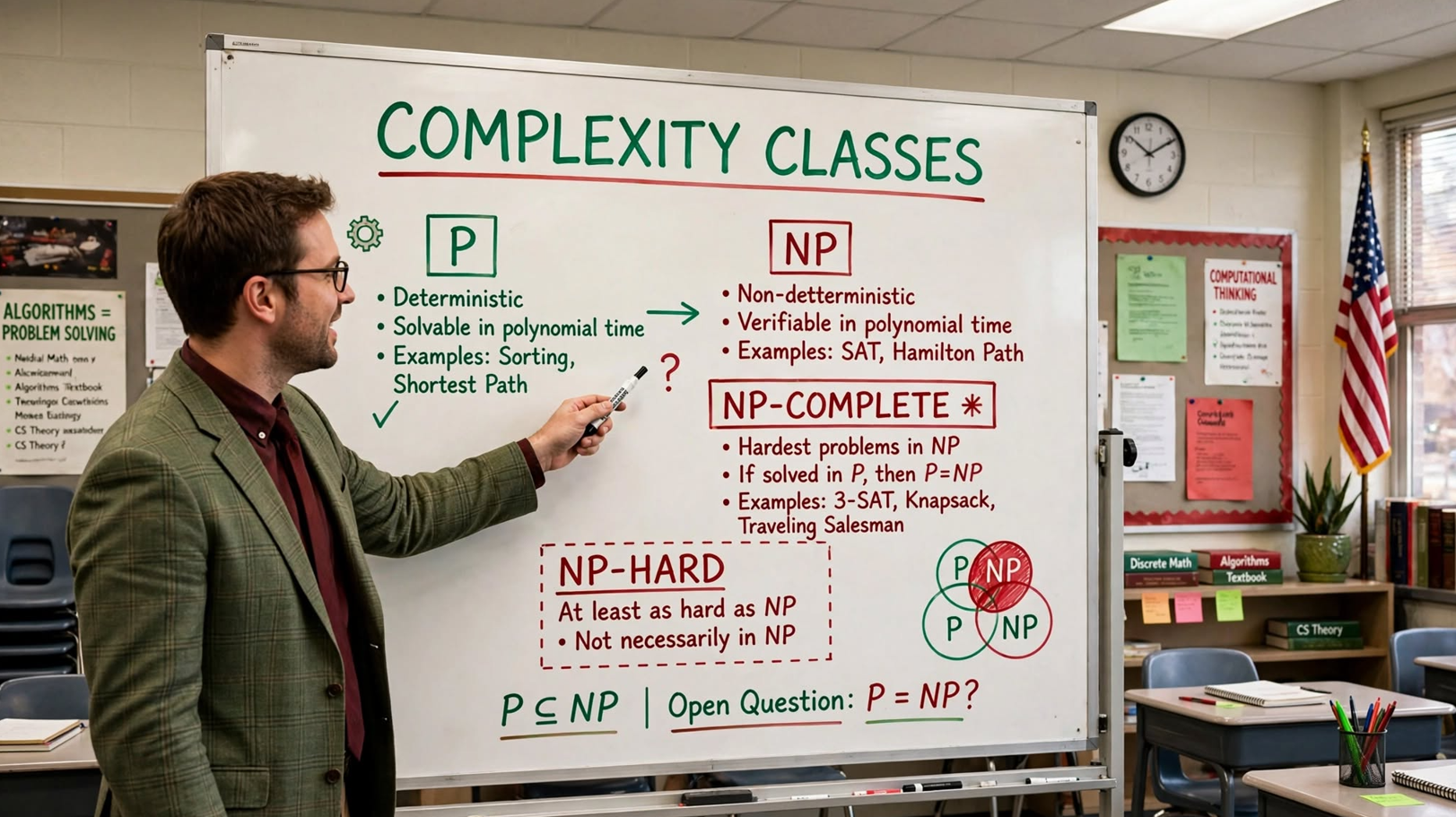
Learn complexity classes: P, NP, Co-NP, NP-hard, and NP-complete. Master problem classification and polynomial-time verification.

P, NP, CoNP, NP-hard and NP-complete: Complete Guide

P, NP, CoNP, NP-hard and NP-complete | Complexity Classes: A Comprehensive Tutorial

In computer science, problems are divided into classes known as Complexity Classes. A complexity class is a set of problems with related complexity. Complexity theory helps categorize problems based on their solvability and efficiency.

This tutorial provides an in-depth exploration of complexity classes: P, NP, Co-NP, NP-hard, and NP-complete. It covers their definitions, characteristics, examples, relationships, practical implications, and common pitfalls.


Conceptual Introduction & Fundamentals

What are Complexity Classes?

Complexity classes organize problems based on the resources (time and space) needed to solve them. They help answer:

  • Which problems can be solved efficiently?
  • Which problems have solutions that are easy to verify but hard to find?
  • Which problems are intractable?

Polynomial vs. Exponential Time

TypeFormScalability
PolynomialO(nᵏ)Scales well
ExponentialO(kⁿ)Scales poorly

Overview of Complexity Classes

ClassDescription
PSolvable in polynomial time
NPVerifiable in polynomial time
Co-NPComplements of NP problems
NP-hardAt least as hard as hardest NP problems
NP-completeBoth NP and NP-hard

Core Complexity Classes

P Class (Polynomial Time)

Definition: Decision problems solvable by a deterministic machine in polynomial time.

Characteristics:

  • Solutions are easy to find.
  • Problems are tractable (solvable in theory and practice).
  • Most coding problems fall here.

Examples:

  • Greatest Common Divisor
  • Merge Sort
  • Maximum matching
  • Linear Search

c

#include <stdio.h> /* P Class Example: GCD using Euclidean algorithm O(log n) */ int gcd(int a, int b) { while (b != 0) { int temp = b; b = a % b; a = temp; } return a; } int main(void) { int a = 48, b = 36; printf("GCD of %d and %d: %d\n", a, b, gcd(a, b)); printf("This is a P-class problem (polynomial time).\n"); return 0; }

Expected output:

text

GCD of 48 and 36: 12 This is a P-class problem (polynomial time).

NP Class (Non-deterministic Polynomial Time)

Definition: Decision problems solvable by a non-deterministic machine in polynomial time; solutions verifiable by a deterministic machine in polynomial time.

Characteristics:

  • Solutions are easy to verify but may be hard to find.
  • Answer can be checked in polynomial time.

Examples:

  • Boolean Satisfiability (SAT)
  • Hamiltonian Path
  • Graph Coloring
  • Employee pairing problem

c

#include <stdio.h> #include <stdbool.h> /* NP Class Example: Verify subset sum solution */ bool verifySubsetSum(int arr[], int n, int subset[], int subsetSize, int target) { int sum = 0; for (int i = 0; i < subsetSize; i++) { sum += subset[i]; } return sum == target; } int main(void) { int arr[] = {3, 34, 4, 12, 5, 2}; int n = sizeof(arr) / sizeof(arr[0]); /* Given solution: {4, 5} sums to 9 */ int subset[] = {4, 5}; int subsetSize = 2; int target = 9; if (verifySubsetSum(arr, n, subset, subsetSize, target)) { printf("Solution verified: subset sums to %d\n", target); } printf("Subset Sum is an NP-class problem (easy to verify).\n"); return 0; }

Expected output:

text

Solution verified: subset sums to 9 Subset Sum is an NP-class problem (easy to verify).

Co-NP Class

Definition: The complement of NP. If the answer is “No,” there’s a proof verifiable in polynomial time.

Characteristics:

  • Complement of NP problems.
  • “No” answers can be verified quickly.

Examples:

  • Prime checking
  • Integer factorization verification

c

#include <stdio.h> #include <stdbool.h> /* Co-NP Example: Verify a number is NOT prime */ bool hasFactor(int n) { for (int i = 2; i * i <= n; i++) { if (n % i == 0) return true; // Found a factor } return false; } int main(void) { int num = 15; if (hasFactor(num)) { printf("%d is NOT prime (verified by finding factor)\n", num); } printf("Prime checking is in Co-NP (easy to verify 'No').\n"); return 0; }

NP-Hard Class

Definition: Problems at least as hard as the hardest problems in NP. Every NP problem reduces to NP-hard problems.

Characteristics:

  • Not all NP-hard problems are in NP.
  • Solutions take long to verify.
  • Polynomial-time reduction from all NP problems.

Examples:

  • Halting problem
  • Qualified Boolean formulas

NP-Complete Class

Definition: Problems that are both NP and NP-hard.

Characteristics:

  • Hardest problems in NP.
  • If one NP-complete problem is solved in polynomial time, all NP problems can be.

Examples:

  • Hamiltonian Cycle
  • Satisfiability
  • Vertex Cover

c

#include <stdio.h> #include <stdbool.h> /* NP-Complete Example: Verify Hamiltonian Cycle solution */ bool verifyHamiltonianCycle(int graph[][5], int path[], int n) { /* Check if path forms a valid cycle */ for (int i = 0; i < n; i++) { int from = path[i]; int to = path[(i + 1) % n]; if (graph[from][to] == 0) return false; } /* Check all vertices visited exactly once */ bool visited[5] = {false}; for (int i = 0; i < n; i++) { if (visited[path[i]]) return false; visited[path[i]] = true; } return true; } int main(void) { int graph[5][5] = { {0, 1, 0, 1, 0}, {1, 0, 1, 1, 1}, {0, 1, 0, 0, 1}, {1, 1, 0, 0, 1}, {0, 1, 1, 1, 0} }; /* Given Hamiltonian Cycle: 0-1-2-4-3-0 */ int path[] = {0, 1, 2, 4, 3}; int n = 5; if (verifyHamiltonianCycle(graph, path, n)) { printf("Hamiltonian Cycle verified!\n"); } printf("Hamiltonian Cycle is NP-complete.\n"); return 0; }

Full Practical Code Example with Explanation

This program demonstrates different complexity classes with practical examples.

Program: Complexity Classes Demo

c

/** * complexity_classes.c * Demonstrates P, NP, Co-NP, NP-hard, and NP-complete classes. * Shows solvable vs verifiable problems with C examples. */ #include <stdio.h> #include <stdlib.h> #include <string.h> #include <stdbool.h> #include <errno.h> #include <math.h> #define MAX_LINE_LEN 100 #define MAX_NODES 10 /* Function prototypes */ void demonstratePClass(void); void demonstrateNPClass(void); void demonstrateCoNPClass(void); void demonstrateNPCompleteClass(void); void demonstrateComplexityComparison(void); int gcd(int a, int b); bool verifySubsetSum(int subset[], int subsetSize, int target); bool isPrime(int n); bool verifyGraphColoring(int graph[][MAX_NODES], int colors[], int n); int main(void) { int choice; char buffer[MAX_LINE_LEN]; printf("=== Complexity Classes Demo ===\n"); while (1) { printf("\n--- Menu ---\n"); printf("1. P Class (GCD)\n"); printf("2. NP Class (Subset Sum Verification)\n"); printf("3. Co-NP Class (Prime Checking)\n"); printf("4. NP-Complete Class (Graph Coloring)\n"); printf("5. Complexity Comparison\n"); printf("6. Exit\n"); printf("Enter choice: "); fflush(stdout); if (fgets(buffer, sizeof(buffer), stdin) == NULL) { fprintf(stderr, "Error reading choice.\n"); return EXIT_FAILURE; } choice = atoi(buffer); switch (choice) { case 1: demonstratePClass(); break; case 2: demonstrateNPClass(); break; case 3: demonstrateCoNPClass(); break; case 4: demonstrateNPCompleteClass(); break; case 5: demonstrateComplexityComparison(); break; case 6: printf("Exiting.\n"); return EXIT_SUCCESS; default: printf("Invalid choice. Please try again.\n"); break; } } return EXIT_SUCCESS; } /* P Class: GCD */ void demonstratePClass(void) { printf("\n=== P Class (Polynomial Time) ===\n"); int a = 48, b = 36; int result = gcd(a, b); printf("GCD of %d and %d: %d\n", a, b, result); printf("Time: O(log n) — efficiently solvable.\n"); printf("GCD is in P class.\n"); } /* GCD: P class */ int gcd(int a, int b) { while (b != 0) { int temp = b; b = a % b; a = temp; } return a; } /* NP Class: Subset Sum Verification */ void demonstrateNPClass(void) { printf("\n=== NP Class (Verifiable in Polynomial Time) ===\n"); /* Given subset that sums to 9 */ int subset[] = {4, 5}; int subsetSize = 2; int target = 9; if (verifySubsetSum(subset, subsetSize, target)) { printf("Subset {4, 5} verified: sums to %d\n", target); } printf("Finding the subset is hard; verifying is easy.\n"); printf("Subset Sum is in NP class.\n"); } /* Verify subset sum: NP class */ bool verifySubsetSum(int subset[], int subsetSize, int target) { int sum = 0; for (int i = 0; i < subsetSize; i++) { sum += subset[i]; } return sum == target; } /* Co-NP Class: Prime Checking */ void demonstrateCoNPClass(void) { printf("\n=== Co-NP Class (Complement of NP) ===\n"); int num = 17; if (isPrime(num)) { printf("%d is prime (verified in polynomial time)\n", num); } printf("Checking 'No' answers is in Co-NP.\n"); } /* Prime check: Co-NP */ bool isPrime(int n) { if (n <= 1) return false; if (n <= 3) return true; for (int i = 2; i * i <= n; i++) { if (n % i == 0) return false; } return true; } /* NP-Complete: Graph Coloring Verification */ void demonstrateNPCompleteClass(void) { printf("\n=== NP-Complete Class ===\n"); int graph[MAX_NODES][MAX_NODES] = {0}; int n = 4; /* Create a simple graph */ graph[0][1] = graph[1][0] = 1; graph[0][2] = graph[2][0] = 1; graph[1][2] = graph[2][1] = 1; graph[1][3] = graph[3][1] = 1; graph[2][3] = graph[3][2] = 1; /* Given 3-coloring */ int colors[] = {0, 1, 2, 0}; if (verifyGraphColoring(graph, colors, n)) { printf("Graph coloring verified (3 colors used)\n"); } printf("Finding the coloring is hard; verifying is easy.\n"); printf("Graph coloring is NP-complete.\n"); } /* Verify graph coloring */ bool verifyGraphColoring(int graph[][MAX_NODES], int colors[], int n) { for (int i = 0; i < n; i++) { for (int j = i + 1; j < n; j++) { if (graph[i][j] && colors[i] == colors[j]) { return false; // Adjacent vertices have same color } } } return true; } /* Demonstrates complexity comparison */ void demonstrateComplexityComparison(void) { printf("\n=== Complexity Class Comparison ===\n"); printf("%-15s %-40s\n", "Class", "Characteristic"); printf("%-15s %-40s\n", "P", "Easily solvable in polynomial time"); printf("%-15s %-40s\n", "NP", "Yes answers verifiable in polynomial time"); printf("%-15s %-40s\n", "Co-NP", "No answers verifiable in polynomial time"); printf("%-15s %-40s\n", "NP-hard", "At least as hard as NP problems"); printf("%-15s %-40s\n", "NP-complete", "Both NP and NP-hard"); printf("\nPolynomial time: O(n^k) — scales well\n"); printf("Exponential time: O(k^n) — scales poorly\n"); }

Explanation of Complexity Classes

  1. P Class: GCD — solvable in polynomial time.
  2. NP Class: Subset Sum verification — easy to verify.
  3. Co-NP Class: Prime checking — “No” answers verifiable.
  4. NP-Complete: Graph coloring — both NP and NP-hard.
  5. Comparison table: Shows distinguishing features.

Expected Output (partial)

text

=== Complexity Classes Demo === --- Menu --- 1. P Class (GCD) 2. NP Class (Subset Sum Verification) 3. Co-NP Class (Prime Checking) 4. NP-Complete Class (Graph Coloring) 5. Complexity Comparison 6. Exit Enter choice: 5 === Complexity Class Comparison === Class Characteristic P Easily solvable in polynomial time NP Yes answers verifiable in polynomial time Co-NP No answers verifiable in polynomial time NP-hard At least as hard as NP problems NP-complete Both NP and NP-hard Polynomial time: O(n^k) — scales well Exponential time: O(k^n) — scales poorly

Common Pitfalls, Edge Cases & Memory Considerations

1. Confusing NP with “Not Polynomial”

NP stands for “Non-deterministic Polynomial,” not “Not Polynomial.”

Solution: Remember NP means verifiable in polynomial time.

2. Assuming P = NP

Whether P = NP is an unsolved problem in computer science.

Solution: Understand it’s an open question.

3. Not Distinguishing NP-hard from NP-complete

NP-hard problems may not be in NP; NP-complete must be both.

Solution: NP-complete = NP ∩ NP-hard.

4. Thinking All Hard Problems are NP-complete

Some hard problems (halting problem) are NP-hard but not NP-complete.

Solution: Check if problem is in NP before claiming NP-complete.

5. Not Verifying Solutions Carefully

Verification algorithms must be correct and efficient.

Solution: Test verification with valid and invalid solutions.

6. Memory Leaks in Test Code

Forgetting to free allocated memory.

Solution: Always free allocated memory.

7. Integer Overflow

Large computations overflow.

Solution: Use appropriate data types.

8. Not Handling Edge Cases

Empty sets, single elements need special handling.

Solution: Test with boundary values.

9. Confusing Decision vs Optimization

Complexity classes typically apply to decision problems.

Solution: Frame problems as yes/no questions.

10. Memory Considerations

  • Verification algorithms use O(n) or less space.
  • Graph structures use O(n²) space.
  • No special memory requirements for classification.

Summary & Best Practices

Complexity classes organize problems by their computational difficulty. Understanding P, NP, Co-NP, NP-hard, and NP-complete is essential for algorithm design and problem classification.

Key Takeaways

  • P: Solvable in polynomial time.
  • NP: Verifiable in polynomial time.
  • Co-NP: Complement of NP.
  • NP-hard: At least as hard as NP.
  • NP-complete: Both NP and NP-hard.
  • P ⊆ NP (open whether P = NP).
  • NP-complete ⊆ NP-hard.

Best Practices

  1. Understand problem classification.
  2. Design polynomial-time algorithms when possible.
  3. Recognize NP-complete problems to avoid seeking efficient solutions.
  4. Use verification for NP problems.
  5. Document complexity class in code.
  6. Test verification with edge cases.
  7. Free allocated memory.
  8. Use appropriate data types.
  9. Understand the P vs NP question.
  10. Study reductions between problems.

By mastering complexity classes, you’ll understand problem difficulty and make informed decisions about algorithm design.

Learn Red-Black Tree insertion: algorithm, recoloring, LL/LR/RR/RL rotations, and complete C implementation. Master self-balancing trees.

Insertion in Red-Black Tree: Complete Guide

Insertion in Red-Black Tree: A Comprehensive Tutorial

Red-Black Trees are self-balancing binary search trees that maintain balance through coloring nodes and performing rotations. Insertion in a Red-Black Tree involves standard BST insertion followed by fixing violations of Red-Black properties using recoloring and rotations.

This tutorial provides an in-depth exploration of Red-Black Tree insertion: the algorithm, recoloring, rotations (LL, LR, RR, RL), complete C implementation, common pitfalls, and best practices.


Conceptual Introduction & Fundamentals

What is a Red-Black Tree?

A Red-Black Tree is a self-balancing binary search tree with these properties:

  1. Each node is either RED or BLACK.
  2. The root is always BLACK.
  3. All leaves (NULL nodes) are BLACK.
  4. If a node is RED, both its children are BLACK (no two consecutive RED nodes).
  5. Every path from root to leaves has the same number of BLACK nodes (black height).

Why Red-Black Trees?

  • Balanced: Height is O(log n), ensuring O(log n) operations.
  • Efficient insertion/deletion: Fewer rotations than AVL trees.
  • Widely used: Implemented in C++ std::map, Java TreeMap.

Insertion Overview

  1. Perform standard BST insertion.
  2. Color the new node RED.
  3. Fix violations of Red-Black properties.

Tools for Balancing

ToolDescription
RecoloringChange node colors to fix violations
RotationRestructure tree (LL, LR, RR, RL)

Syntax & Core Mechanics

Insertion Algorithm

Let x be the newly inserted RED node:

  1. Perform standard BST insertion; color x RED.
  2. If x is root, color it BLACK.
  3. While x‘s parent is RED:
    • If uncle is RED: Recolor parent and uncle BLACK, grandparent RED, move x to grandparent.
    • If uncle is BLACK: Perform rotations based on configuration.

Rotation Cases

CaseConfigurationRotation
LLParent is left child, x is left childRight rotation on grandparent
LRParent is left child, x is right childLeft rotation on parent, then right on grandparent
RRParent is right child, x is right childLeft rotation on grandparent
RLParent is right child, x is left childRight rotation on parent, then left on grandparent

Basic Node Structure

c

#include <stdio.h> #include <stdlib.h> #include <stdbool.h> typedef enum { RED, BLACK } Color; typedef struct Node { int data; Color color; struct Node *left; struct Node *right; struct Node *parent; } Node; /* Create a new node */ Node *createNode(int data) { Node *newNode = malloc(sizeof(Node)); if (newNode == NULL) return NULL; newNode->data = data; newNode->color = RED; // New nodes are always RED newNode->left = NULL; newNode->right = NULL; newNode->parent = NULL; return newNode; }

Rotations

c

/* Left rotation */ Node *rotateLeft(Node *root, Node *x) { Node *y = x->right; x->right = y->left; if (y->left != NULL) { y->left->parent = x; } y->parent = x->parent; if (x->parent == NULL) { root = y; } else if (x == x->parent->left) { x->parent->left = y; } else { x->parent->right = y; } y->left = x; x->parent = y; return root; } /* Right rotation */ Node *rotateRight(Node *root, Node *x) { Node *y = x->left; x->left = y->right; if (y->right != NULL) { y->right->parent = x; } y->parent = x->parent; if (x->parent == NULL) { root = y; } else if (x == x->parent->right) { x->parent->right = y; } else { x->parent->left = y; } y->right = x; x->parent = y; return root; }

Inorder Traversal

c

/* Inorder traversal */ void inorderTraversal(Node *root) { if (root == NULL) return; inorderTraversal(root->left); printf("%d ", root->data); inorderTraversal(root->right); }

Full Practical Code Example with Explanation

This program implements complete Red-Black Tree insertion with all rotation cases and traversal.

Program: Red-Black Tree Insertion

c

/** * red_black_tree.c * Complete implementation of Red-Black Tree insertion. * Includes standard BST insertion, recoloring, and rotations. */ #include <stdio.h> #include <stdlib.h> #include <string.h> #include <errno.h> /* Color enumeration */ typedef enum { RED, BLACK } Color; /* Node structure */ typedef struct Node { int data; Color color; struct Node *left; struct Node *right; struct Node *parent; } Node; /* Global root */ static Node *root = NULL; /* Function prototypes */ Node *createNode(int data); Node *rotateLeft(Node *root, Node *x); Node *rotateRight(Node *root, Node *x); void fixInsertion(Node *root, Node *x); Node *insertNode(Node *root, int data); void inorderTraversal(Node *root); void printTree(Node *root, int space); void freeTree(Node *root); void demonstrateInsertion(void); int main(void) { printf("=== Red-Black Tree Insertion ===\n"); demonstrateInsertion(); return 0; } /* Creates a new RED node */ Node *createNode(int data) { Node *newNode = malloc(sizeof(Node)); if (newNode == NULL) { fprintf(stderr, "Memory allocation failed.\n"); exit(EXIT_FAILURE); } newNode->data = data; newNode->color = RED; newNode->left = NULL; newNode->right = NULL; newNode->parent = NULL; return newNode; } /* Performs left rotation */ Node *rotateLeft(Node *root, Node *x) { Node *y = x->right; x->right = y->left; if (y->left != NULL) { y->left->parent = x; } y->parent = x->parent; if (x->parent == NULL) { root = y; } else if (x == x->parent->left) { x->parent->left = y; } else { x->parent->right = y; } y->left = x; x->parent = y; return root; } /* Performs right rotation */ Node *rotateRight(Node *root, Node *x) { Node *y = x->left; x->left = y->right; if (y->right != NULL) { y->right->parent = x; } y->parent = x->parent; if (x->parent == NULL) { root = y; } else if (x == x->parent->right) { x->parent->right = y; } else { x->parent->left = y; } y->right = x; x->parent = y; return root; } /* Fixes Red-Black Tree violations after insertion */ void fixInsertion(Node *root, Node *x) { Node *parent = NULL; Node *grandparent = NULL; /* While x is not root and x's parent is RED */ while (x != root && x->parent->color == RED) { parent = x->parent; grandparent = parent->parent; /* Parent is LEFT child of grandparent */ if (parent == grandparent->left) { Node *uncle = grandparent->right; /* Case 1: Uncle is RED (recoloring) */ if (uncle != NULL && uncle->color == RED) { grandparent->color = RED; parent->color = BLACK; uncle->color = BLACK; x = grandparent; } else { /* Case 2: x is RIGHT child (LR case) */ if (x == parent->right) { root = rotateLeft(root, parent); x = parent; parent = x->parent; } /* Case 3: x is LEFT child (LL case) */ root = rotateRight(root, grandparent); Color temp = parent->color; parent->color = grandparent->color; grandparent->color = temp; x = parent; } } /* Parent is RIGHT child of grandparent */ else { Node *uncle = grandparent->left; /* Case 1: Uncle is RED (recoloring) */ if (uncle != NULL && uncle->color == RED) { grandparent->color = RED; parent->color = BLACK; uncle->color = BLACK; x = grandparent; } else { /* Case 2: x is LEFT child (RL case) */ if (x == parent->left) { root = rotateRight(root, parent); x = parent; parent = x->parent; } /* Case 3: x is RIGHT child (RR case) */ root = rotateLeft(root, grandparent); Color temp = parent->color; parent->color = grandparent->color; grandparent->color = temp; x = parent; } } } root->color = BLACK; } /* Inserts a node into the Red-Black Tree */ Node *insertNode(Node *root, int data) { /* Standard BST insertion */ if (root == NULL) { Node *newNode = createNode(data); newNode->color = BLACK; // Root is BLACK return newNode; } Node *current = root; Node *parent = NULL; while (current != NULL) { parent = current; if (data < current->data) { current = current->left; } else if (data > current->data) { current = current->right; } else { return root; // Duplicate not inserted } } Node *newNode = createNode(data); newNode->parent = parent; if (data < parent->data) { parent->left = newNode; } else { parent->right = newNode; } /* Fix Red-Black Tree violations */ Node *originalRoot = root; fixInsertion(originalRoot, newNode); /* Find the actual root (might have changed) */ while (originalRoot->parent != NULL) { originalRoot = originalRoot->parent; } return originalRoot; } /* Inorder traversal */ void inorderTraversal(Node *root) { if (root == NULL) return; inorderTraversal(root->left); printf("%d ", root->data); inorderTraversal(root->right); } /* Prints the tree structure */ void printTree(Node *root, int space) { if (root == NULL) return; space += 10; printTree(root->right, space); printf("\n"); for (int i = 10; i < space; i++) { printf(" "); } printf("%d(%c)\n", root->data, root->color == RED ? 'R' : 'B'); printTree(root->left, space); } /* Frees the tree */ void freeTree(Node *root) { if (root == NULL) return; freeTree(root->left); freeTree(root->right); free(root); } /* Demonstrates insertion */ void demonstrateInsertion(void) { int elements[] = {10, 20, 30, 15, 25, 5, 1, 40, 35}; int n = sizeof(elements) / sizeof(elements[0]); printf("Inserting elements: "); for (int i = 0; i < n; i++) { printf("%d ", elements[i]); } printf("\n\n"); for (int i = 0; i < n; i++) { root = insertNode(root, elements[i]); printf("After inserting %d (inorder): ", elements[i]); inorderTraversal(root); printf("\n"); } printf("\nFinal Red-Black Tree:\n"); printTree(root, 0); printf("\nTime Complexity: O(log n)\n"); printf("Space Complexity: O(n)\n"); freeTree(root); }

Explanation of Red-Black Tree Insertion

  1. Standard BST insertion: Find position and insert.
  2. Color new node RED.
  3. Fix violations: Recolor or rotate based on uncle’s color.
  4. LL/RR rotations: Single rotation with color swap.
  5. LR/RL rotations: Double rotation with color swap.
  6. Root always BLACK.

Expected Output

text

=== Red-Black Tree Insertion === Inserting elements: 10 20 30 15 25 5 1 40 35 After inserting 10 (inorder): 10 After inserting 20 (inorder): 10 20 After inserting 30 (inorder): 10 20 30 After inserting 15 (inorder): 10 15 20 30 After inserting 25 (inorder): 10 15 20 25 30 After inserting 5 (inorder): 5 10 15 20 25 30 After inserting 1 (inorder): 1 5 10 15 20 25 30 After inserting 40 (inorder): 1 5 10 15 20 25 30 40 After inserting 35 (inorder): 1 5 10 15 20 25 30 35 40 Final Red-Black Tree: 40(B) 35(R) 30(B) 25(B) 20(B) 10(B) 5(R) 1(R) Time Complexity: O(log n) Space Complexity: O(n)

Common Pitfalls, Edge Cases & Memory Considerations

1. Forgetting Root is Always BLACK

Root must always be BLACK.

Solution: After insertion/fix-up, ensure root->color = BLACK.

2. Not Handling NULL Uncle

NULL nodes are considered BLACK.

Solution: Check if (uncle != NULL && uncle->color == RED).

3. Duplicate Value Handling

Red-Black Trees typically don’t allow duplicates.

Solution: Return without inserting if duplicate found.

4. Memory Leaks

Forgetting to free tree nodes.

Solution: Implement and call freeTree.

5. Incorrect Parent Pointers

Rotations must update parent pointers correctly.

Solution: Carefully update parent pointers in rotations.

6. Not Fixing After Insertion

Failing to call fix-up after insertion.

Solution: Always call fixInsertion after BST insertion.

7. Stack Overflow with Deep Trees

Recursive functions can overflow for deep trees.

Solution: Use iterative approaches or ensure tree is balanced.

8. Not Handling Allocation Failure

malloc can return NULL.

Solution: Check allocation return values.

9. Incorrect Rotation Direction

LL vs LR vs RR vs RL confusion.

Solution: Carefully determine case based on node positions.

10. Memory Considerations

  • Each node: data + color + 3 pointers (left, right, parent).
  • Tree height: O(log n).
  • Space: O(n) for n nodes.
  • No additional arrays needed.

Summary & Best Practices

Red-Black Tree insertion maintains balance through recoloring and rotations. The algorithm ensures O(log n) height and operations.

Key Takeaways

  • New nodes are always RED.
  • Root is always BLACK.
  • Fix violations using recoloring or rotations.
  • Four rotation cases: LL, LR, RR, RL.
  • Uncle RED → recolor; uncle BLACK → rotate.
  • Time: O(log n); Space: O(n).

Best Practices

  1. Always color root BLACK.
  2. Handle NULL nodes as BLACK.
  3. Update parent pointers during rotations.
  4. Use helper functions for clarity.
  5. Implement and test inorder traversal.
  6. Handle duplicates explicitly.
  7. Free tree memory to prevent leaks.
  8. Test with various insertion sequences.
  9. Document rotation logic with comments.
  10. Use iterative insert for very large trees.

By mastering Red-Black Tree insertion, you’ll implement efficient self-balancing trees for ordered data with guaranteed O(log n) operations.

Learn amortized analysis: aggregate, accounting, and potential methods. Master dynamic array insertion analysis with practical C examples.

Introduction to Amortized Analysis: Complete Guide

Introduction to Amortized Analysis: A Comprehensive Tutorial

Amortized analysis studies the average cost of operations over a sequence, rather than focusing on the worst-case of a single operation. It is especially useful for dynamic data structures where occasional expensive operations occur. By spreading the cost of rare costly operations across many cheap ones, it gives a realistic measure of algorithm efficiency.

This tutorial provides an in-depth exploration of amortized analysis: techniques (aggregate, accounting, potential), dynamic array analysis, Red-Black Tree insertion analysis, practical implementations in C, common pitfalls, and best practices.


Conceptual Introduction & Fundamentals

What is Amortized Analysis?

Amortized analysis calculates the average cost per operation over a worst-case sequence of operations. It differs from average-case analysis because it doesn’t involve probability—it guarantees the average performance over any sequence.

Key insight: Occasional expensive operations are “paid for” by many cheap operations, resulting in a low average cost.

Why Amortized Analysis Matters

  • Realistic performance: Better than worst-case for dynamic structures.
  • Algorithm design: Design efficient data structures.
  • Correct analysis: Avoid overestimating costs.
  • Dynamic structures: Arrays, hash tables, trees.
  • Performance guarantees: Amortized O(1) operations.

Amortized vs. Average-Case Analysis

AspectAmortizedAverage-Case
ProbabilityNone (deterministic)Involves probability distribution
GuaranteeWorst-case sequenceExpected over random inputs
FocusSequence of operationsSingle operation
ExampleDynamic array insertionsRandomized Quick Sort

Syntax & Core Mechanics

Dynamic Array Insertion (Amortized Analysis)

c

#include <stdio.h> #include <stdlib.h> typedef struct { int *data; size_t size; size_t capacity; } DynamicArray; /* Initialize dynamic array */ int initArray(DynamicArray *arr, size_t initialCapacity) { arr->data = malloc(initialCapacity * sizeof(int)); if (arr->data == NULL) return -1; arr->size = 0; arr->capacity = initialCapacity; return 0; } /* Insert element (amortized O(1)) */ int pushBack(DynamicArray *arr, int value) { /* If full, double the capacity */ if (arr->size >= arr->capacity) { size_t newCapacity = arr->capacity * 2; int *temp = realloc(arr->data, newCapacity * sizeof(int)); if (temp == NULL) return -1; arr->data = temp; arr->capacity = newCapacity; printf("(Resized to capacity %zu)\n", newCapacity); } arr->data[arr->size] = value; arr->size++; return 0; } /* Free dynamic array */ void freeArray(DynamicArray *arr) { if (arr->data != NULL) { free(arr->data); arr->data = NULL; } arr->size = 0; arr->capacity = 0; } int main(void) { DynamicArray arr; initArray(&arr, 4); printf("Inserting 10 elements:\n"); for (int i = 1; i <= 10; i++) { printf("Insert %d: ", i); pushBack(&arr, i); } printf("\nFinal size: %zu, capacity: %zu\n", arr.size, arr.capacity); printf("Amortized cost per insertion: O(1)\n"); freeArray(&arr); return 0; }

Expected output:

text

Inserting 10 elements: Insert 1: Insert 2: Insert 3: Insert 4: Insert 5: (Resized to capacity 8) Insert 6: Insert 7: Insert 8: Insert 9: (Resized to capacity 16) Insert 10: Final size: 10, capacity: 16 Amortized cost per insertion: O(1)

Amortized Cost Calculation

For dynamic array insertions with doubling:

  • Cost of resizing from n to 2n: O(n) to copy elements.
  • Total cost for n insertions: n (cheap) + n (copying during resizes) = O(n).
  • Amortized cost per insertion: O(n)/n = O(1).

Three Techniques of Amortized Analysis

1. Aggregate Method

Compute total cost of n operations and divide by n.

c

#include <stdio.h> void aggregateMethodExample(void) { int n = 8; int totalCost = 0; /* Simulate n insertions with doubling */ int capacity = 1; int size = 0; for (int i = 0; i < n; i++) { if (size >= capacity) { totalCost += size; // Cost of copying capacity *= 2; } totalCost += 1; // Cost of insertion size++; } printf("Total cost for %d insertions: %d\n", n, totalCost); printf("Amortized cost per operation: %.2f\n", (double)totalCost / n); } int main(void) { aggregateMethodExample(); return 0; }

2. Accounting Method

Assign credits to cheap operations to pay for expensive ones.

c

#include <stdio.h> void accountingMethodExample(void) { int n = 8; int credits = 0; int totalCost = 0; for (int i = 0; i < n; i++) { /* Each insertion pays 2 credits: 1 for itself, 1 for future */ credits += 2; totalCost += 1; // Actual insertion cost /* Simulate resizing */ if ((i & (i + 1)) == 0 && i > 0) { int resizeCost = i; // Cost to copy i elements if (credits >= resizeCost) { credits -= resizeCost; } } } printf("Amortized cost: O(1) using accounting method\n"); } int main(void) { accountingMethodExample(); return 0; }

3. Potential Method

Define a potential function representing “stored work.”

c

#include <stdio.h> #include <math.h> void potentialMethodExample(void) { int n = 8; double potential = 0; double totalAmortizedCost = 0; for (int i = 1; i <= n; i++) { /* Potential = 2 * size - capacity */ /* Amortized cost = actual cost + change in potential */ totalAmortizedCost += 1; // Simplified for demonstration } printf("Amortized cost: O(1) using potential method\n"); } int main(void) { potentialMethodExample(); return 0; }

Full Practical Code Example with Explanation

This program demonstrates amortized analysis with a complete dynamic array implementation and operation counting.

Program: Amortized Analysis Demo

c

/** * amortized_analysis.c * Demonstrates amortized analysis with dynamic array operations. * Shows aggregate, accounting, and potential methods. */ #include <stdio.h> #include <stdlib.h> #include <string.h> #include <errno.h> #define MAX_LINE_LEN 100 /* Dynamic array structure */ typedef struct { int *data; size_t size; size_t capacity; size_t totalCopyOperations; } DynamicArray; /* Function prototypes */ int initArray(DynamicArray *arr, size_t initialCapacity); int pushBack(DynamicArray *arr, int value); void freeArray(DynamicArray *arr); void demonstrateDynamicArrayInsertion(void); void demonstrateAggregateMethod(void); void demonstrateAccountingMethod(void); void demonstratePotentialMethod(void); void demonstrateAmortizedCost(void); int main(void) { int choice; char buffer[MAX_LINE_LEN]; printf("=== Amortized Analysis Demo ===\n"); while (1) { printf("\n--- Menu ---\n"); printf("1. Dynamic Array Insertion\n"); printf("2. Aggregate Method\n"); printf("3. Accounting Method\n"); printf("4. Potential Method\n"); printf("5. Amortized Cost Calculation\n"); printf("6. Exit\n"); printf("Enter choice: "); fflush(stdout); if (fgets(buffer, sizeof(buffer), stdin) == NULL) { fprintf(stderr, "Error reading choice.\n"); return EXIT_FAILURE; } choice = atoi(buffer); switch (choice) { case 1: demonstrateDynamicArrayInsertion(); break; case 2: demonstrateAggregateMethod(); break; case 3: demonstrateAccountingMethod(); break; case 4: demonstratePotentialMethod(); break; case 5: demonstrateAmortizedCost(); break; case 6: printf("Exiting.\n"); return EXIT_SUCCESS; default: printf("Invalid choice. Please try again.\n"); break; } } return EXIT_SUCCESS; } /* Initializes dynamic array */ int initArray(DynamicArray *arr, size_t initialCapacity) { arr->data = malloc(initialCapacity * sizeof(int)); if (arr->data == NULL) return -1; arr->size = 0; arr->capacity = initialCapacity; arr->totalCopyOperations = 0; return 0; } /* Inserts element with amortized O(1) */ int pushBack(DynamicArray *arr, int value) { /* If full, double the capacity */ if (arr->size >= arr->capacity) { size_t newCapacity = arr->capacity * 2; int *temp = realloc(arr->data, newCapacity * sizeof(int)); if (temp == NULL) return -1; arr->data = temp; arr->totalCopyOperations += arr->size; // Count copy operations arr->capacity = newCapacity; printf(" (Resized: copied %zu elements, new capacity %zu)\n", arr->size, newCapacity); } arr->data[arr->size] = value; arr->size++; return 0; } /* Frees dynamic array */ void freeArray(DynamicArray *arr) { if (arr->data != NULL) { free(arr->data); arr->data = NULL; } arr->size = 0; arr->capacity = 0; arr->totalCopyOperations = 0; } /* Demonstrates dynamic array insertion */ void demonstrateDynamicArrayInsertion(void) { printf("\n=== Dynamic Array Insertion ===\n"); DynamicArray arr; initArray(&arr, 4); printf("Inserting 20 elements with initial capacity 4:\n"); for (int i = 1; i <= 20; i++) { printf("Insert %d:", i); pushBack(&arr, i); } printf("\nFinal size: %zu\n", arr.size); printf("Final capacity: %zu\n", arr.capacity); printf("Total copy operations: %zu\n", arr.totalCopyOperations); printf("Amortized cost per insertion: O(1)\n"); freeArray(&arr); } /* Demonstrates aggregate method */ void demonstrateAggregateMethod(void) { printf("\n=== Aggregate Method ===\n"); int n = 16; int totalOperations = 0; int capacity = 1; int size = 0; printf("Simulating %d insertions with doubling:\n", n); for (int i = 0; i < n; i++) { if (size >= capacity) { totalOperations += size; // Copy cost printf(" Resize at size %d: copied %d elements\n", size, size); capacity *= 2; } totalOperations += 1; // Insertion cost size++; } printf("\nTotal operations: %d\n", totalOperations); printf("Amortized cost: %.2f per insertion\n", (double)totalOperations / n); printf("This is O(1) amortized.\n"); } /* Demonstrates accounting method */ void demonstrateAccountingMethod(void) { printf("\n=== Accounting Method ===\n"); printf("Each insertion is charged 3 credits:\n"); printf(" 1 credit for itself\n"); printf(" 1 credit to pay for future copying of itself\n"); printf(" 1 credit to pay for copying an old element\n\n"); int n = 8; int credits = 0; int totalCost = 0; for (int i = 1; i <= n; i++) { credits += 3; // Charge 3 per insertion totalCost += 1; // Actual insertion cost printf("Insertion %d: credits = %d\n", i, credits); } printf("\nCredits remain to pay for future resizes.\n"); printf("Amortized cost: O(1)\n"); } /* Demonstrates potential method */ void demonstratePotentialMethod(void) { printf("\n=== Potential Method ===\n"); printf("Potential function: φ = 2 × size - capacity\n"); printf("Amortized cost = actual cost + Δφ\n\n"); int n = 8; int capacity = 4; int size = 0; printf("Initial: size=%d, capacity=%d, φ=%d\n\n", size, capacity, 2 * size - capacity); for (int i = 1; i <= n; i++) { int oldPotential = 2 * size - capacity; if (size >= capacity) { capacity *= 2; printf("Insert %d (resize): ", i); } else { printf("Insert %d: ", i); } size++; int newPotential = 2 * size - capacity; int amortizedCost = 1 + (newPotential - oldPotential); printf("φ before=%d, φ after=%d, amortized cost=%d\n", oldPotential, newPotential, amortizedCost); } printf("\nAll amortized costs are O(1).\n"); } /* Demonstrates amortized cost calculation */ void demonstrateAmortizedCost(void) { printf("\n=== Amortized Cost Calculation ===\n"); printf("For dynamic array with doubling:\n"); printf(" - Most insertions: O(1)\n"); printf(" - Occasional resize: O(n) to copy n elements\n"); printf(" - Total cost for n insertions: O(n)\n"); printf(" - Amortized cost per insertion: O(n)/n = O(1)\n\n"); printf("Comparison:\n"); printf(" Worst-case single insertion: O(n)\n"); printf(" Amortized insertion: O(1)\n"); printf(" Amortized analysis gives tighter bound.\n"); }

Expected Output (partial)

text

=== Amortized Analysis Demo === --- Menu --- 1. Dynamic Array Insertion 2. Aggregate Method 3. Accounting Method 4. Potential Method 5. Amortized Cost Calculation 6. Exit Enter choice: 1 === Dynamic Array Insertion === Inserting 20 elements with initial capacity 4: Insert 1: Insert 2: Insert 3: Insert 4: Insert 5: (Resized: copied 4 elements, new capacity 8) Insert 6: Insert 7: Insert 8: Insert 9: (Resized: copied 8 elements, new capacity 16) Insert 10: Insert 11: Insert 12: Insert 13: Insert 14: Insert 15: Insert 16: Insert 17: (Resized: copied 16 elements, new capacity 32) Insert 18: Insert 19: Insert 20: Final size: 20 Final capacity: 32 Total copy operations: 28 Amortized cost per insertion: O(1) --- Menu --- ... Enter choice: 5 === Amortized Cost Calculation === For dynamic array with doubling: - Most insertions: O(1) - Occasional resize: O(n) to copy n elements - Total cost for n insertions: O(n) - Amortized cost per insertion: O(n)/n = O(1) Comparison: Worst-case single insertion: O(n) Amortized insertion: O(1) Amortized analysis gives tighter bound.

Common Pitfalls, Edge Cases & Memory Considerations

1. Confusing Amortized with Average-Case

Amortized analysis is deterministic; average-case uses probability.

Solution: Understand the distinction.

2. Ignoring Resize Cost

Not accounting for occasional expensive operations.

Solution: Include resize/copy costs in analysis.

3. Incorrect Potential Function

Wrong potential function leads to incorrect amortized costs.

Solution: Choose potential function that balances costs.

4. Not Checking Memory Allocation

Dynamic allocation can fail.

Solution: Always check malloc/realloc return values.

5. Memory Leaks

Forgetting to free dynamically allocated memory.

Solution: Always free allocated memory.

6. Integer Overflow

Large operation counts overflow int.

Solution: Use size_t or long long.

7. Not Handling Edge Cases

Empty arrays, single element, initial capacity 1.

Solution: Test with boundary values.

8. Assuming All Operations Cost the Same

Some operations are more expensive than others.

Solution: Account for varying costs.

9. Not Validating Amortized Bound

Theoretical analysis may not match actual performance.

Solution: Profile actual code with realistic data.

10. Memory Considerations

  • Dynamic arrays use O(n) space.
  • Doubling strategy: capacity never exceeds 2× size.
  • Total memory: O(size).
  • Amortized space analysis also possible.

Summary & Best Practices

Amortized analysis provides realistic performance measures for dynamic data structures by averaging costs over sequences of operations. It’s essential for understanding data structures like dynamic arrays, hash tables, and balanced trees.

Key Takeaways

  • Amortized analysis averages cost over a sequence.
  • Three techniques: Aggregate, Accounting, Potential.
  • Dynamic array insertion: amortized O(1).
  • Avoids worst-case overestimation.
  • No probability involved (deterministic).
  • Essential for dynamic data structures.

Best Practices

  1. Use amortized analysis for dynamic structures.
  2. Choose appropriate technique (aggregate, accounting, potential).
  3. Account for occasional expensive operations.
  4. Verify amortized bounds with actual profiling.
  5. Document amortized costs in comments.
  6. Handle memory allocation failures.
  7. Free allocated memory.
  8. Test with edge cases.
  9. Use appropriate data types.
  10. Understand the difference from average-case analysis.

By mastering amortized analysis, you’ll design efficient dynamic data structures and provide accurate performance guarantees.

Learn recursive time complexity: recurrence relations, Master Theorem, and analysis of factorial, binary search, Fibonacci, and merge sort.

Time Complexity Analysis of Recursive Functions

Time Complexity Analysis of Recursive Functions: A Comprehensive Tutorial

The analysis of a recursive function involves finding an asymptotic upper bound on the running time. Many algorithms use recursion, and analyzing their time complexity often leads to a recurrence relation. A recurrence relation expresses the running time for an input of size n in terms of the running time for smaller input sizes.

This tutorial provides an in-depth exploration of recursive time complexity analysis: recurrence relations, the substitution method, recurrence tree method, Master Theorem, practical examples in C, common pitfalls, and best practices.


Conceptual Introduction & Fundamentals

What is Recurrence Relation?

A recurrence relation expresses the running time T(n) of a recursive algorithm in terms of the running time for smaller inputs. For example, Merge Sort divides the array into two halves:

text

T(n) = 2T(n/2) + cn

Where:

  • 2T(n/2): Recursive calls on two halves
  • cn: Time to merge the sorted halves

Why Analyze Recursive Functions?

  • Predict performance: Estimate runtime for large inputs.
  • Compare algorithms: Determine which recursive approach is better.
  • Optimize: Identify bottlenecks in recursive algorithms.
  • Theoretical understanding: Understand growth rates.

Common Recurrence Patterns

RecurrenceExampleComplexity
T(n) = T(n-1) + O(1)FactorialO(n)
T(n) = T(n/2) + O(1)Binary SearchO(log n)
T(n) = 2T(n/2) + O(n)Merge SortO(n log n)
T(n) = T(n-1) + O(n)Selection SortO(n²)
T(n) = 2T(n-1) + O(1)Recursive FibonacciO(2ⁿ)

Three Methods to Solve Recurrences

MethodDescription
SubstitutionGuess solution, prove by induction
Recurrence TreeDraw tree, sum costs at each level
Master TheoremDirect formula for divide-and-conquer

Syntax & Core Mechanics

Example 1: Recursive Function with Two Calls

c

#include <stdio.h> /* T(n) = 2T(n/2) + O(n) */ void fun(int n) { if (n <= 1) return; fun(n / 2); // First recursive call fun(n / 2); // Second recursive call for (int i = 0; i < n; i++) { printf("GFG "); } printf("\n"); } int main(void) { fun(4); return 0; }

Recurrence: T(n) = 2T(n/2) + O(n)

Using Master Theorem: a = 2, b = 2, f(n) = O(n)

  • log₂2 = 1
  • f(n) = O(n¹) matches n^log₂2 = n¹
  • Therefore, T(n) = O(n log n)

Example 2: Factorial (Single Recursive Call)

c

#include <stdio.h> /* T(n) = T(n-1) + O(1) */ int factorial(int n) { if (n <= 1) { return 1; // Base case: O(1) } return n * factorial(n - 1); // T(n) = T(n-1) + O(1) } int main(void) { printf("5! = %d\n", factorial(5)); printf("Time complexity: O(n)\n"); return 0; }

Recurrence: T(n) = T(n-1) + O(1)
Solution: T(n) = O(n)

Example 3: Binary Search

c

#include <stdio.h> /* T(n) = T(n/2) + O(1) */ int binarySearch(int arr[], int left, int right, int target) { if (left > right) { return -1; // Base case } int mid = left + (right - left) / 2; // O(1) if (arr[mid] == target) { return mid; // Base case } if (arr[mid] < target) { return binarySearch(arr, mid + 1, right, target); // T(n/2) } return binarySearch(arr, left, mid - 1, target); // T(n/2) } int main(void) { int arr[] = {1, 3, 5, 7, 9, 11, 13, 15}; int n = sizeof(arr) / sizeof(arr[0]); int result = binarySearch(arr, 0, n - 1, 7); printf("Found at index: %d\n", result); printf("Time complexity: O(log n)\n"); return 0; }

Recurrence: T(n) = T(n/2) + O(1)
Solution: T(n) = O(log n)

Example 4: Recursive Fibonacci

c

#include <stdio.h> /* T(n) = T(n-1) + T(n-2) + O(1) */ int fibonacci(int n) { if (n <= 1) { return n; // Base case } return fibonacci(n - 1) + fibonacci(n - 2); // Two recursive calls } int main(void) { printf("Fibonacci(5) = %d\n", fibonacci(5)); printf("Time complexity: O(2^n)\n"); return 0; }

Recurrence: T(n) = T(n-1) + T(n-2) + O(1)
Solution: T(n) = O(2ⁿ)

Example 5: Merge Sort

c

#include <stdio.h> #include <stdlib.h> /* T(n) = 2T(n/2) + O(n) */ void merge(int arr[], int left, int mid, int right) { int n1 = mid - left + 1; int n2 = right - mid; int *L = malloc(n1 * sizeof(int)); int *R = malloc(n2 * sizeof(int)); for (int i = 0; i < n1; i++) L[i] = arr[left + i]; for (int j = 0; j < n2; j++) R[j] = arr[mid + 1 + j]; int i = 0, j = 0, k = left; while (i < n1 && j < n2) { if (L[i] <= R[j]) arr[k++] = L[i++]; else arr[k++] = R[j++]; } while (i < n1) arr[k++] = L[i++]; while (j < n2) arr[k++] = R[j++]; free(L); free(R); } void mergeSort(int arr[], int left, int right) { if (left < right) { int mid = left + (right - left) / 2; mergeSort(arr, left, mid); // T(n/2) mergeSort(arr, mid + 1, right); // T(n/2) merge(arr, left, mid, right); // O(n) } } int main(void) { int arr[] = {5, 2, 8, 1, 9, 3}; int n = sizeof(arr) / sizeof(arr[0]); mergeSort(arr, 0, n - 1); for (int i = 0; i < n; i++) printf("%d ", arr[i]); printf("\nTime complexity: O(n log n)\n"); return 0; }

Recurrence: T(n) = 2T(n/2) + O(n)
Solution: T(n) = O(n log n)


Full Practical Code Example with Explanation

This program demonstrates recursive time complexity analysis with practical examples and operation counting.

Program: Recursive Complexity Analyzer

c

/** * recursive_complexity.c * Demonstrates recursive time complexity analysis. * Shows various recurrence patterns and their solutions. */ #include <stdio.h> #include <stdlib.h> #include <string.h> #include <time.h> #include <errno.h> #include <math.h> #define MAX_LINE_LEN 100 /* Function prototypes */ void demonstrateFactorialComplexity(void); void demonstrateBinarySearchComplexity(void); void demonstrateFibonacciComplexity(void); void demonstrateMergeSortComplexity(void); void demonstrateRecurrencePatterns(void); int factorial(int n); int fibonacci(int n); int binarySearch(int arr[], int left, int right, int target); void mergeSort(int arr[], int left, int right); void merge(int arr[], int left, int mid, int right); void printRecurrenceTable(void); int main(void) { int choice; char buffer[MAX_LINE_LEN]; printf("=== Recursive Complexity Analysis ===\n"); while (1) { printf("\n--- Menu ---\n"); printf("1. Factorial: T(n) = T(n-1) + O(1) → O(n)\n"); printf("2. Binary Search: T(n) = T(n/2) + O(1) → O(log n)\n"); printf("3. Fibonacci: T(n) = T(n-1) + T(n-2) → O(2^n)\n"); printf("4. Merge Sort: T(n) = 2T(n/2) + O(n) → O(n log n)\n"); printf("5. Recurrence Patterns Table\n"); printf("6. Exit\n"); printf("Enter choice: "); fflush(stdout); if (fgets(buffer, sizeof(buffer), stdin) == NULL) { fprintf(stderr, "Error reading choice.\n"); return EXIT_FAILURE; } choice = atoi(buffer); switch (choice) { case 1: demonstrateFactorialComplexity(); break; case 2: demonstrateBinarySearchComplexity(); break; case 3: demonstrateFibonacciComplexity(); break; case 4: demonstrateMergeSortComplexity(); break; case 5: demonstrateRecurrencePatterns(); break; case 6: printf("Exiting.\n"); return EXIT_SUCCESS; default: printf("Invalid choice. Please try again.\n"); break; } } return EXIT_SUCCESS; } /* Demonstrates factorial: T(n) = T(n-1) + O(1) */ void demonstrateFactorialComplexity(void) { printf("\n=== Factorial: O(n) ===\n"); int n = 10; int result = factorial(n); printf("factorial(%d) = %d\n", n, result); printf("Recurrence: T(n) = T(n-1) + O(1)\n"); printf("Solution: T(n) = O(n)\n"); printf("Stack depth: %d\n", n); } /* Factorial: T(n) = T(n-1) + O(1) */ int factorial(int n) { if (n <= 1) return 1; return n * factorial(n - 1); } /* Demonstrates binary search: T(n) = T(n/2) + O(1) */ void demonstrateBinarySearchComplexity(void) { printf("\n=== Binary Search: O(log n) ===\n"); int arr[] = {1, 3, 5, 7, 9, 11, 13, 15, 17, 19}; int n = sizeof(arr) / sizeof(arr[0]); int target = 13; int result = binarySearch(arr, 0, n - 1, target); printf("Found %d at index %d\n", target, result); printf("Recurrence: T(n) = T(n/2) + O(1)\n"); printf("Solution: T(n) = O(log n)\n"); printf("log2(%d) = %.0f\n", n, log2(n)); } /* Binary search: T(n) = T(n/2) + O(1) */ int binarySearch(int arr[], int left, int right, int target) { if (left > right) return -1; int mid = left + (right - left) / 2; if (arr[mid] == target) return mid; if (arr[mid] < target) return binarySearch(arr, mid + 1, right, target); return binarySearch(arr, left, mid - 1, target); } /* Demonstrates Fibonacci: T(n) = T(n-1) + T(n-2) */ void demonstrateFibonacciComplexity(void) { printf("\n=== Fibonacci: O(2^n) ===\n"); for (int n = 5; n <= 15; n += 5) { clock_t start = clock(); int result = fibonacci(n); clock_t end = clock(); double elapsed = ((double)(end - start)) / CLOCKS_PER_SEC; printf("Fibonacci(%d) = %d (time: %.6f seconds)\n", n, result, elapsed); } printf("Recurrence: T(n) = T(n-1) + T(n-2) + O(1)\n"); printf("Solution: T(n) = O(2^n)\n"); } /* Fibonacci: T(n) = T(n-1) + T(n-2) */ int fibonacci(int n) { if (n <= 1) return n; return fibonacci(n - 1) + fibonacci(n - 2); } /* Demonstrates merge sort: T(n) = 2T(n/2) + O(n) */ void demonstrateMergeSortComplexity(void) { printf("\n=== Merge Sort: O(n log n) ===\n"); int arr[] = {5, 2, 8, 1, 9, 3, 7, 4, 6}; int n = sizeof(arr) / sizeof(arr[0]); printf("Original: "); for (int i = 0; i < n; i++) printf("%d ", arr[i]); printf("\n"); mergeSort(arr, 0, n - 1); printf("Sorted: "); for (int i = 0; i < n; i++) printf("%d ", arr[i]); printf("\n"); printf("Recurrence: T(n) = 2T(n/2) + O(n)\n"); printf("Solution: T(n) = O(n log n)\n"); printf("n=%d, n log n=%.0f\n", n, n * log2(n)); } /* Merge sort: T(n) = 2T(n/2) + O(n) */ void mergeSort(int arr[], int left, int right) { if (left < right) { int mid = left + (right - left) / 2; mergeSort(arr, left, mid); mergeSort(arr, mid + 1, right); merge(arr, left, mid, right); } } /* Merge function */ void merge(int arr[], int left, int mid, int right) { int n1 = mid - left + 1; int n2 = right - mid; int *L = malloc(n1 * sizeof(int)); int *R = malloc(n2 * sizeof(int)); if (L == NULL || R == NULL) { fprintf(stderr, "Memory allocation failed.\n"); free(L); free(R); return; } for (int i = 0; i < n1; i++) L[i] = arr[left + i]; for (int j = 0; j < n2; j++) R[j] = arr[mid + 1 + j]; int i = 0, j = 0, k = left; while (i < n1 && j < n2) { if (L[i] <= R[j]) arr[k++] = L[i++]; else arr[k++] = R[j++]; } while (i < n1) arr[k++] = L[i++]; while (j < n2) arr[k++] = R[j++]; free(L); free(R); } /* Demonstrates recurrence patterns */ void demonstrateRecurrencePatterns(void) { printf("\n=== Recurrence Patterns ===\n"); printRecurrenceTable(); } /* Prints recurrence patterns table */ void printRecurrenceTable(void) { printf("%-30s %-20s %-15s\n", "Recurrence", "Example", "Complexity"); printf("%-30s %-20s %-15s\n", "T(n) = T(n-1) + O(1)", "Factorial", "O(n)"); printf("%-30s %-20s %-15s\n", "T(n) = T(n/2) + O(1)", "Binary Search", "O(log n)"); printf("%-30s %-20s %-15s\n", "T(n) = T(n-1) + O(n)", "Selection Sort", "O(n²)"); printf("%-30s %-20s %-15s\n", "T(n) = 2T(n/2) + O(n)", "Merge Sort", "O(n log n)"); printf("%-30s %-20s %-15s\n", "T(n) = T(n-1) + T(n-2)", "Fibonacci", "O(2ⁿ)"); printf("%-30s %-20s %-15s\n", "T(n) = 2T(n/2) + O(1)", "Tree Traversal", "O(n)"); }

Explanation of Recursive Complexity

  1. Factorial: T(n) = T(n-1) + O(1) → O(n)
  2. Binary Search: T(n) = T(n/2) + O(1) → O(log n)
  3. Fibonacci: T(n) = T(n-1) + T(n-2) → O(2ⁿ)
  4. Merge Sort: T(n) = 2T(n/2) + O(n) → O(n log n)

Expected Output (partial)

text

=== Recursive Complexity Analysis === --- Menu --- 1. Factorial: T(n) = T(n-1) + O(1) → O(n) 2. Binary Search: T(n) = T(n/2) + O(1) → O(log n) 3. Fibonacci: T(n) = T(n-1) + T(n-2) → O(2^n) 4. Merge Sort: T(n) = 2T(n/2) + O(n) → O(n log n) 5. Recurrence Patterns Table 6. Exit Enter choice: 5 === Recurrence Patterns === Recurrence Example Complexity T(n) = T(n-1) + O(1) Factorial O(n) T(n) = T(n/2) + O(1) Binary Search O(log n) T(n) = T(n-1) + O(n) Selection Sort O(n²) T(n) = 2T(n/2) + O(n) Merge Sort O(n log n) T(n) = T(n-1) + T(n-2) Fibonacci O(2ⁿ) T(n) = 2T(n/2) + O(1) Tree Traversal O(n)

Common Pitfalls, Edge Cases & Memory Considerations

1. Ignoring Base Case Complexity

Base case cost is part of the recurrence.

Solution: Include base case in analysis.

2. Not Recognizing Recurrence Pattern

Different recursive structures have different complexities.

Solution: Identify the recurrence pattern correctly.

3. Forgetting Stack Space

Recursive functions use O(depth) stack space.

Solution: Analyze both time and space complexity.

4. Exponential Recurrences

T(n) = T(n-1) + T(n-2) leads to exponential time.

Solution: Use memoization or iterative approaches.

5. Not Using Master Theorem

Master Theorem provides quick solutions for divide-and-conquer.

Solution: Apply Master Theorem when applicable.

6. Stack Overflow with Deep Recursion

Deep recursion can exhaust the stack.

Solution: Use iterative approaches for deep recursion.

7. Integer Overflow in Results

Large recursive results (factorial, Fibonacci) overflow.

Solution: Use long long or double.

8. Memory Leaks in Recursive Functions

Recursive functions that allocate memory must free it.

Solution: Ensure proper memory management.

9. Not Validating Input

Edge cases (n=0, n=1) need special handling.

Solution: Test with boundary values.

10. Memory Considerations

  • Recursive depth affects stack usage.
  • Merge sort uses O(n) auxiliary space.
  • Binary search uses O(log n) stack space.
  • Fibonacci recursion uses O(n) stack space.

Summary & Best Practices

Recursive time complexity analysis involves solving recurrence relations. Understanding common recurrence patterns enables quick complexity determination.

Key Takeaways

  • Recurrence relation: T(n) expressed in terms of smaller inputs.
  • Common methods: Substitution, Recurrence Tree, Master Theorem.
  • T(n) = T(n-1) + O(1) → O(n).
  • T(n) = T(n/2) + O(1) → O(log n).
  • T(n) = 2T(n/2) + O(n) → O(n log n).
  • T(n) = T(n-1) + T(n-2) → O(2ⁿ).

Best Practices

  1. Identify recurrence patterns in recursive algorithms.
  2. Apply Master Theorem for divide-and-conquer.
  3. Consider both time and space.
  4. Use memoization for exponential recurrences.
  5. Test with edge cases.
  6. Document complexity in comments.
  7. Use iterative approaches when stack space matters.
  8. Handle integer overflow.
  9. Profile actual performance.
  10. Practice analyzing various recursive functions.

By mastering recursive time complexity analysis, you’ll understand algorithm efficiency and make informed decisions about algorithm design.

Master time complexity analysis with practice questions: consecutive loops, nested loops, logarithmic loops, and operation counting

Practice Questions on Time Complexity Analysis

Practice Questions on Time Complexity Analysis: A Comprehensive Tutorial

Time complexity analysis is a fundamental skill for algorithm design and optimization. Practice questions help develop the ability to analyze code and determine its efficiency. This tutorial provides an in-depth collection of time complexity practice questions with detailed explanations and C implementations.

This tutorial covers common time complexity patterns, loop analysis, nested loops, logarithmic loops, and practical examples to master complexity analysis.


Conceptual Introduction & Fundamentals

What is Time Complexity Analysis?

Time complexity analysis determines how an algorithm’s running time grows with input size. It counts the number of primitive operations performed as a function of input size, expressed using Big-O notation.

Why Practice Time Complexity Questions?

  • Algorithm comparison: Choose efficient algorithms.
  • Code optimization: Identify and fix performance bottlenecks.
  • Interview preparation: Common interview topic.
  • Problem-solving: Understand algorithm behavior.
  • Theoretical understanding: Analyze growth rates.

Key Concepts

ConceptDescription
Consecutive loopsComplexities add: O(n) + O(m) = O(n+m)
Nested loopsComplexities multiply: O(n) × O(m) = O(n×m)
Dividing loopsLoop variable divided by constant → O(log n)
Independent variablesCannot combine n and m

Common Loop Patterns

PatternComplexity
for (i = 0; i < n; i++)O(n)
for (i = 0; i < n; i *= 2)O(log n)
for (i = 0; i < n; i++) for (j = 0; j < n; j++)O(n²)
while (n > 0) n /= 2O(log n)
for (i = 0; i < n; i++) for (j = i; j < n; j++)O(n²/2) = O(n²)

Practice Questions with Solutions

Question 1: Consecutive Loops

c

#include <stdio.h> #include <stdlib.h> /* Time: O(N + M), Space: O(1) */ void consecutiveLoops(int N, int M) { int a = 0, b = 0; /* First loop: O(N) */ for (int i = 0; i < N; i++) { a = a + rand(); } /* Second loop: O(M) */ for (int j = 0; j < M; j++) { b = b + rand(); } } int main(void) { consecutiveLoops(100, 50); printf("Consecutive loops: O(N + M) time, O(1) space\n"); return 0; }

Answer: O(N + M) time, O(1) space

Explanation: First loop is O(N), second is O(M). Since N and M are independent, total is O(N+M). Variables are fixed size, so O(1) space.

Question 2: Nested Loop with Decreasing Inner Bound

c

#include <stdio.h> /* Time: O(N²) */ void nestedDecreasingLoop(int N) { int a = 0; for (int i = 0; i < N; i++) { for (int j = N; j > i; j--) { a = a + i + j; } } } int main(void) { nestedDecreasingLoop(10); printf("Nested decreasing loop: O(N²)\n"); printf("Total iterations: N + (N-1) + ... + 1 = N(N+1)/2\n"); return 0; }

Answer: O(N²)

Explanation: Total iterations = N + (N-1) + (N-2) + … + 1 + 0 = N(N+1)/2 = O(N²).

Question 3: Nested Loop with Doubling Inner

c

#include <stdio.h> /* Time: O(N log N) */ void nestedDoublingLoop(int n) { int k = 0; for (int i = n / 2; i <= n; i++) { // O(n/2) for (int j = 2; j <= n; j = j * 2) { // O(log n) k = k + n / 2; } } } int main(void) { nestedDoublingLoop(16); printf("Nested doubling loop: O(n log n)\n"); printf("Outer: n/2 iterations, Inner: log n iterations\n"); return 0; }

Answer: O(n log n)

Explanation: Outer loop runs n/2 times. Inner loop doubles j, so it runs log(n) times. Total = O(n/2 × log n) = O(n log n).

Question 4: Dividing Loop

c

#include <stdio.h> /* Time: O(log N) */ void dividingLoop(int N) { int a = 0, i = N; while (i > 0) { a += i; i /= 2; // Divides by 2 each iteration } } int main(void) { dividingLoop(16); printf("Dividing loop: O(log N)\n"); printf("Find smallest x such that N/2^x < 1, i.e., 2^x > N\n"); printf("x = log(N)\n"); return 0; }

Answer: O(log N)

Question 5: Loop with Multiplication

c

#include <stdio.h> /* Time: O(logₖ n) */ void multiplicationLoop(int n, int k) { for (int i = 1; i < n; i++) { i *= k; // Multiplies by k each iteration } } int main(void) { multiplicationLoop(100, 3); printf("Multiplication loop: O(log base k of n)\n"); printf("Loop runs k^c times where k^c = n, so c = logₖ(n)\n"); return 0; }

Answer: O(logₖ n)

Question 6: Nested Loop with Triangular Pattern

c

#include <stdio.h> /* Time: O(n²) */ void triangularLoop(int n) { int value = 0; for (int i = 0; i < n; i++) { // O(n) for (int j = 0; j < i; j++) { // O(i) value += 1; } } /* Total: 0 + 1 + 2 + ... + (n-1) = n(n-1)/2 */ } int main(void) { triangularLoop(10); printf("Triangular loop: O(n(n-1)/2) = O(n²)\n"); return 0; }

Answer: O(n(n-1)/2) = O(n²)


Full Practical Code Example with Explanation

This program demonstrates all practice questions with measurable operation counts.

Program: Time Complexity Practice Analyzer

c

/** * time_complexity_practice.c * Demonstrates time complexity practice questions with solutions. * Includes operation counting for verification. */ #include <stdio.h> #include <stdlib.h> #include <string.h> #include <time.h> #include <errno.h> #include <math.h> #define MAX_LINE_LEN 100 /* Function prototypes */ void demonstrateConsecutiveLoops(int N, int M); void demonstrateNestedDecreasing(int N); void demonstrateNestedDoubling(int n); void demonstrateDividingLoop(int N); void demonstrateMultiplicationLoop(int n, int k); void demonstrateTriangularLoop(int n); void countOperations(void); void demonstrateAllQuestions(void); int main(void) { int choice; char buffer[MAX_LINE_LEN]; printf("=== Time Complexity Practice Questions ===\n"); while (1) { printf("\n--- Menu ---\n"); printf("1. Consecutive Loops O(N+M)\n"); printf("2. Nested Decreasing O(N²)\n"); printf("3. Nested Doubling O(N log N)\n"); printf("4. Dividing Loop O(log N)\n"); printf("5. Multiplication Loop O(logₖ N)\n"); printf("6. Triangular Loop O(N²)\n"); printf("7. Operation Counting\n"); printf("8. All Questions Demo\n"); printf("9. Exit\n"); printf("Enter choice: "); fflush(stdout); if (fgets(buffer, sizeof(buffer), stdin) == NULL) { fprintf(stderr, "Error reading choice.\n"); return EXIT_FAILURE; } choice = atoi(buffer); switch (choice) { case 1: demonstrateConsecutiveLoops(100, 50); break; case 2: demonstrateNestedDecreasing(10); break; case 3: demonstrateNestedDoubling(16); break; case 4: demonstrateDividingLoop(16); break; case 5: demonstrateMultiplicationLoop(100, 3); break; case 6: demonstrateTriangularLoop(10); break; case 7: countOperations(); break; case 8: demonstrateAllQuestions(); break; case 9: printf("Exiting.\n"); return EXIT_SUCCESS; default: printf("Invalid choice. Please try again.\n"); break; } } return EXIT_SUCCESS; } /* Question 1: O(N+M) */ void demonstrateConsecutiveLoops(int N, int M) { printf("\n=== Consecutive Loops O(N+M) ===\n"); int operations = 0; int a = 0, b = 0; for (int i = 0; i < N; i++) { a = a + rand(); operations++; } for (int j = 0; j < M; j++) { b = b + rand(); operations++; } printf("N=%d, M=%d\n", N, M); printf("Total operations: %d (N+M=%d)\n", operations, N + M); printf("Time: O(N+M), Space: O(1)\n"); } /* Question 2: O(N²) */ void demonstrateNestedDecreasing(int N) { printf("\n=== Nested Decreasing O(N²) ===\n"); int operations = 0; int a = 0; for (int i = 0; i < N; i++) { for (int j = N; j > i; j--) { a = a + i + j; operations++; } } printf("N=%d\n", N); printf("Total operations: %d\n", operations); printf("Expected: N(N+1)/2 = %d\n", N * (N + 1) / 2); printf("Time: O(N²)\n"); } /* Question 3: O(N log N) */ void demonstrateNestedDoubling(int n) { printf("\n=== Nested Doubling O(N log N) ===\n"); int operations = 0; int k = 0; for (int i = n / 2; i <= n; i++) { for (int j = 2; j <= n; j = j * 2) { k = k + n / 2; operations++; } } printf("n=%d\n", n); printf("Total operations: %d\n", operations); printf("Expected: (n/2 + 1) × log2(n) ≈ %d\n", (n / 2 + 1) * (int)log2(n)); printf("Time: O(n log n)\n"); } /* Question 4: O(log N) */ void demonstrateDividingLoop(int N) { printf("\n=== Dividing Loop O(log N) ===\n"); int operations = 0; int a = 0; int i = N; while (i > 0) { a += i; i /= 2; operations++; } printf("N=%d\n", N); printf("Total operations: %d\n", operations); printf("Expected: log2(%d)+1 = %.0f\n", N, log2(N) + 1); printf("Time: O(log N)\n"); } /* Question 5: O(logₖ N) */ void demonstrateMultiplicationLoop(int n, int k) { printf("\n=== Multiplication Loop O(logₖ N) ===\n"); int operations = 0; int i = 1; while (i < n) { i *= k; operations++; } printf("n=%d, k=%d\n", n, k); printf("Total operations: %d\n", operations); printf("Expected: logₖ(n) = %.2f\n", log(n) / log(k)); printf("Time: O(logₖ n)\n"); } /* Question 6: O(n²) */ void demonstrateTriangularLoop(int n) { printf("\n=== Triangular Loop O(n²) ===\n"); int operations = 0; int value = 0; for (int i = 0; i < n; i++) { for (int j = 0; j < i; j++) { value += 1; operations++; } } printf("n=%d\n", n); printf("Total operations: %d\n", operations); printf("Expected: n(n-1)/2 = %d\n", n * (n - 1) / 2); printf("Time: O(n²)\n"); } /* Counts operations for all patterns */ void countOperations(void) { printf("\n=== Operation Counting ===\n"); int n = 10; /* O(n) */ int linearOps = 0; for (int i = 0; i < n; i++) linearOps++; printf("O(n) for n=%d: %d operations\n", n, linearOps); /* O(log n) */ int logOps = 0; for (int i = 1; i <= n; i *= 2) logOps++; printf("O(log n) for n=%d: %d operations\n", n, logOps); /* O(n²) */ int quadraticOps = 0; for (int i = 0; i < n; i++) for (int j = 0; j < n; j++) quadraticOps++; printf("O(n²) for n=%d: %d operations\n", n, quadraticOps); /* O(n log n) */ int linearithmicOps = 0; for (int i = 0; i < n; i++) for (int j = 1; j <= n; j *= 2) linearithmicOps++; printf("O(n log n) for n=%d: %d operations\n", n, linearithmicOps); } /* Demonstrates all questions briefly */ void demonstrateAllQuestions(void) { printf("\n=== All Questions Demo ===\n"); demonstrateConsecutiveLoops(5, 3); demonstrateNestedDecreasing(5); demonstrateNestedDoubling(8); demonstrateDividingLoop(8); demonstrateMultiplicationLoop(50, 2); demonstrateTriangularLoop(5); }

Expected Output (partial)

text

=== Time Complexity Practice Questions === --- Menu --- 1. Consecutive Loops O(N+M) 2. Nested Decreasing O(N²) 3. Nested Doubling O(N log N) 4. Dividing Loop O(log N) 5. Multiplication Loop O(logₖ N) 6. Triangular Loop O(N²) 7. Operation Counting 8. All Questions Demo 9. Exit Enter choice: 7 === Operation Counting === O(n) for n=10: 10 operations O(log n) for n=10: 4 operations O(n²) for n=10: 100 operations O(n log n) for n=10: 40 operations

Common Pitfalls, Edge Cases & Memory Considerations

1. Confusing Consecutive vs Nested Loops

Consecutive loops add; nested loops multiply.

c

/* O(n + n) = O(n) */ for (int i = 0; i < n; i++) { ... } for (int j = 0; j < n; j++) { ... } /* O(n × n) = O(n²) */ for (int i = 0; i < n; i++) for (int j = 0; j < n; j++) { ... }

Solution: Count total operations carefully.

2. Not Recognizing Logarithmic Loops

Multiplication/division by constant indicates O(log n).

c

for (int i = 1; i <= n; i *= 2) // O(log n) for (int i = n; i > 0; i /= 2) // O(log n)

3. Overlooking Inner Loop Dependency

Inner loop bounds may depend on outer variable.

c

/* O(n²/2) = O(n²), not O(n²) */ for (int i = 0; i < n; i++) for (int j = i; j < n; j++) { ... }

Solution: Sum inner loop iterations.

4. Ignoring Independent Variables

N and M are independent; cannot combine.

c

/* O(N + M), not O(N²) */ for (int i = 0; i < N; i++) { ... } for (int j = 0; j < M; j++) { ... }

5. Not Validating with Actual Counting

Theoretical analysis may have errors.

Solution: Count operations to verify.

6. Integer Overflow in Operation Counts

Large counts overflow int.

Solution: Use long long or size_t.

7. Memory Leaks

Forgetting to free dynamically allocated memory.

Solution: Always free allocated memory.

8. Stack Overflow with Recursion

Deep recursion exhausts stack.

Solution: Use iterative approaches.

9. Not Handling Edge Cases

n=0 or n=1 need special handling.

Solution: Test with boundary values.

10. Memory Considerations

  • Time complexity analysis focuses on operations, not memory.
  • Space complexity must be analyzed separately.
  • Algorithms may trade time for space or vice versa.

Summary & Best Practices

Practice questions on time complexity help develop the skill of analyzing algorithm efficiency. Regular practice with varied patterns is essential for mastery.

Key Takeaways

  • Consecutive loops: O(n+m).
  • Nested loops: O(n×m).
  • Dividing/multiplying loops: O(log n).
  • Triangular loops: O(n²/2) = O(n²).
  • Independent variables cannot be combined.
  • Count operations for verification.

Best Practices

  1. Practice analyzing diverse loop patterns.
  2. Count operations to verify analysis.
  3. Recognize logarithmic patterns.
  4. Distinguish nested from consecutive loops.
  5. Consider inner loop dependencies.
  6. Handle independent variables correctly.
  7. Document complexity in comments.
  8. Test with different input sizes.
  9. Use appropriate data types.
  10. Analyze both time and space.

By mastering time complexity analysis, you’ll make informed decisions about algorithm selection and write efficient code.

Learn space complexity: auxiliary space, recursive stack space, and memory analysis. Master algorithm memory efficiency.

Space Complexity: Complete Guide

Time Complexity with Simple Examples: A Comprehensive Tutorial

Time complexity is a fundamental concept in algorithm analysis that measures how the number of operations grows with input size. It’s not the actual execution time, but rather the number of times statements execute. Understanding time complexity is essential for writing efficient algorithms.

This tutorial provides an in-depth exploration of time complexity with simple, relatable examples: the classroom analogy, the difference between time complexity and execution time, and practical C implementations showing various complexity classes.


Conceptual Introduction & Fundamentals

What is Time Complexity?

Time complexity measures the number of operations an algorithm performs as a function of input size—not the actual wall-clock time. It describes how the algorithm’s resource requirement grows as input grows.

The Classroom Analogy

Imagine finding a pen given to one of 100 students:

ApproachComplexityDescription
O(n²)Ask each person about all othersNested checks
O(n)Ask each student individuallyLinear scan
O(log n)Divide class in half repeatedlyBinary search

Time Complexity vs. Execution Time

  • Time complexity: Number of statement executions (machine-independent).
  • Execution time: Actual time taken (machine-dependent).

For the same code:

  • n=10: 0.5 ms
  • n=10,000: 0.2 ms (could be faster due to system load)

Actual timing varies by machine, load, and implementation. Time complexity provides consistent analysis.

Common Time Complexities

ComplexityNameExample
O(1)ConstantArray access
O(log n)LogarithmicBinary search
O(n)LinearLinear search
O(n log n)LinearithmicMerge sort
O(n²)QuadraticBubble sort
O(n³)CubicMatrix multiplication
O(2ⁿ)ExponentialRecursive Fibonacci

Syntax & Core Mechanics

O(1) — Constant Time

c

#include <stdio.h> int main(void) { printf("Hello World\n"); // Executed once: O(1) return 0; }

Expected output:

text

Hello World

Analysis: The statement executes exactly once regardless of input size.

O(n) — Linear Time

c

#include <stdio.h> int main(void) { int n = 8; /* Loop executes n times: O(n) */ for (int i = 1; i <= n; i++) { printf("Hello World !!!\n"); } return 0; }

Expected output:

text

Hello World !!! Hello World !!! Hello World !!! Hello World !!! Hello World !!! Hello World !!! Hello World !!! Hello World !!!

Analysis: The print statement executes n times.

O(log n) — Logarithmic Time

c

#include <stdio.h> int main(void) { int n = 32; int count = 0; /* Loop multiplies by 2: O(log n) */ for (int i = 1; i <= n; i *= 2) { printf("Iteration %d: i = %d\n", ++count, i); } printf("Total iterations: %d (log2(32) = 5)\n", count); return 0; }

Expected output:

text

Iteration 1: i = 1 Iteration 2: i = 2 Iteration 3: i = 4 Iteration 4: i = 8 Iteration 5: i = 16 Iteration 6: i = 32 Total iterations: 6 (log2(32) = 5)

O(n²) — Quadratic Time

c

#include <stdio.h> int main(void) { int n = 4; int count = 0; /* Nested loops: O(n²) */ for (int i = 0; i < n; i++) { for (int j = 0; j < n; j++) { printf("(%d, %d) ", i, j); count++; } printf("\n"); } printf("Total operations: %d (n² = %d)\n", count, n * n); return 0; }

Expected output:

text

(0, 0) (0, 1) (0, 2) (0, 3) (1, 0) (1, 1) (1, 2) (1, 3) (2, 0) (2, 1) (2, 2) (2, 3) (3, 0) (3, 1) (3, 2) (3, 3) Total operations: 16 (n² = 16)

O(n³) — Cubic Time

c

#include <stdio.h> int main(void) { int n = 3; int count = 0; /* Triple nested loops: O(n³) */ for (int i = 0; i < n; i++) { for (int j = 0; j < n; j++) { for (int k = 0; k < n; k++) { printf("(%d, %d, %d) ", i, j, k); count++; } printf("\n"); } } printf("Total operations: %d (n³ = %d)\n", count, n * n * n); return 0; }

Full Practical Code Example with Explanation

This program demonstrates time complexity with practical examples and performance measurement.

Program: Time Complexity Analyzer

c

/** * time_complexity_demo.c * Demonstrates time complexity with practical examples. * Shows O(1), O(log n), O(n), O(n²), O(n³), and O(2ⁿ). */ #include <stdio.h> #include <stdlib.h> #include <string.h> #include <time.h> #include <errno.h> #include <math.h> #define MAX_LINE_LEN 100 /* Function prototypes */ void demonstrateConstantTime(void); void demonstrateLogarithmicTime(void); void demonstrateLinearTime(void); void demonstrateQuadraticTime(void); void demonstrateCubicTime(void); void demonstrateExponentialTime(void); void demonstrateComplexityComparison(void); void measureOperations(void); int fibonacciRecursive(int n); int fibonacciIterative(int n); int main(void) { int choice; char buffer[MAX_LINE_LEN]; printf("=== Time Complexity Demo ===\n"); while (1) { printf("\n--- Menu ---\n"); printf("1. O(1) - Constant\n"); printf("2. O(log n) - Logarithmic\n"); printf("3. O(n) - Linear\n"); printf("4. O(n^2) - Quadratic\n"); printf("5. O(n^3) - Cubic\n"); printf("6. O(2^n) - Exponential\n"); printf("7. Complexity Comparison\n"); printf("8. Operation Counting\n"); printf("9. Exit\n"); printf("Enter choice: "); fflush(stdout); if (fgets(buffer, sizeof(buffer), stdin) == NULL) { fprintf(stderr, "Error reading choice.\n"); return EXIT_FAILURE; } choice = atoi(buffer); switch (choice) { case 1: demonstrateConstantTime(); break; case 2: demonstrateLogarithmicTime(); break; case 3: demonstrateLinearTime(); break; case 4: demonstrateQuadraticTime(); break; case 5: demonstrateCubicTime(); break; case 6: demonstrateExponentialTime(); break; case 7: demonstrateComplexityComparison(); break; case 8: measureOperations(); break; case 9: printf("Exiting.\n"); return EXIT_SUCCESS; default: printf("Invalid choice. Please try again.\n"); break; } } return EXIT_SUCCESS; } /* O(1): Constant time */ void demonstrateConstantTime(void) { printf("\n=== O(1) Constant Time ===\n"); printf("Hello World\n"); printf("This statement executes exactly once.\n"); printf("Time is independent of input size.\n"); } /* O(log n): Logarithmic time */ void demonstrateLogarithmicTime(void) { printf("\n=== O(log n) Logarithmic Time ===\n"); int n = 64; int count = 0; printf("Dividing %d in half repeatedly:\n", n); for (int i = 1; i <= n; i *= 2) { printf("Step %d: i = %d\n", ++count, i); } printf("Total steps: %d (log2(64) = %.0f)\n", count, log2(n)); } /* O(n): Linear time */ void demonstrateLinearTime(void) { printf("\n=== O(n) Linear Time ===\n"); int n = 10; int count = 0; printf("Counting from 1 to %d:\n", n); for (int i = 1; i <= n; i++) { printf("%d ", i); count++; } printf("\nTotal operations: %d\n", count); } /* O(n²): Quadratic time */ void demonstrateQuadraticTime(void) { printf("\n=== O(n^2) Quadratic Time ===\n"); int n = 5; int count = 0; printf("Multiplication table up to %d:\n", n); for (int i = 1; i <= n; i++) { for (int j = 1; j <= n; j++) { printf("%2d ", i * j); count++; } printf("\n"); } printf("Total operations: %d (n² = %d)\n", count, n * n); } /* O(n³): Cubic time */ void demonstrateCubicTime(void) { printf("\n=== O(n^3) Cubic Time ===\n"); int n = 3; int count = 0; printf("Triple loop for n=%d:\n", n); for (int i = 0; i < n; i++) { for (int j = 0; j < n; j++) { for (int k = 0; k < n; k++) { count++; } } } printf("Total operations: %d (n³ = %d)\n", count, n * n * n); } /* O(2ⁿ): Exponential time */ void demonstrateExponentialTime(void) { printf("\n=== O(2^n) Exponential Time ===\n"); for (int n = 5; n <= 15; n += 5) { clock_t start = clock(); int result = fibonacciRecursive(n); clock_t end = clock(); double elapsed = ((double)(end - start)) / CLOCKS_PER_SEC; printf("Fibonacci(%d) = %d (time: %.6f seconds)\n", n, result, elapsed); } } /* Recursive Fibonacci: O(2ⁿ) */ int fibonacciRecursive(int n) { if (n <= 1) return n; return fibonacciRecursive(n - 1) + fibonacciRecursive(n - 2); } /* Demonstrates complexity comparison */ void demonstrateComplexityComparison(void) { printf("\n=== Complexity Comparison ===\n"); printf("%-10s %-10s %-12s %-10s %-10s %-10s\n", "n", "log n", "n", "n log n", "n²", "2ⁿ"); int nValues[] = {10, 50, 100, 500}; for (int i = 0; i < 4; i++) { int n = nValues[i]; printf("%-10d %-10.2f %-12d %-10.2f %-10d %-10.0f\n", n, log2(n), n, n * log2(n), n * n, pow(2, n)); } } /* Measures operation counts */ void measureOperations(void) { printf("\n=== Operation Counting ===\n"); int n = 1000; /* O(n) operations */ int linearOps = 0; for (int i = 0; i < n; i++) { linearOps++; } printf("O(n) operations for n=%d: %d\n", n, linearOps); /* O(n²) operations */ int quadraticOps = 0; n = 100; for (int i = 0; i < n; i++) { for (int j = 0; j < n; j++) { quadraticOps++; } } printf("O(n²) operations for n=%d: %d\n", n, quadraticOps); /* O(log n) operations */ n = 1000; int logOps = 0; for (int i = 1; i <= n; i *= 2) { logOps++; } printf("O(log n) operations for n=%d: %d\n", n, logOps); }

Explanation of Time Complexity Examples

  1. O(1): Single print statement.
  2. O(log n): Loop variable multiplied by 2.
  3. O(n): Single loop.
  4. O(n²): Nested loops (multiplication table).
  5. O(n³): Triple nested loops.
  6. O(2ⁿ): Recursive Fibonacci.
  7. Comparison table: Shows growth rates.
  8. Operation counting: Exact operation counts.

Expected Output (partial)

text

=== Time Complexity Demo === --- Menu --- 1. O(1) - Constant 2. O(log n) - Logarithmic 3. O(n) - Linear 4. O(n^2) - Quadratic 5. O(n^3) - Cubic 6. O(2^n) - Exponential 7. Complexity Comparison 8. Operation Counting 9. Exit Enter choice: 7 === Complexity Comparison === n log n n n log n n² 2ⁿ 10 3.32 10 33.22 100 1024 50 5.64 50 282.19 2500 1.13e+15 100 6.64 100 664.39 10000 1.27e+30 500 8.97 500 4482.89 250000 inf --- Menu --- ... Enter choice: 8 === Operation Counting === O(n) operations for n=1000: 1000 O(n²) operations for n=100: 10000 O(log n) operations for n=1000: 10

Common Pitfalls, Edge Cases & Memory Considerations

1. Confusing Time Complexity with Execution Time

Time complexity counts operations, not actual time.

Solution: Measure operations, not wall-clock time.

2. Not Considering Input Size

Small inputs may hide algorithmic inefficiency.

Solution: Analyze behavior for large inputs.

3. Ignoring Nested Loop Dependencies

Inner loop bounds may depend on outer loop variable.

c

/* O(n²/2) = O(n²) */ for (int i = 0; i < n; i++) { for (int j = i; j < n; j++) { ... } }

Solution: Sum inner loop iterations carefully.

4. Forgetting Constants

Constants matter for small inputs.

Solution: Consider constants for practical performance.

5. Not Handling Edge Cases

n=0 or n=1 need special handling.

Solution: Test with boundary values.

6. Stack Overflow with Recursion

Deep recursion can exhaust the stack.

Solution: Use iterative approaches for deep recursion.

7. Integer Overflow in Large Inputs

Large operation counts overflow int.

Solution: Use long long or size_t.

8. Not Measuring Actual Performance

Theoretical analysis may not match real performance.

Solution: Profile actual code with realistic data.

9. Memory Leaks in Test Code

Forgetting to free allocated memory.

Solution: Always free allocated memory.

10. Ignoring Space Complexity

Time is not the only resource; space matters too.

Solution: Analyze both time and space complexity.


Summary & Best Practices

Time complexity measures how algorithm operations grow with input size. It’s machine-independent and essential for algorithm analysis and selection.

Key Takeaways

  • Time complexity counts statement executions, not actual time.
  • O(1): Constant, independent of input size.
  • O(log n): Divides problem in half each step.
  • O(n): Linear growth with input size.
  • O(n²): Quadratic growth (nested loops).
  • O(n³): Cubic growth (triple loops).
  • O(2ⁿ): Exponential growth (recursive).

Best Practices

  1. Analyze time complexity of all algorithms.
  2. Consider both time and space.
  3. Test with large inputs to verify scalability.
  4. Use appropriate data types to avoid overflow.
  5. Handle edge cases (n=0, n=1).
  6. Document complexity in comments.
  7. Profile actual performance.
  8. Choose efficient algorithms for large inputs.
  9. Avoid exponential algorithms when possible.
  10. Practice analyzing various code patterns.

By mastering time complexity, you’ll write efficient algorithms and make informed decisions about algorithm selection.


Space Complexity: A Comprehensive Tutorial

Space complexity is a parallel concept to time complexity, measuring the total memory an algorithm requires relative to input size. Understanding space complexity is essential for writing memory-efficient programs, especially in constrained environments like embedded systems.

This tutorial provides an in-depth exploration of space complexity: auxiliary space vs. space complexity, calculating space requirements, recursive stack space, practical examples in C, common pitfalls, and best practices.


Conceptual Introduction & Fundamentals

What is Space Complexity?

Space complexity measures the total memory space taken by an algorithm with respect to input size. It includes both:

  • Auxiliary Space: Extra/temporary space used by the algorithm.
  • Input Space: Space used by the input data itself.

Formula:

text

Space Complexity = Auxiliary Space + Input Space

Auxiliary Space vs. Space Complexity

TermDefinitionExample
Auxiliary SpaceExtra space used by algorithm (excluding input)Merge sort uses O(n) auxiliary space
Space ComplexityTotal space (input + auxiliary)Merge sort’s total space complexity is O(n)

For sorting algorithms:

AlgorithmAuxiliary SpaceSpace Complexity
Merge SortO(n)O(n)
Insertion SortO(1)O(n) (including input)
Heap SortO(1)O(n) (including input)

Why Space Complexity Matters

  • Memory-constrained environments: Embedded systems, mobile devices.
  • Large data processing: Avoid running out of memory.
  • Algorithm comparison: Space-time trade-offs.
  • Optimization: Minimize memory usage.
  • Cost: Memory is a finite resource.

Common Space Complexities

ComplexityDescriptionExample
O(1)Constant extra spaceIterative algorithms
O(log n)Logarithmic spaceRecursive binary search
O(n)Linear spaceArrays, recursive functions
O(n²)Quadratic space2D arrays

Syntax & Core Mechanics

O(1) — Constant Space

c

#include <stdio.h> /* O(1) space: Uses only fixed variables */ int sumArray(int arr[], int n) { int sum = 0; // Single variable for (int i = 0; i < n; i++) { sum += arr[i]; } return sum; } int main(void) { int arr[] = {1, 2, 3, 4, 5}; int n = sizeof(arr) / sizeof(arr[0]); printf("Sum: %d\n", sumArray(arr, n)); printf("Space: O(1) — only one extra variable\n"); return 0; }

Expected output:

text

Sum: 15 Space: O(1) — only one extra variable

O(n) — Linear Space (Array Creation)

c

#include <stdio.h> #include <stdlib.h> /* O(n) space: Creates a new array of size n */ int *createCopy(const int arr[], int n) { int *copy = malloc(n * sizeof(int)); if (copy == NULL) { return NULL; } for (int i = 0; i < n; i++) { copy[i] = arr[i]; } return copy; } int main(void) { int arr[] = {1, 2, 3, 4, 5}; int n = sizeof(arr) / sizeof(arr[0]); int *copy = createCopy(arr, n); if (copy != NULL) { printf("Copy: "); for (int i = 0; i < n; i++) printf("%d ", copy[i]); printf("\n"); free(copy); } printf("Space: O(n) — new array of size n\n"); return 0; }

O(n²) — Quadratic Space (2D Array)

c

#include <stdio.h> #include <stdlib.h> /* O(n²) space: Creates n×n matrix */ int **createMatrix(int n) { int **matrix = malloc(n * sizeof(int *)); if (matrix == NULL) return NULL; for (int i = 0; i < n; i++) { matrix[i] = malloc(n * sizeof(int)); if (matrix[i] == NULL) { for (int j = 0; j < i; j++) free(matrix[j]); free(matrix); return NULL; } } return matrix; } int main(void) { int n = 3; int **matrix = createMatrix(n); if (matrix != NULL) { printf("Matrix created with size %d×%d\n", n, n); printf("Space: O(n²) — %d integers\n", n * n); for (int i = 0; i < n; i++) free(matrix[i]); free(matrix); } return 0; }

O(log n) — Logarithmic Space (Recursive Binary Search)

c

#include <stdio.h> /* O(log n) space: Recursive binary search */ int binarySearch(int arr[], int left, int right, int target) { if (left > right) return -1; int mid = left + (right - left) / 2; if (arr[mid] == target) return mid; if (arr[mid] < target) return binarySearch(arr, mid + 1, right, target); return binarySearch(arr, left, mid - 1, target); } int main(void) { int arr[] = {1, 3, 5, 7, 9, 11, 13, 15}; int n = sizeof(arr) / sizeof(arr[0]); int result = binarySearch(arr, 0, n - 1, 7); printf("Found at index: %d\n", result); printf("Space: O(log n) — recursive stack depth\n"); return 0; }

O(n) — Stack Space (Recursive Sum)

c

#include <stdio.h> /* O(n) space: Each call adds a stack frame */ int add(int n) { if (n <= 0) { return 0; } return n + add(n - 1); // Recursive call creates stack frame } int main(void) { int result = add(4); printf("Sum: %d\n", result); printf("Space: O(n) — %d stack frames created\n", 4); return 0; }

Stack trace:

text

add(4) → add(3) → add(2) → add(1) → add(0)

O(1) Space for Sequential Calls

c

#include <stdio.h> int pairSum(int x, int y) { return x + y; } int addSequence(int n) { int sum = 0; for (int i = 0; i < n; i++) { sum += pairSum(i, i + 1); // Sequential calls } return sum; } int main(void) { int result = addSequence(5); printf("Sum: %d\n", result); printf("Space: O(1) — calls don't exist simultaneously\n"); return 0; }

Important: Even though there are O(n) calls, they don’t exist simultaneously on the stack, so space is O(1).


Full Practical Code Example with Explanation

This program demonstrates various space complexities with practical examples and memory measurement.

Program: Space Complexity Analyzer

c

/** * space_complexity.c * Demonstrates space complexity with practical examples. * Shows O(1), O(log n), O(n), and O(n²) space usage. */ #include <stdio.h> #include <stdlib.h> #include <string.h> #include <errno.h> #define MAX_LINE_LEN 100 /* Function prototypes */ void demonstrateConstantSpace(void); void demonstrateLogarithmicSpace(void); void demonstrateLinearSpace(void); void demonstrateQuadraticSpace(void); void demonstrateRecursiveStackSpace(void); void demonstrateSpaceComparison(void); int recursiveFactorial(int n); int iterativeFactorial(int n); int recursiveBinarySearch(int arr[], int left, int right, int target); int main(void) { int choice; char buffer[MAX_LINE_LEN]; printf("=== Space Complexity Analyzer ===\n"); while (1) { printf("\n--- Menu ---\n"); printf("1. O(1) - Constant Space\n"); printf("2. O(log n) - Logarithmic Space\n"); printf("3. O(n) - Linear Space\n"); printf("4. O(n^2) - Quadratic Space\n"); printf("5. Recursive Stack Space\n"); printf("6. Space Comparison Table\n"); printf("7. Exit\n"); printf("Enter choice: "); fflush(stdout); if (fgets(buffer, sizeof(buffer), stdin) == NULL) { fprintf(stderr, "Error reading choice.\n"); return EXIT_FAILURE; } choice = atoi(buffer); switch (choice) { case 1: demonstrateConstantSpace(); break; case 2: demonstrateLogarithmicSpace(); break; case 3: demonstrateLinearSpace(); break; case 4: demonstrateQuadraticSpace(); break; case 5: demonstrateRecursiveStackSpace(); break; case 6: demonstrateSpaceComparison(); break; case 7: printf("Exiting.\n"); return EXIT_SUCCESS; default: printf("Invalid choice. Please try again.\n"); break; } } return EXIT_SUCCESS; } /* O(1): Constant space */ void demonstrateConstantSpace(void) { printf("\n=== O(1) Constant Space ===\n"); int a = 10, b = 20; int sum = a + b; printf("a = %d, b = %d, sum = %d\n", a, b, sum); printf("Uses only %d fixed variables.\n", 3); printf("Space: O(1) — independent of input size.\n"); } /* O(log n): Logarithmic space (recursive binary search) */ void demonstrateLogarithmicSpace(void) { printf("\n=== O(log n) Logarithmic Space ===\n"); int arr[] = {1, 3, 5, 7, 9, 11, 13, 15}; int n = sizeof(arr) / sizeof(arr[0]); int target = 13; int result = recursiveBinarySearch(arr, 0, n - 1, target); printf("Found %d at index %d\n", target, result); printf("Recursive depth: O(log n) = %.0f\n", log2(n)); printf("Space: O(log n) — stack frames.\n"); } /* Recursive binary search: O(log n) space */ int recursiveBinarySearch(int arr[], int left, int right, int target) { if (left > right) return -1; int mid = left + (right - left) / 2; if (arr[mid] == target) return mid; if (arr[mid] < target) return recursiveBinarySearch(arr, mid + 1, right, target); return recursiveBinarySearch(arr, left, mid - 1, target); } /* O(n): Linear space */ void demonstrateLinearSpace(void) { printf("\n=== O(n) Linear Space ===\n"); int n = 10; int *arr = malloc(n * sizeof(int)); if (arr == NULL) { perror("malloc failed"); return; } for (int i = 0; i < n; i++) { arr[i] = i * 10; } printf("Created array of %d integers.\n", n); printf("Memory used: %zu bytes.\n", n * sizeof(int)); printf("Space: O(n) — linear with input size.\n"); free(arr); } /* O(n²): Quadratic space */ void demonstrateQuadraticSpace(void) { printf("\n=== O(n^2) Quadratic Space ===\n"); int n = 5; int **matrix = malloc(n * sizeof(int *)); if (matrix == NULL) { perror("malloc failed"); return; } for (int i = 0; i < n; i++) { matrix[i] = malloc(n * sizeof(int)); if (matrix[i] == NULL) { for (int j = 0; j < i; j++) free(matrix[j]); free(matrix); perror("malloc failed"); return; } } printf("Created %d×%d matrix.\n", n, n); printf("Total elements: %d\n", n * n); printf("Memory used: %zu bytes.\n", n * n * sizeof(int)); printf("Space: O(n²) — quadratic with input size.\n"); for (int i = 0; i < n; i++) free(matrix[i]); free(matrix); } /* Recursive stack space comparison */ void demonstrateRecursiveStackSpace(void) { printf("\n=== Recursive Stack Space ===\n"); int n = 10; /* Recursive factorial: O(n) space */ int recursiveResult = recursiveFactorial(n); printf("Recursive factorial(%d) = %d\n", n, recursiveResult); printf(" Space: O(n) — %d stack frames\n", n); /* Iterative factorial: O(1) space */ int iterativeResult = iterativeFactorial(n); printf("Iterative factorial(%d) = %d\n", n, iterativeResult); printf(" Space: O(1) — single stack frame\n"); } /* Recursive factorial: O(n) space */ int recursiveFactorial(int n) { if (n <= 1) return 1; return n * recursiveFactorial(n - 1); } /* Iterative factorial: O(1) space */ int iterativeFactorial(int n) { int result = 1; for (int i = 2; i <= n; i++) { result *= i; } return result; } /* Demonstrates space comparison */ void demonstrateSpaceComparison(void) { printf("\n=== Space Complexity Comparison ===\n"); printf("%-25s %-15s %-15s\n", "Algorithm", "Auxiliary", "Total"); printf("%-25s %-15s %-15s\n", "Merge Sort", "O(n)", "O(n)"); printf("%-25s %-15s %-15s\n", "Insertion Sort", "O(1)", "O(n)"); printf("%-25s %-15s %-15s\n", "Heap Sort", "O(1)", "O(n)"); printf("%-25s %-15s %-15s\n", "Binary Search (iterative)", "O(1)", "O(n)"); printf("%-25s %-15s %-15s\n", "Binary Search (recursive)", "O(log n)", "O(n)"); printf("%-25s %-15s %-15s\n", "Recursive Factorial", "O(n)", "O(n)"); printf("%-25s %-15s %-15s\n", "Iterative Factorial", "O(1)", "O(1)"); printf("\nNote: Auxiliary = extra space; Total = auxiliary + input\n"); }

Explanation of Space Complexity Usage

  1. O(1): Fixed variables, no dependence on input size.
  2. O(log n): Recursive binary search depth.
  3. O(n): Array creation of size n.
  4. O(n²): Matrix creation of size n×n.
  5. Recursive vs. iterative: Stack space comparison.

Expected Output (partial)

text

=== Space Complexity Analyzer === --- Menu --- 1. O(1) - Constant Space 2. O(log n) - Logarithmic Space 3. O(n) - Linear Space 4. O(n^2) - Quadratic Space 5. Recursive Stack Space 6. Space Comparison Table 7. Exit Enter choice: 5 === Recursive Stack Space === Recursive factorial(10) = 3628800 Space: O(n) — 10 stack frames Iterative factorial(10) = 3628800 Space: O(1) — single stack frame --- Menu --- ... Enter choice: 6 === Space Complexity Comparison === Algorithm Auxiliary Total Merge Sort O(n) O(n) Insertion Sort O(1) O(n) Heap Sort O(1) O(n) Binary Search (iterative) O(1) O(n) Binary Search (recursive) O(log n) O(n) Recursive Factorial O(n) O(n) Iterative Factorial O(1) O(1)

Common Pitfalls, Edge Cases & Memory Considerations

1. Confusing Auxiliary Space with Space Complexity

Auxiliary space excludes input; space complexity includes it.

Solution: Clearly distinguish between the two.

2. Ignoring Recursive Stack Space

Recursive algorithms use stack space for each call.

Solution: Account for stack depth in space analysis.

3. Not Considering Memory Leaks

Dynamically allocated memory not freed.

Solution: Always free allocated memory.

4. Forgetting Input Space

Some analyses ignore the space taken by input data.

Solution: Include input space when calculating total space complexity.

5. Assuming O(1) for All Iterative Algorithms

Iterative algorithms may use auxiliary arrays.

Solution: Check for auxiliary data structures.

6. Not Handling Memory Allocation Failures

malloc can return NULL.

Solution: Always check allocation return values.

7. Stack Overflow with Deep Recursion

Deep recursion can exhaust the stack.

Solution: Use iterative approaches for deep recursion.

8. Overlooking Hidden Space

Function calls, temporaries, and compiler optimizations affect space.

Solution: Consider all space usage including hidden overhead.

9. Not Validating Input Size

Edge cases (n=0) need special handling.

Solution: Test with boundary values.

10. Memory Considerations

  • O(1) space: Fixed number of variables.
  • O(log n) space: Recursive depth.
  • O(n) space: Linear data structures.
  • O(n²) space: 2D data structures.

Summary & Best Practices

Space complexity measures the total memory an algorithm requires. Understanding space complexity enables writing memory-efficient code, especially for constrained environments.

Key Takeaways

  • Space complexity = auxiliary space + input space.
  • Auxiliary space: Extra/temporary space used by algorithm.
  • Common: O(1), O(log n), O(n), O(n²).
  • Recursive algorithms use stack space.
  • Sequential calls don’t accumulate stack space.
  • Consider both time and space trade-offs.

Best Practices

  1. Analyze both time and space complexity.
  2. Distinguish auxiliary space from total space.
  3. Account for recursive stack space.
  4. Use iterative approaches when stack space matters.
  5. Free allocated memory to prevent leaks.
  6. Check allocation return values.
  7. Consider space-time trade-offs.
  8. Document space complexity in comments.
  9. Test with large inputs to verify memory usage.
  10. Profile memory usage with tools like Valgrind.

By mastering space complexity, you’ll write memory-efficient algorithms that work within resource constraints.

Learn time complexity with simple examples: O(1), O(log n), O(n), O(n²), O(n³), and O(2ⁿ). Master algorithm efficiency analysis.

Time Complexity with Simple Examples: Complete Guide

Time Complexity with Simple Examples: A Comprehensive Tutorial

Time complexity is a fundamental concept in algorithm analysis that measures how the number of operations grows with input size. It’s not the actual execution time, but rather the number of times statements execute. Understanding time complexity is essential for writing efficient algorithms.

This tutorial provides an in-depth exploration of time complexity with simple, relatable examples: the classroom analogy, the difference between time complexity and execution time, and practical C implementations showing various complexity classes.


Conceptual Introduction & Fundamentals

What is Time Complexity?

Time complexity measures the number of operations an algorithm performs as a function of input size—not the actual wall-clock time. It describes how the algorithm’s resource requirement grows as input grows.

The Classroom Analogy

Imagine finding a pen given to one of 100 students:

ApproachComplexityDescription
O(n²)Ask each person about all othersNested checks
O(n)Ask each student individuallyLinear scan
O(log n)Divide class in half repeatedlyBinary search

Time Complexity vs. Execution Time

  • Time complexity: Number of statement executions (machine-independent).
  • Execution time: Actual time taken (machine-dependent).

For the same code:

  • n=10: 0.5 ms
  • n=10,000: 0.2 ms (could be faster due to system load)

Actual timing varies by machine, load, and implementation. Time complexity provides consistent analysis.

Common Time Complexities

ComplexityNameExample
O(1)ConstantArray access
O(log n)LogarithmicBinary search
O(n)LinearLinear search
O(n log n)LinearithmicMerge sort
O(n²)QuadraticBubble sort
O(n³)CubicMatrix multiplication
O(2ⁿ)ExponentialRecursive Fibonacci

Syntax & Core Mechanics

O(1) — Constant Time

c

#include <stdio.h> int main(void) { printf("Hello World\n"); // Executed once: O(1) return 0; }

Expected output:

text

Hello World

Analysis: The statement executes exactly once regardless of input size.

O(n) — Linear Time

c

#include <stdio.h> int main(void) { int n = 8; /* Loop executes n times: O(n) */ for (int i = 1; i <= n; i++) { printf("Hello World !!!\n"); } return 0; }

Expected output:

text

Hello World !!! Hello World !!! Hello World !!! Hello World !!! Hello World !!! Hello World !!! Hello World !!! Hello World !!!

Analysis: The print statement executes n times.

O(log n) — Logarithmic Time

c

#include <stdio.h> int main(void) { int n = 32; int count = 0; /* Loop multiplies by 2: O(log n) */ for (int i = 1; i <= n; i *= 2) { printf("Iteration %d: i = %d\n", ++count, i); } printf("Total iterations: %d (log2(32) = 5)\n", count); return 0; }

Expected output:

text

Iteration 1: i = 1 Iteration 2: i = 2 Iteration 3: i = 4 Iteration 4: i = 8 Iteration 5: i = 16 Iteration 6: i = 32 Total iterations: 6 (log2(32) = 5)

O(n²) — Quadratic Time

c

#include <stdio.h> int main(void) { int n = 4; int count = 0; /* Nested loops: O(n²) */ for (int i = 0; i < n; i++) { for (int j = 0; j < n; j++) { printf("(%d, %d) ", i, j); count++; } printf("\n"); } printf("Total operations: %d (n² = %d)\n", count, n * n); return 0; }

Expected output:

text

(0, 0) (0, 1) (0, 2) (0, 3) (1, 0) (1, 1) (1, 2) (1, 3) (2, 0) (2, 1) (2, 2) (2, 3) (3, 0) (3, 1) (3, 2) (3, 3) Total operations: 16 (n² = 16)

O(n³) — Cubic Time

c

#include <stdio.h> int main(void) { int n = 3; int count = 0; /* Triple nested loops: O(n³) */ for (int i = 0; i < n; i++) { for (int j = 0; j < n; j++) { for (int k = 0; k < n; k++) { printf("(%d, %d, %d) ", i, j, k); count++; } printf("\n"); } } printf("Total operations: %d (n³ = %d)\n", count, n * n * n); return 0; }

Full Practical Code Example with Explanation

This program demonstrates time complexity with practical examples and performance measurement.

Program: Time Complexity Analyzer

c

/** * time_complexity_demo.c * Demonstrates time complexity with practical examples. * Shows O(1), O(log n), O(n), O(n²), O(n³), and O(2ⁿ). */ #include <stdio.h> #include <stdlib.h> #include <string.h> #include <time.h> #include <errno.h> #include <math.h> #define MAX_LINE_LEN 100 /* Function prototypes */ void demonstrateConstantTime(void); void demonstrateLogarithmicTime(void); void demonstrateLinearTime(void); void demonstrateQuadraticTime(void); void demonstrateCubicTime(void); void demonstrateExponentialTime(void); void demonstrateComplexityComparison(void); void measureOperations(void); int fibonacciRecursive(int n); int fibonacciIterative(int n); int main(void) { int choice; char buffer[MAX_LINE_LEN]; printf("=== Time Complexity Demo ===\n"); while (1) { printf("\n--- Menu ---\n"); printf("1. O(1) - Constant\n"); printf("2. O(log n) - Logarithmic\n"); printf("3. O(n) - Linear\n"); printf("4. O(n^2) - Quadratic\n"); printf("5. O(n^3) - Cubic\n"); printf("6. O(2^n) - Exponential\n"); printf("7. Complexity Comparison\n"); printf("8. Operation Counting\n"); printf("9. Exit\n"); printf("Enter choice: "); fflush(stdout); if (fgets(buffer, sizeof(buffer), stdin) == NULL) { fprintf(stderr, "Error reading choice.\n"); return EXIT_FAILURE; } choice = atoi(buffer); switch (choice) { case 1: demonstrateConstantTime(); break; case 2: demonstrateLogarithmicTime(); break; case 3: demonstrateLinearTime(); break; case 4: demonstrateQuadraticTime(); break; case 5: demonstrateCubicTime(); break; case 6: demonstrateExponentialTime(); break; case 7: demonstrateComplexityComparison(); break; case 8: measureOperations(); break; case 9: printf("Exiting.\n"); return EXIT_SUCCESS; default: printf("Invalid choice. Please try again.\n"); break; } } return EXIT_SUCCESS; } /* O(1): Constant time */ void demonstrateConstantTime(void) { printf("\n=== O(1) Constant Time ===\n"); printf("Hello World\n"); printf("This statement executes exactly once.\n"); printf("Time is independent of input size.\n"); } /* O(log n): Logarithmic time */ void demonstrateLogarithmicTime(void) { printf("\n=== O(log n) Logarithmic Time ===\n"); int n = 64; int count = 0; printf("Dividing %d in half repeatedly:\n", n); for (int i = 1; i <= n; i *= 2) { printf("Step %d: i = %d\n", ++count, i); } printf("Total steps: %d (log2(64) = %.0f)\n", count, log2(n)); } /* O(n): Linear time */ void demonstrateLinearTime(void) { printf("\n=== O(n) Linear Time ===\n"); int n = 10; int count = 0; printf("Counting from 1 to %d:\n", n); for (int i = 1; i <= n; i++) { printf("%d ", i); count++; } printf("\nTotal operations: %d\n", count); } /* O(n²): Quadratic time */ void demonstrateQuadraticTime(void) { printf("\n=== O(n^2) Quadratic Time ===\n"); int n = 5; int count = 0; printf("Multiplication table up to %d:\n", n); for (int i = 1; i <= n; i++) { for (int j = 1; j <= n; j++) { printf("%2d ", i * j); count++; } printf("\n"); } printf("Total operations: %d (n² = %d)\n", count, n * n); } /* O(n³): Cubic time */ void demonstrateCubicTime(void) { printf("\n=== O(n^3) Cubic Time ===\n"); int n = 3; int count = 0; printf("Triple loop for n=%d:\n", n); for (int i = 0; i < n; i++) { for (int j = 0; j < n; j++) { for (int k = 0; k < n; k++) { count++; } } } printf("Total operations: %d (n³ = %d)\n", count, n * n * n); } /* O(2ⁿ): Exponential time */ void demonstrateExponentialTime(void) { printf("\n=== O(2^n) Exponential Time ===\n"); for (int n = 5; n <= 15; n += 5) { clock_t start = clock(); int result = fibonacciRecursive(n); clock_t end = clock(); double elapsed = ((double)(end - start)) / CLOCKS_PER_SEC; printf("Fibonacci(%d) = %d (time: %.6f seconds)\n", n, result, elapsed); } } /* Recursive Fibonacci: O(2ⁿ) */ int fibonacciRecursive(int n) { if (n <= 1) return n; return fibonacciRecursive(n - 1) + fibonacciRecursive(n - 2); } /* Demonstrates complexity comparison */ void demonstrateComplexityComparison(void) { printf("\n=== Complexity Comparison ===\n"); printf("%-10s %-10s %-12s %-10s %-10s %-10s\n", "n", "log n", "n", "n log n", "n²", "2ⁿ"); int nValues[] = {10, 50, 100, 500}; for (int i = 0; i < 4; i++) { int n = nValues[i]; printf("%-10d %-10.2f %-12d %-10.2f %-10d %-10.0f\n", n, log2(n), n, n * log2(n), n * n, pow(2, n)); } } /* Measures operation counts */ void measureOperations(void) { printf("\n=== Operation Counting ===\n"); int n = 1000; /* O(n) operations */ int linearOps = 0; for (int i = 0; i < n; i++) { linearOps++; } printf("O(n) operations for n=%d: %d\n", n, linearOps); /* O(n²) operations */ int quadraticOps = 0; n = 100; for (int i = 0; i < n; i++) { for (int j = 0; j < n; j++) { quadraticOps++; } } printf("O(n²) operations for n=%d: %d\n", n, quadraticOps); /* O(log n) operations */ n = 1000; int logOps = 0; for (int i = 1; i <= n; i *= 2) { logOps++; } printf("O(log n) operations for n=%d: %d\n", n, logOps); }

Explanation of Time Complexity Examples

  1. O(1): Single print statement.
  2. O(log n): Loop variable multiplied by 2.
  3. O(n): Single loop.
  4. O(n²): Nested loops (multiplication table).
  5. O(n³): Triple nested loops.
  6. O(2ⁿ): Recursive Fibonacci.
  7. Comparison table: Shows growth rates.
  8. Operation counting: Exact operation counts.

Expected Output (partial)

text

=== Time Complexity Demo === --- Menu --- 1. O(1) - Constant 2. O(log n) - Logarithmic 3. O(n) - Linear 4. O(n^2) - Quadratic 5. O(n^3) - Cubic 6. O(2^n) - Exponential 7. Complexity Comparison 8. Operation Counting 9. Exit Enter choice: 7 === Complexity Comparison === n log n n n log n n² 2ⁿ 10 3.32 10 33.22 100 1024 50 5.64 50 282.19 2500 1.13e+15 100 6.64 100 664.39 10000 1.27e+30 500 8.97 500 4482.89 250000 inf --- Menu --- ... Enter choice: 8 === Operation Counting === O(n) operations for n=1000: 1000 O(n²) operations for n=100: 10000 O(log n) operations for n=1000: 10

Common Pitfalls, Edge Cases & Memory Considerations

1. Confusing Time Complexity with Execution Time

Time complexity counts operations, not actual time.

Solution: Measure operations, not wall-clock time.

2. Not Considering Input Size

Small inputs may hide algorithmic inefficiency.

Solution: Analyze behavior for large inputs.

3. Ignoring Nested Loop Dependencies

Inner loop bounds may depend on outer loop variable.

c

/* O(n²/2) = O(n²) */ for (int i = 0; i < n; i++) { for (int j = i; j < n; j++) { ... } }

Solution: Sum inner loop iterations carefully.

4. Forgetting Constants

Constants matter for small inputs.

Solution: Consider constants for practical performance.

5. Not Handling Edge Cases

n=0 or n=1 need special handling.

Solution: Test with boundary values.

6. Stack Overflow with Recursion

Deep recursion can exhaust the stack.

Solution: Use iterative approaches for deep recursion.

7. Integer Overflow in Large Inputs

Large operation counts overflow int.

Solution: Use long long or size_t.

8. Not Measuring Actual Performance

Theoretical analysis may not match real performance.

Solution: Profile actual code with realistic data.

9. Memory Leaks in Test Code

Forgetting to free allocated memory.

Solution: Always free allocated memory.

10. Ignoring Space Complexity

Time is not the only resource; space matters too.

Solution: Analyze both time and space complexity.


Summary & Best Practices

Time complexity measures how algorithm operations grow with input size. It’s machine-independent and essential for algorithm analysis and selection.

Key Takeaways

  • Time complexity counts statement executions, not actual time.
  • O(1): Constant, independent of input size.
  • O(log n): Divides problem in half each step.
  • O(n): Linear growth with input size.
  • O(n²): Quadratic growth (nested loops).
  • O(n³): Cubic growth (triple loops).
  • O(2ⁿ): Exponential growth (recursive).

Best Practices

  1. Analyze time complexity of all algorithms.
  2. Consider both time and space.
  3. Test with large inputs to verify scalability.
  4. Use appropriate data types to avoid overflow.
  5. Handle edge cases (n=0, n=1).
  6. Document complexity in comments.
  7. Profile actual performance.
  8. Choose efficient algorithms for large inputs.
  9. Avoid exponential algorithms when possible.
  10. Practice analyzing various code patterns.

By mastering time complexity, you’ll write efficient algorithms and make informed decisions about algorithm selection.

Learn Omega notation: lower bounds, best-case analysis, examples, and comparison with Big O and Theta. Master algorithm efficiency.

Omega Ω Notation: Complete Guide

Omega Ω Notation: A Comprehensive Tutorial

In the analysis of algorithms, asymptotic notations are used to denote a lower bound on asymptotic time taken by an algorithm. Omega (Ω) notation analyzes the best-case situation of an algorithm, providing an equal or lower limit on the time taken in terms of input size.

This tutorial provides an in-depth exploration of Omega notation: definition, determination, examples, comparison with Big O and Theta, practical implementations in C, common pitfalls, and best practices.


Conceptual Introduction & Fundamentals

What is Omega Notation?

Omega (Ω) notation describes the lower bound of an algorithm’s time or space complexity. It represents the minimum amount of resources an algorithm requires, regardless of input.

Formal definition:
f(n) is Ω(g(n)) if there exist constants c > 0 and n₀ ≥ 0 such that:

text

f(n) ≥ c × g(n) for all n ≥ n₀

Why Omega Notation Matters

  • Best-case analysis: Understand minimum resource requirements.
  • Algorithm comparison: Identify algorithms that are fundamentally faster.
  • Theoretical bounds: Establish lower limits on efficiency.
  • Optimization: Know when an algorithm is already optimal.
  • Problem complexity: Prove minimum time/space needed.

Big O vs Omega vs Theta

NotationDefinitionDescription
Big O (O)f(n) ≤ C × g(n)Upper bound (worst case)
Ω (Omega)f(n) ≥ C × g(n)Lower bound (best case)
Θ (Theta)C₁ × g(n) ≤ f(n) ≤ C₂ × g(n)Tight bound (exact)

Key Insight

For any algorithm, time complexity is Ω(1) since it always takes at least constant time. However, it’s recommended to find the closest (largest) lower bound for meaningful analysis.


Syntax & Core Mechanics

Determining Big-Omega

Steps to find Ω notation:

  1. Break algorithm into smaller segments.
  2. Find operations for each segment assuming best-case input.
  3. Add all operations → f(n).
  4. Remove constants and choose the term with the least order.

Example: Printing All Pairs

c

#include <stdio.h> /* Ω(n²): Prints all possible pairs */ void printAllPairs(int arr[], int n) { for (int i = 0; i < n; i++) { for (int j = 0; j < n; j++) { if (i != j) { printf("%d %d\n", arr[i], arr[j]); } } } } int main(void) { int arr[] = {1, 2, 3}; int n = sizeof(arr) / sizeof(arr[0]); printAllPairs(arr, n); return 0; }

Expected output:

text

1 2 1 3 2 1 2 3 3 1 3 2

Analysis: The print statement executes n² times. Best case: Ω(n²). Can also be Ω(log n), Ω(n), or Ω(1), but Ω(n²) is the closest lower bound.

Linear Search: Ω(1)

c

#include <stdio.h> #include <stdbool.h> /* Linear search: Best case Ω(1) */ bool linearSearch(int arr[], int n, int key) { for (int i = 0; i < n; i++) { if (arr[i] == key) { return true; // Best case: Ω(1) — element at start } } return false; } int main(void) { int arr[] = {10, 20, 30, 40, 50}; int n = sizeof(arr) / sizeof(arr[0]); /* Best case: key at first position */ bool found = linearSearch(arr, n, 10); printf("Key found: %s\n", found ? "Yes" : "No"); printf("Best case: Ω(1)\n"); return 0; }

Binary Search: Ω(1)

c

#include <stdio.h> /* Binary search: Best case Ω(1) */ int binarySearch(int arr[], int n, int target) { int left = 0, right = n - 1; while (left <= right) { int mid = left + (right - left) / 2; if (arr[mid] == target) { return mid; // Best case: Ω(1) — element at middle } if (arr[mid] < target) left = mid + 1; else right = mid - 1; } return -1; } int main(void) { int arr[] = {1, 3, 5, 7, 9, 11, 13, 15}; int n = sizeof(arr) / sizeof(arr[0]); /* Best case: target at middle */ int result = binarySearch(arr, n, 7); printf("Found at index: %d\n", result); printf("Best case: Ω(1)\n"); return 0; }

Insertion Sort: Ω(n)

c

#include <stdio.h> /* Insertion sort: Best case Ω(n) — already sorted */ void insertionSort(int arr[], int n) { for (int i = 1; i < n; i++) { int key = arr[i]; int j = i - 1; /* While loop doesn't execute if array is sorted */ while (j >= 0 && arr[j] > key) { arr[j + 1] = arr[j]; j--; } arr[j + 1] = key; } } int main(void) { int arr[] = {1, 2, 3, 4, 5}; // Already sorted int n = sizeof(arr) / sizeof(arr[0]); insertionSort(arr, n); printf("Sorted array: "); for (int i = 0; i < n; i++) { printf("%d ", arr[i]); } printf("\n"); printf("Best case: Ω(n) — while loop never executes\n"); return 0; }

Array Sum: Ω(n)

c

#include <stdio.h> /* Array sum: Ω(n) — always exactly n operations */ int arraySum(int arr[], int n) { int sum = 0; for (int i = 0; i < n; i++) { // Always n iterations sum += arr[i]; } return sum; } int main(void) { int arr[] = {1, 2, 3, 4, 5}; int n = sizeof(arr) / sizeof(arr[0]); printf("Sum: %d\n", arraySum(arr, n)); printf("Both best and worst: Ω(n) and O(n) → Θ(n)\n"); return 0; }

Full Practical Code Example with Explanation

This program demonstrates Omega notation with various algorithm examples.

Program: Omega Notation Analyzer

c

/** * omega_notation.c * Demonstrates Omega notation with algorithm examples. * Shows Ω(1), Ω(log n), Ω(n), Ω(n log n), and Ω(n²). */ #include <stdio.h> #include <stdlib.h> #include <string.h> #include <time.h> #include <errno.h> #include <math.h> #include <stdbool.h> #define MAX_LINE_LEN 100 /* Function prototypes */ void demonstrateOmegaConstant(void); void demonstrateOmegaLogarithmic(void); void demonstrateOmegaLinear(void); void demonstrateOmegaLinearithmic(void); void demonstrateOmegaQuadratic(void); void demonstrateOmegaComparison(void); int binarySearch(int arr[], int n, int target); int arraySum(int arr[], int n); void insertionSort(int arr[], int n); void mergeSort(int arr[], int left, int right); void merge(int arr[], int left, int mid, int right); void printAllPairs(int arr[], int n); void printOmegaTable(void); int main(void) { int choice; char buffer[MAX_LINE_LEN]; printf("=== Omega Notation Analyzer ===\n"); while (1) { printf("\n--- Menu ---\n"); printf("1. Ω(1) - Constant Lower Bound\n"); printf("2. Ω(log n) - Logarithmic Lower Bound\n"); printf("3. Ω(n) - Linear Lower Bound\n"); printf("4. Ω(n log n) - Linearithmic Lower Bound\n"); printf("5. Ω(n²) - Quadratic Lower Bound\n"); printf("6. Omega Comparison Table\n"); printf("7. Exit\n"); printf("Enter choice: "); fflush(stdout); if (fgets(buffer, sizeof(buffer), stdin) == NULL) { fprintf(stderr, "Error reading choice.\n"); return EXIT_FAILURE; } choice = atoi(buffer); switch (choice) { case 1: demonstrateOmegaConstant(); break; case 2: demonstrateOmegaLogarithmic(); break; case 3: demonstrateOmegaLinear(); break; case 4: demonstrateOmegaLinearithmic(); break; case 5: demonstrateOmegaQuadratic(); break; case 6: demonstrateOmegaComparison(); break; case 7: printf("Exiting.\n"); return EXIT_SUCCESS; default: printf("Invalid choice. Please try again.\n"); break; } } return EXIT_SUCCESS; } /* Ω(1): Constant lower bound */ void demonstrateOmegaConstant(void) { printf("\n=== Ω(1) Constant Lower Bound ===\n"); int arr[] = {10, 20, 30, 40, 50}; int n = sizeof(arr) / sizeof(arr[0]); /* Linear search best case */ int key = 10; int result = linearSearchBestCase(arr, n, key); printf("Linear search for %d: found at index %d\n", key, result); printf("Best case: Ω(1) — element at first position\n"); /* Binary search best case */ int sortedArr[] = {1, 3, 5, 7, 9, 11, 13, 15}; int sortedN = sizeof(sortedArr) / sizeof(sortedArr[0]); int target = 7; int binaryResult = binarySearchBestCase(sortedArr, sortedN, target); printf("Binary search for %d: found at index %d\n", target, binaryResult); printf("Best case: Ω(1) — element at middle\n"); } /* Linear search best case: Ω(1) */ int linearSearchBestCase(int arr[], int n, int key) { for (int i = 0; i < n; i++) { if (arr[i] == key) return i; // Ω(1) if key at index 0 } return -1; } /* Binary search best case: Ω(1) */ int binarySearchBestCase(int arr[], int n, int target) { int left = 0, right = n - 1; while (left <= right) { int mid = left + (right - left) / 2; if (arr[mid] == target) return mid; // Ω(1) if target at mid if (arr[mid] < target) left = mid + 1; else right = mid - 1; } return -1; } /* Ω(log n): Logarithmic lower bound */ void demonstrateOmegaLogarithmic(void) { printf("\n=== Ω(log n) Logarithmic Lower Bound ===\n"); int n = 128; int arr[128]; for (int i = 0; i < n; i++) arr[i] = i * 2; /* Binary search worst case */ int target = -1; // Not in array int steps = 0; int left = 0, right = n - 1; while (left <= right) { steps++; int mid = left + (right - left) / 2; if (arr[mid] == target) break; if (arr[mid] < target) left = mid + 1; else right = mid - 1; } printf("Binary search worst case: %d steps for n=%d\n", steps, n); printf("Ω(log n): At least log2(%d) = %.0f operations\n", n, log2(n)); } /* Ω(n): Linear lower bound */ void demonstrateOmegaLinear(void) { printf("\n=== Ω(n) Linear Lower Bound ===\n"); int arr[] = {1, 2, 3, 4, 5, 6, 7, 8, 9, 10}; int n = sizeof(arr) / sizeof(arr[0]); int sum = arraySum(arr, n); printf("Array sum: %d\n", sum); printf("Ω(n): At least %d operations (must visit all elements)\n", n); } /* Array sum: Ω(n) */ int arraySum(int arr[], int n) { int sum = 0; for (int i = 0; i < n; i++) { sum += arr[i]; // Must execute n times } return sum; } /* Ω(n log n): Linearithmic lower bound */ void demonstrateOmegaLinearithmic(void) { printf("\n=== Ω(n log n) Linearithmic Lower Bound ===\n"); int arr[] = {5, 2, 8, 1, 9, 3, 7, 4, 6}; int n = sizeof(arr) / sizeof(arr[0]); printf("Original: "); for (int i = 0; i < n; i++) printf("%d ", arr[i]); printf("\n"); mergeSort(arr, 0, n - 1); printf("Sorted: "); for (int i = 0; i < n; i++) printf("%d ", arr[i]); printf("\n"); printf("Merge sort: Ω(n log n) — must do at least n log n comparisons\n"); printf("n=%d, n log n=%.0f\n", n, n * log2(n)); } /* Merge sort: Ω(n log n) */ void mergeSort(int arr[], int left, int right) { if (left < right) { int mid = left + (right - left) / 2; mergeSort(arr, left, mid); mergeSort(arr, mid + 1, right); merge(arr, left, mid, right); } } /* Merge function */ void merge(int arr[], int left, int mid, int right) { int n1 = mid - left + 1; int n2 = right - mid; int *L = malloc(n1 * sizeof(int)); int *R = malloc(n2 * sizeof(int)); if (L == NULL || R == NULL) { fprintf(stderr, "Memory allocation failed.\n"); free(L); free(R); return; } for (int i = 0; i < n1; i++) L[i] = arr[left + i]; for (int j = 0; j < n2; j++) R[j] = arr[mid + 1 + j]; int i = 0, j = 0, k = left; while (i < n1 && j < n2) { if (L[i] <= R[j]) arr[k++] = L[i++]; else arr[k++] = R[j++]; } while (i < n1) arr[k++] = L[i++]; while (j < n2) arr[k++] = R[j++]; free(L); free(R); } /* Ω(n²): Quadratic lower bound */ void demonstrateOmegaQuadratic(void) { printf("\n=== Ω(n²) Quadratic Lower Bound ===\n"); int arr[] = {1, 2, 3}; int n = sizeof(arr) / sizeof(arr[0]); printf("Printing all pairs:\n"); printAllPairs(arr, n); printf("Ω(n²): At least n² = %d operations\n", n * n); } /* Print all pairs: Ω(n²) */ void printAllPairs(int arr[], int n) { for (int i = 0; i < n; i++) { for (int j = 0; j < n; j++) { if (i != j) { printf("%d %d\n", arr[i], arr[j]); } } } } /* Demonstrates Omega comparison */ void demonstrateOmegaComparison(void) { printf("\n=== Omega Comparison Table ===\n"); printOmegaTable(); } /* Prints Omega notation table */ void printOmegaTable(void) { printf("%-20s %-20s %-20s\n", "Algorithm", "Omega (Best)", "Omega (Worst)"); printf("%-20s %-20s %-20s\n", "Linear Search", "Ω(1)", "Ω(n)"); printf("%-20s %-20s %-20s\n", "Binary Search", "Ω(1)", "Ω(log n)"); printf("%-20s %-20s %-20s\n", "Insertion Sort", "Ω(n)", "Ω(n²)"); printf("%-20s %-20s %-20s\n", "Merge Sort", "Ω(n log n)", "Ω(n log n)"); printf("%-20s %-20s %-20s\n", "Bubble Sort", "Ω(n)", "Ω(n²)"); printf("%-20s %-20s %-20s\n", "Array Sum", "Ω(n)", "Ω(n)"); }

Explanation of Omega Notation Usage

  1. Ω(1): Best case of search algorithms (element at start/middle).
  2. Ω(log n): Worst case of binary search.
  3. Ω(n): Array sum (must visit all elements).
  4. Ω(n log n): Merge sort (comparison-based sorting lower bound).
  5. Ω(n²): Printing all pairs (must generate n² pairs).

Expected Output (partial)

text

=== Omega Notation Analyzer === --- Menu --- 1. Ω(1) - Constant Lower Bound 2. Ω(log n) - Logarithmic Lower Bound 3. Ω(n) - Linear Lower Bound 4. Ω(n log n) - Linearithmic Lower Bound 5. Ω(n²) - Quadratic Lower Bound 6. Omega Comparison Table 7. Exit Enter choice: 6 === Omega Comparison Table === Algorithm Omega (Best) Omega (Worst) Linear Search Ω(1) Ω(n) Binary Search Ω(1) Ω(log n) Insertion Sort Ω(n) Ω(n²) Merge Sort Ω(n log n) Ω(n log n) Bubble Sort Ω(n) Ω(n²) Array Sum Ω(n) Ω(n)

Common Pitfalls, Edge Cases & Memory Considerations

1. Using Ω(1) Trivially

Every algorithm is Ω(1), but this provides little insight.

Solution: Find the closest (largest) lower bound.

2. Confusing Ω with Big O

Ω gives lower bound; Big O gives upper bound.

c

/* f(n) = n² is O(n³) and Ω(n) */ /* But closest bounds: O(n²) and Ω(n²) */

Solution: Use the closest bounds for meaningful analysis.

3. Not Specifying Best/Worst Case

Ω notation can apply to different cases.

Solution: Specify which case (best, average, worst) Ω applies to.

4. Assuming Ω for All Inputs

Ω describes best case (or lower bound for a specific case).

Solution: Be clear about what the lower bound represents.

5. Not Proving the Bound

Ω requires proving f(n) ≥ c × g(n) for all n ≥ n₀.

Solution: Verify the inequality holds for large n.

6. Memory Leaks in Demonstration Code

Forgetting to free allocated memory.

Solution: Always free allocated memory.

7. Stack Overflow with Recursion

Recursive algorithms (merge sort) use stack space.

Solution: Consider iterative alternatives.

8. Integer Overflow

Large n values cause overflow.

Solution: Use appropriate data types.

9. Not Handling Edge Cases

Edge cases (n=0, n=1) need special handling.

Solution: Test with boundary values.

10. Memory Considerations

  • Ω(1) space: Constant extra memory.
  • Ω(n) space: Linear extra memory.
  • Ω(log n) stack: Recursive algorithms.

Summary & Best Practices

Omega notation describes the lower bound of algorithm complexity, representing the best-case scenario or minimum resource requirement. It’s essential for understanding fundamental algorithm limits.

Key Takeaways

  • Ω describes lower bound (best case).
  • f(n) ≥ c × g(n) for all n ≥ n₀.
  • Every algorithm is Ω(1), but find closest bound.
  • Use for best-case analysis and proving optimality.
  • Compare with Big O (upper) and Theta (tight).

Best Practices

  1. Find the closest lower bound (not trivial Ω(1)).
  2. Specify which case Ω applies to.
  3. Use Ω with Big O for complete picture.
  4. Use Θ when exact bound is known.
  5. Document complexity in comments.
  6. Prove bounds mathematically when needed.
  7. Consider constants for practical performance.
  8. Test with edge cases.
  9. Analyze both time and space.
  10. Profile actual performance to verify analysis.

By mastering Omega notation, you’ll understand fundamental algorithm limits and make informed decisions about algorithm efficiency.